Appearance
4. Deploying To The Cloud
4.1. Introduction
The Lehigh CSE department hosts a private Dokku instance that you can use to deploy your application. Dokku is an open-source Platform as a Service (PaaS) provider that is similar to Heroku. The instructions in this chapter should not need many changes in order to work with Heroku or other Heroku-like cloud PaaS providers.
The changes you'll make to your app in this chapter help to align with the 12 Factor App principles. 12-factor is, in effect, a pattern for DevOps, similar to the way that there are Software Design Patterns.
Warning: Use your project name rather than quickstart!
In this tutorial, wherever you see quickstart as the project name, you should (nearly always) replace it with the project name you chose or was given to you.
The only exceptions to this rule may be
- in your database url (i.e. the final portion must use underscores rather than dashes), and
- your java package name (i.e.
package quickstart.backend;, if you changed that to use your team name.
For example, assume your project name on dokku is of the form<year><sp|fa>-tutorial-<uid>, as in2026sp-tutorial-sml3.
Then, wherever you see quickstart as the dokku project name, you would instead use your project name.[1]
4.2. Why Isn't The Code Ready To Deploy?
There are a few problems that will keep your app from running on Dokku right now.
- The Database: Right now the app uses SQLite for the database. You will need to switch to a database that runs in the cloud. PostgreSQL is a popular choice and it's already integrated with the CSE Dokku server.
- URLs: There are a few places where the program expects a
localhostpath. Through Dokku, your app will have a url likehttp://quickstart.dokku.cse.lehigh.edu, so you will need to update some configuration (especially OAuth) accordingly. - Launch Script: Dokku, prefers integrated deployments through git. In practice, this means that Dokku will give you a specially configured git repository where you can push ready-to-deploy code, and then it will package that code into a jar and launch it. This will require some care to set up.
- Environment: Dokku manages environment variables without a
backend.envfile, so that will need to be set up too.
This chapter will walk you through the process of getting everything to work with Dokku. When you're done, you'll have made a bunch of one-time fixes to your code, and you'll have a script you can use to deploy your app to Dokku any time it changes.
4.3. Testing Your Dokku Configuration
If you are taking CSE 216, you should have been instructed to work with the CSE Department System Administration Staff to set up your ssh keys with the Dokku server.[2] After that, you should have been given a name for your project on one of the Dokku servers. As you work through this chapter, please note that the CSE Dokku servers are only accessible from within the Lehigh network or VPN.
To ensure that your ssh keys are correctly configured, and to see the initial configuration of your app, connect to dokku and run the config:export command. You can do this by typing:
bash
ssh -t dokku@dokku.cse.lehigh.edu 'config:export quickstart'The result should look like this:
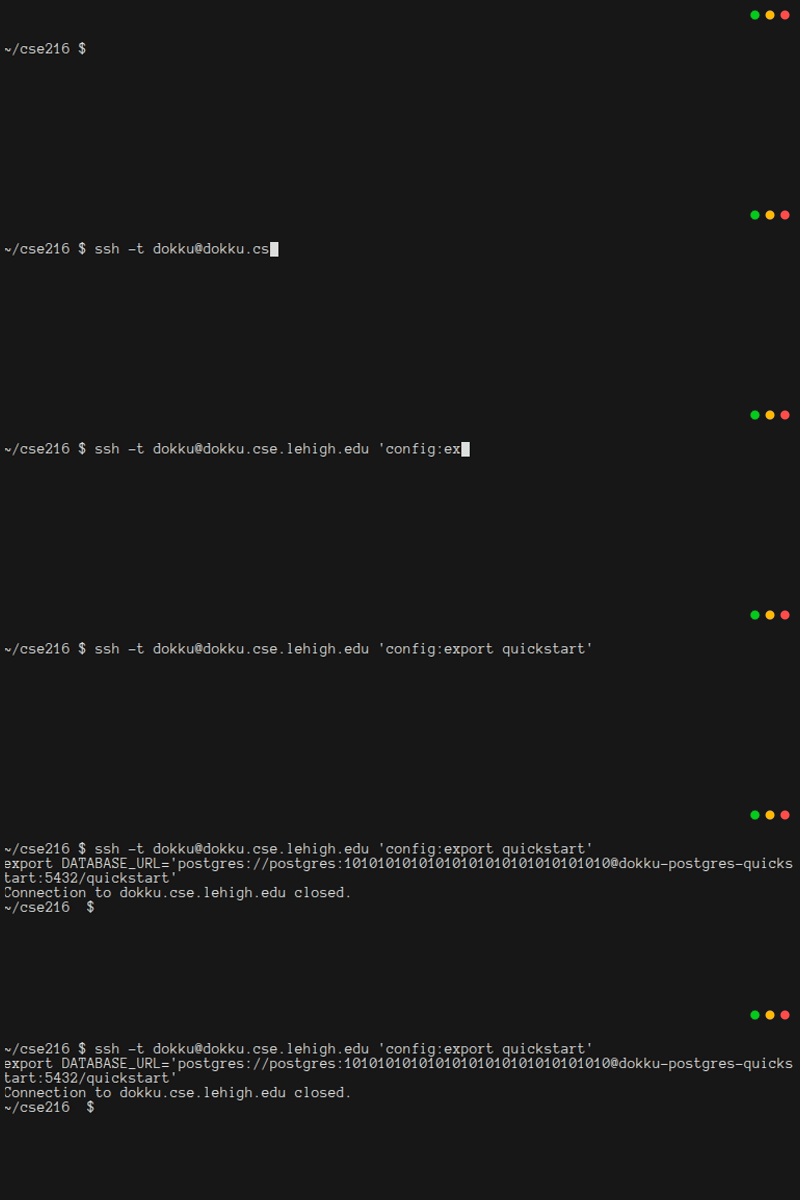
You hopefully recognize what's happening here: Dokku is ready to pass configuration information to your app through environment variables. Furthermore, there is one environment variable already set up for you: the URL for a pre-configured PostgreSQL database.
Using the command line, you can set and unset environment variables:
bash
ssh -t dokku@dokku.cse.lehigh.edu 'config:set quickstart DATABASE_FILE=db.db'
ssh -t dokku@dokku.cse.lehigh.edu 'config:export quickstart'
ssh -t dokku@dokku.cse.lehigh.edu 'config:unset quickstart DATABASE_FILE'
ssh -t dokku@dokku.cse.lehigh.edu 'config:export quickstart'
The result should look like this:
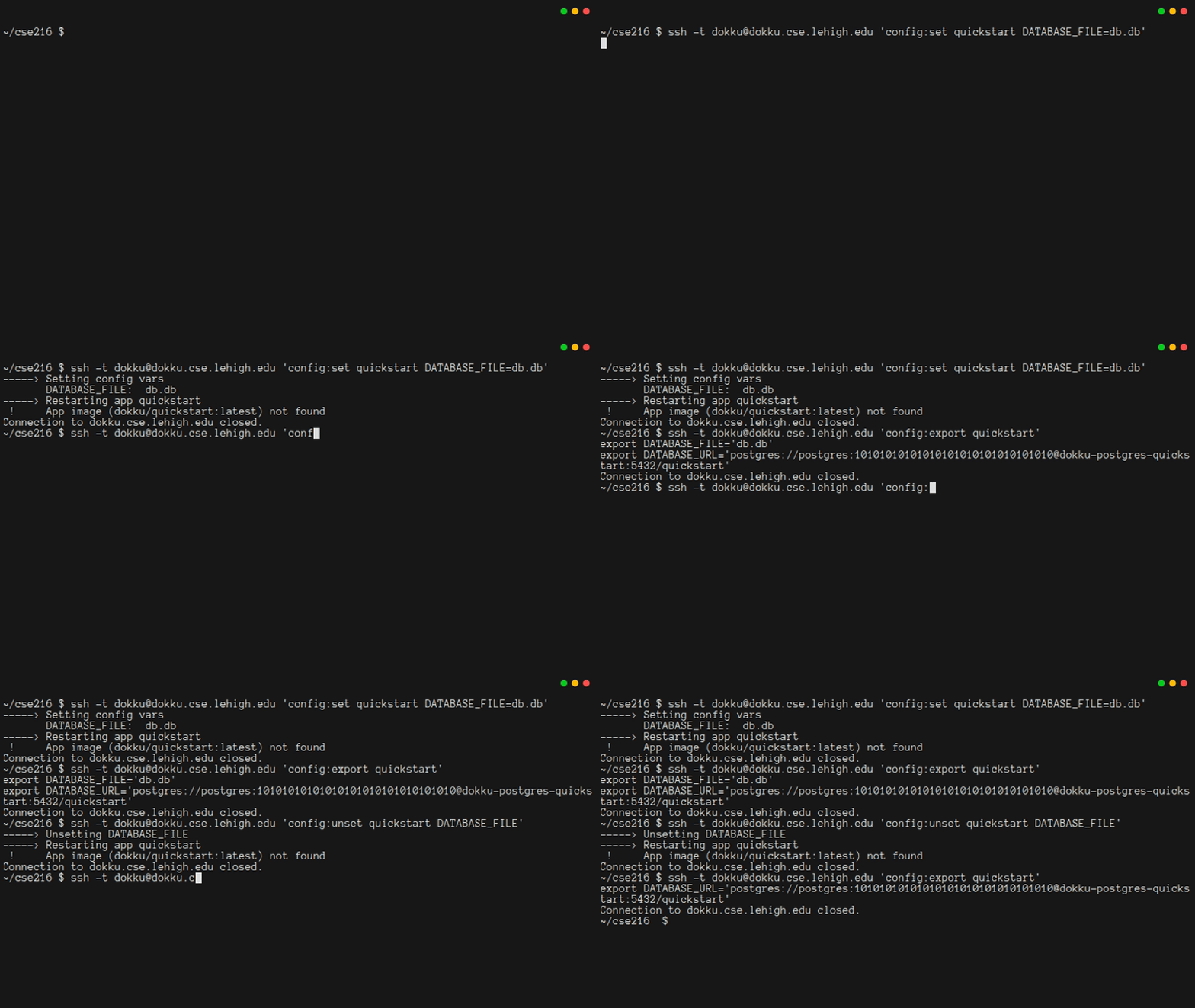
Remember that your environment variables will be stored by Dokku and passed to your app every time it starts/restarts. Changing environment variables will cause Dokku to automatically restart your app. Also, note that the DATABASE_URL is security critical. It includes a password, and thus anyone who has the full DATABASE_URL and is on the Lehigh network will be able to access your PostgreSQL database. You'll want to keep it secret!
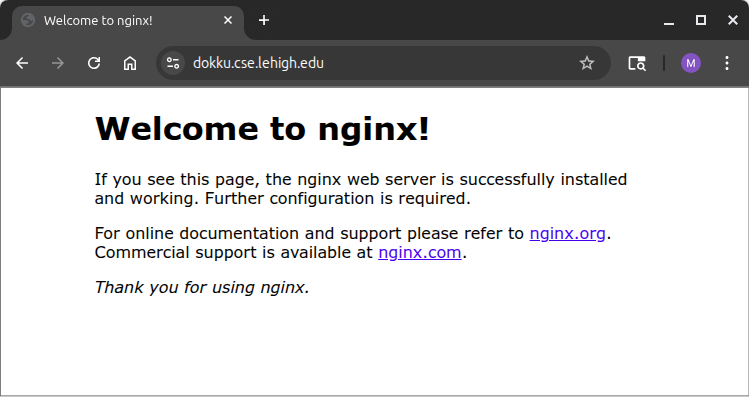
Right now, your app is not ready to deploy to Dokku, but it would still be good to test out Dokku and make sure it works. If you try to visit the Dokku server at http://dokku.cse.lehigh.edu, you should see this:
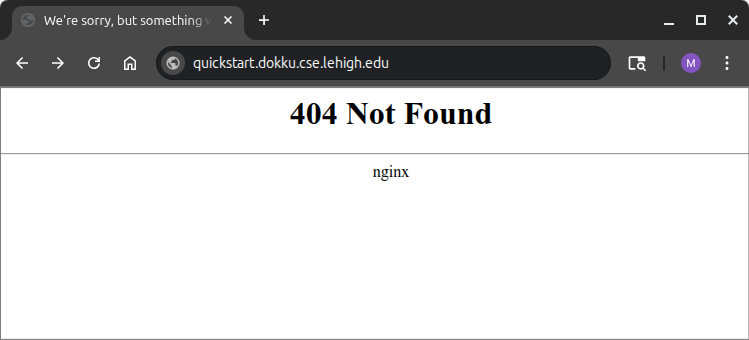
However, if you try to visit your app at http://quickstart.dokku.cse.lehigh.edu, you'll get an error, because you haven't provided any code for Dokku to run:
4.4. Using Git To Launch Dokku Apps
The process of launching a Dokku app is tricky enough that you'll want to practice it with something simple, before you do it with your Javalin-based app. You might think this would be easy. After all, your code is in a git repository. Dokku has a different git repository set up for your app. If you pushed your code to Dokku's repository instead of yours, Dokku would automatically build your app and start it.
It would seem like using a git remote so that your repository could also push to Dokku would do the job. However, since Dokku is hosting your backend, it needs your backend to be stored in the root of its repository, not in a subfolder. It seems like a simple problem to fix, but it can rapidly turn into a nightmare.
This tutorial series recommends an out-of-tree approach to the problem. Right now, you have a file structure like this, which corresponds to having checked out the git repository that holds all of your code. (Note: in the listing below, the git repository is named cse216. Your repository name will be different):
text
.
└── cse216
    ├── admin
    │   └── ...
    ├── backend
    │   └── ...
    ├── frontend
    │   └── ...
    ├── local
    │   └── ...
    ├── .git
    │   └── ...
    └── .gitignore
It doesn't really make sense to put another repository inside of this folder, so instead, you are going to make another repository as a sibling of the folder where you've checked out your code. You'll want the result to look like this:
text
.
├── ccse216
│   ├── admin
│   │   └── ...
│   ├── backend
│   │   └── ...
│   ├── frontend
│   │   └── ...
│   ├── local
│   │   └── ...
│   ├── .git
│   │   └── ...
│   └── .gitignore
└── dokku-tutorial
    ├── .git
    │   └── ...
    └── .gitignore
In terms of how to make that dokku-tutorial folder, you can simply clone it from the Dokku server:
bash
git clone dokku@dokku.cse.lehigh.edu:quickstart dokku-tutorialThe result should look like this:
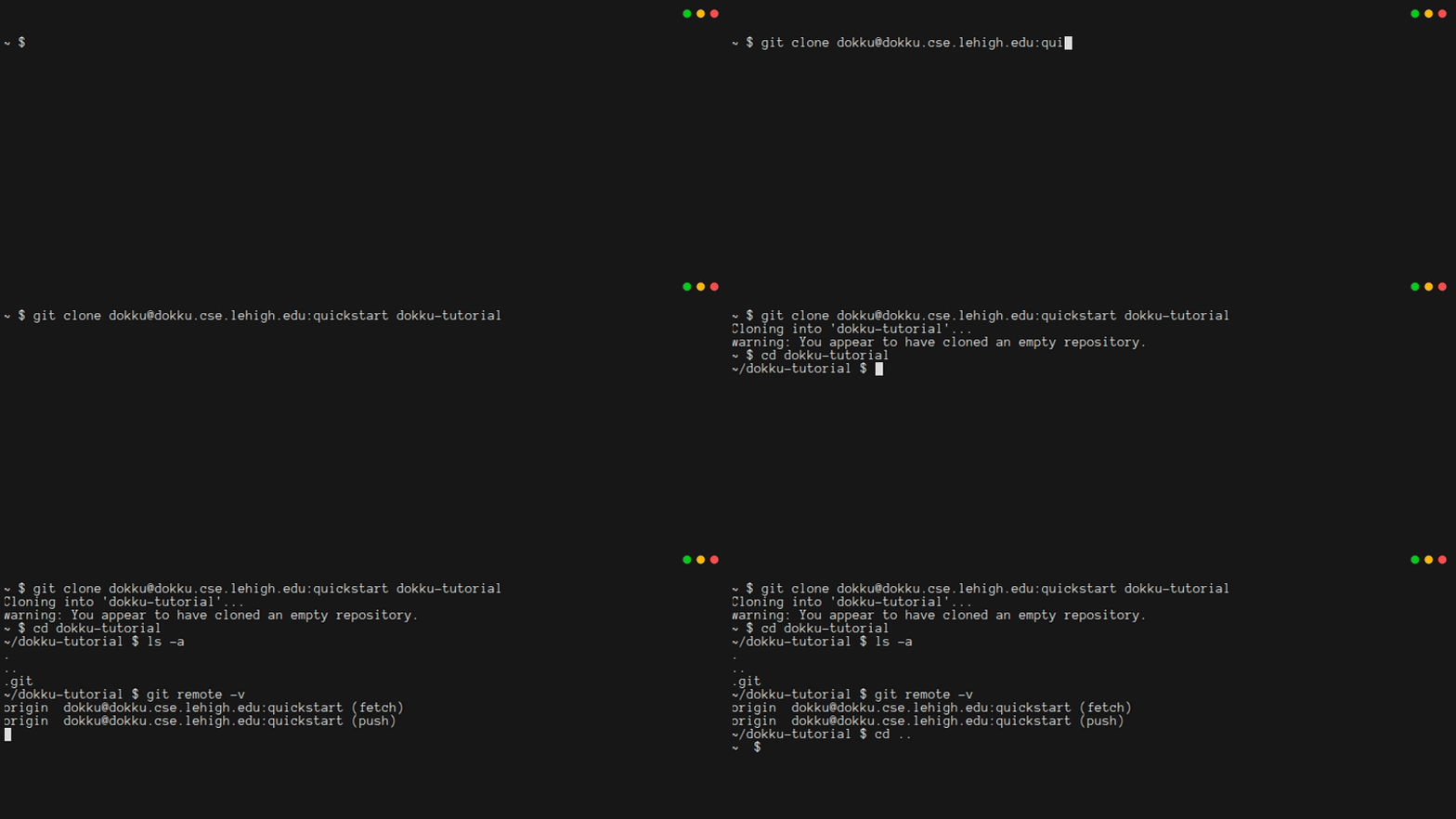
Dokku is able to host all sorts of different apps. In fact, it can also host static web sites. It's easy to set this up, and it will help to show that your server is working. In the root folder of your dokku-tutorial repository checkout, create a file called index.html:
html
<html>
<head><title>Hello from Dokku</title></head>
<body>
Congratulations, you've successfully pushed a static site to Dokku!
</body>
</html>
To tell Dokku that this is a static site, create an empty file called .static:
bash
touch .staticNow when you commit and push in this repository, Dokku will automatically start hosting your site. Type the following three commands:
bash
git add .static index.html
git commit -m "Created a simple static site, to test Dokku"
git push
The output will look something like this. Note that the process takes a few minutes. When everything works, you will see the line =====> Application deployed. The output will also report the URIs for your app.
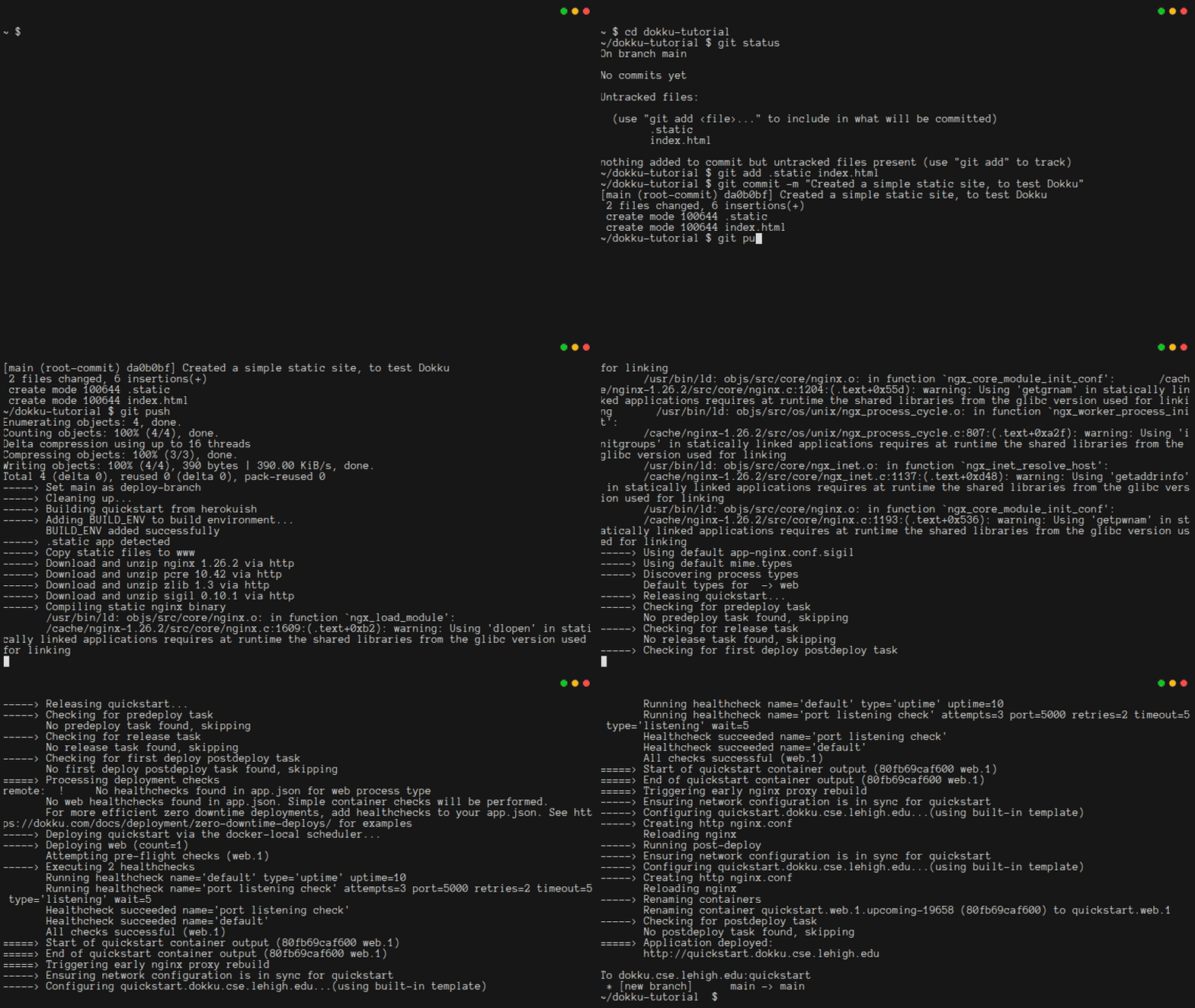
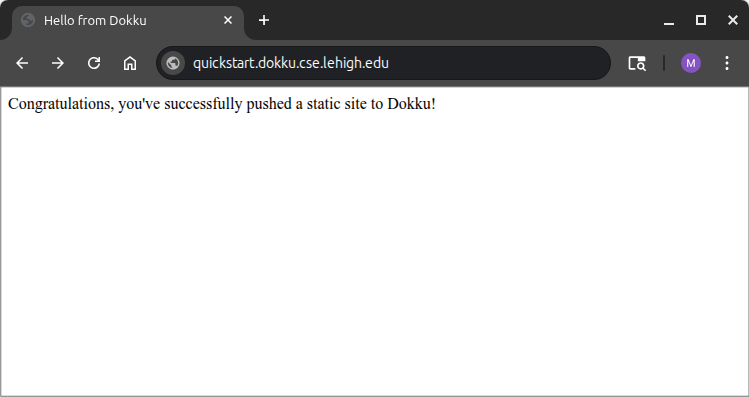
When you visit http://quickstart.dokku.cse.lehigh.edu in your browser, you should see your static site:
Note: HTTP and HTTPS
A production app should only use https endpoints. In some cases the CSE Dokku server provides http endpoints instead. Throughout this chapter, you'll be asked to set things up for http and https. If your project requires https, be sure to work with the instructor to ensure that you aren't given http endpoints by mistake.
Finally, clean up your repository by deleting the files you just made.
bash
git rm .static index.html
git commit -m "removed static site, so repository is ready for launching the Javalin-based backend"
If you type git push, you will eventually receive an App build failed message:
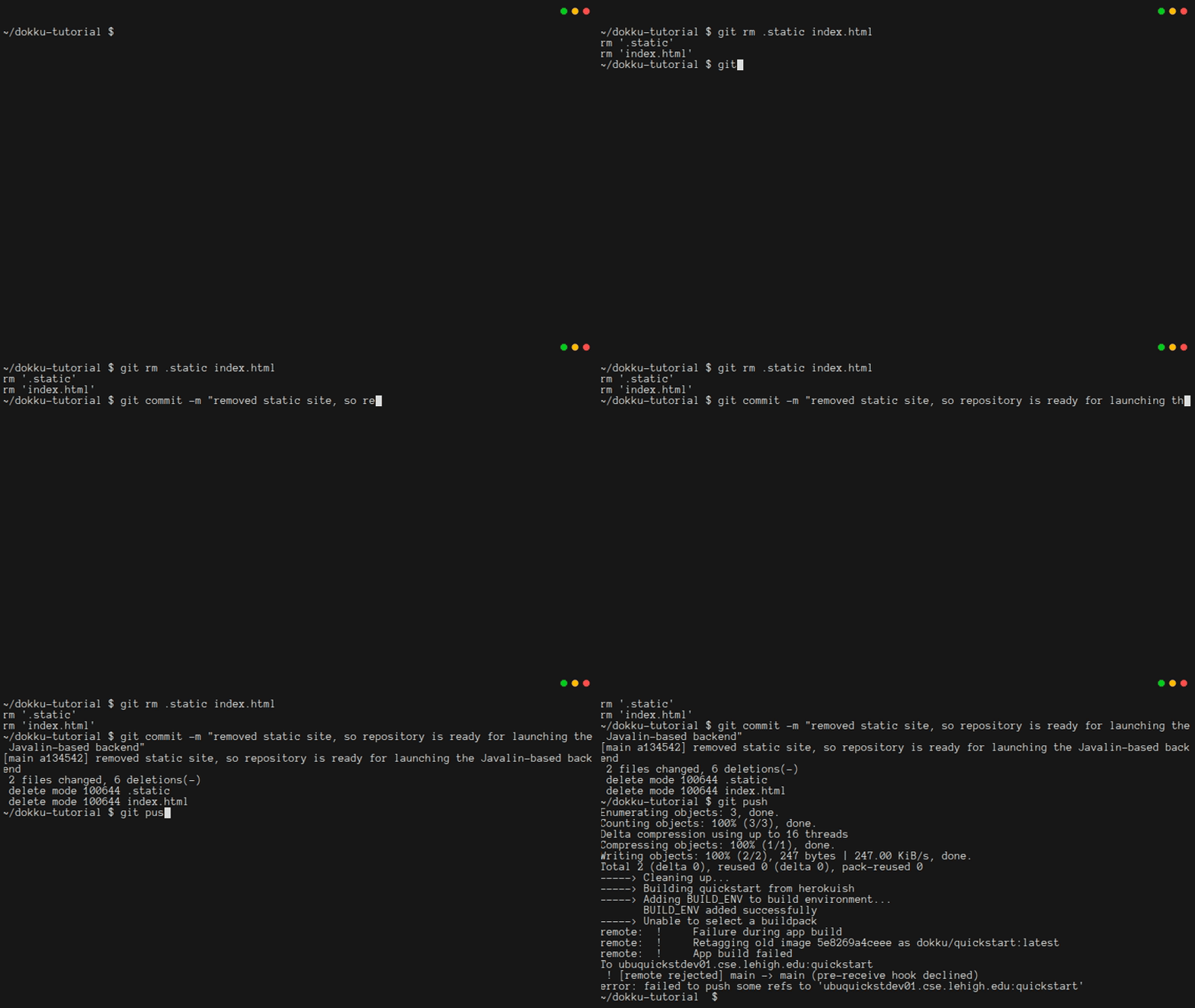
This is not a bad thing. Dokku noticed that you tried to push something invalid, and it rejected your push. You are likely to encounter this often when developing code that runs in the cloud. Dokku has an expected and reliable way of preventing you from deploying a broken build.
4.5. Switching The Admin App To PostgreSQL
Your Dokku instance includes a PostgreSQL database, which is good, since you really shouldn't be using SQLite for a web app. Now is a good time to switch your admin and backend programs from SQLite to PostgreSQL. This will involve a few small changes that need to be done in both apps, and a few changes specific to the admin app. But before you make those changes, it would be a good idea to make sure your database is working. Otherwise, you might be troubleshooting your Java code when the problem is somewhere else!
In Chapter 1, you saw the sqlite3 program for command-line interactions with a SQLite database. The psql program does the same, but for PostgreSQL.[3] However, if you try to use it to connect to your database, using the DATABASE_URL from your app's environment variables, it won't work:
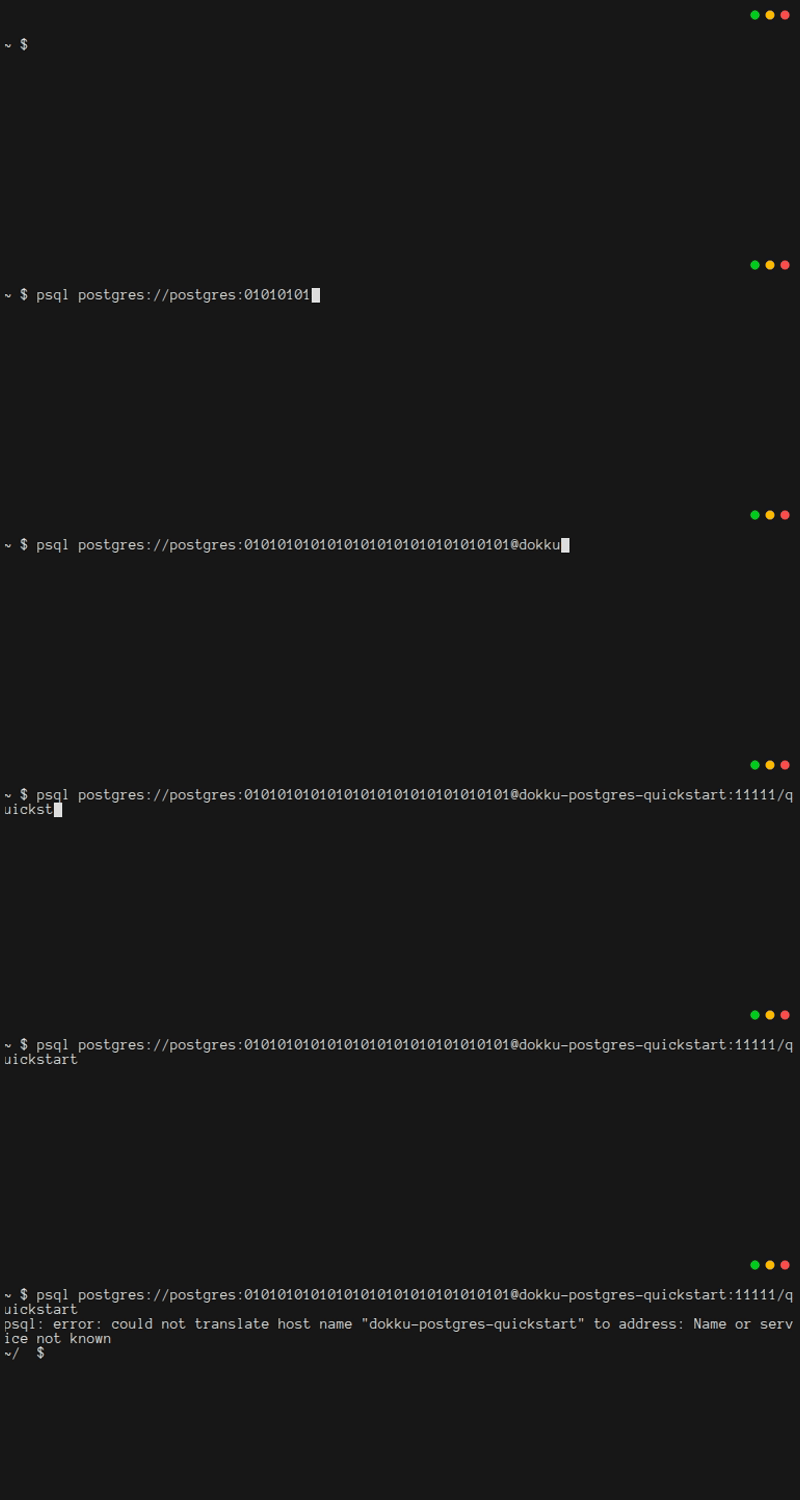
It turns out that there are two problems here:
- The first is that you need to provide a more exact name for the database when you're trying to connect to it from your laptop.
- Instead of
dokku-postgres-quickstart, you'll need to type the full namedokku-postgres-quickstart.dokku.cse.lehigh.edu. - But if you change this, you'll just get a "Connection timed out" error, because there is another issue...
- Instead of
- By default, your database is not visible to any program other than your app on the Dokku server.
- To make it visible, you need to expose a port.
- The default PostgreSQL port is
5432, but since the Dokku server is used by many people simultaneously, you can't use that port.
Instead of using the default port, you will run a command to expose the port and receive an automatically assigned available external port:
bash
ssh -t -q dokku@dokku.cse.lehigh.edu 'postgres:expose quickstart'And, depending upon how the dokku host is configured, you should be able to see the full URL to modify by running:
bash
ssh -t -q dokku@dokku.cse.lehigh.edu 'postgres:info quickstart'Then you can build a valid URI for accessing your database. If your appname has dashes in it (e.g. 2026sp-tutorial-uid123), you will have to change the final portion of the url to use underscores instead, for example:
bash
postgres://postgres:abcdefghijklmnopqrstuvwxyz123456@dokku-postgres-2026sp-tutorial-uid123.dokku.cse.lehigh.edu:13543/2026sp_tutorial_uid123From within psql, you can press ctrl-d or type \q to exit: The whole process should look like this:
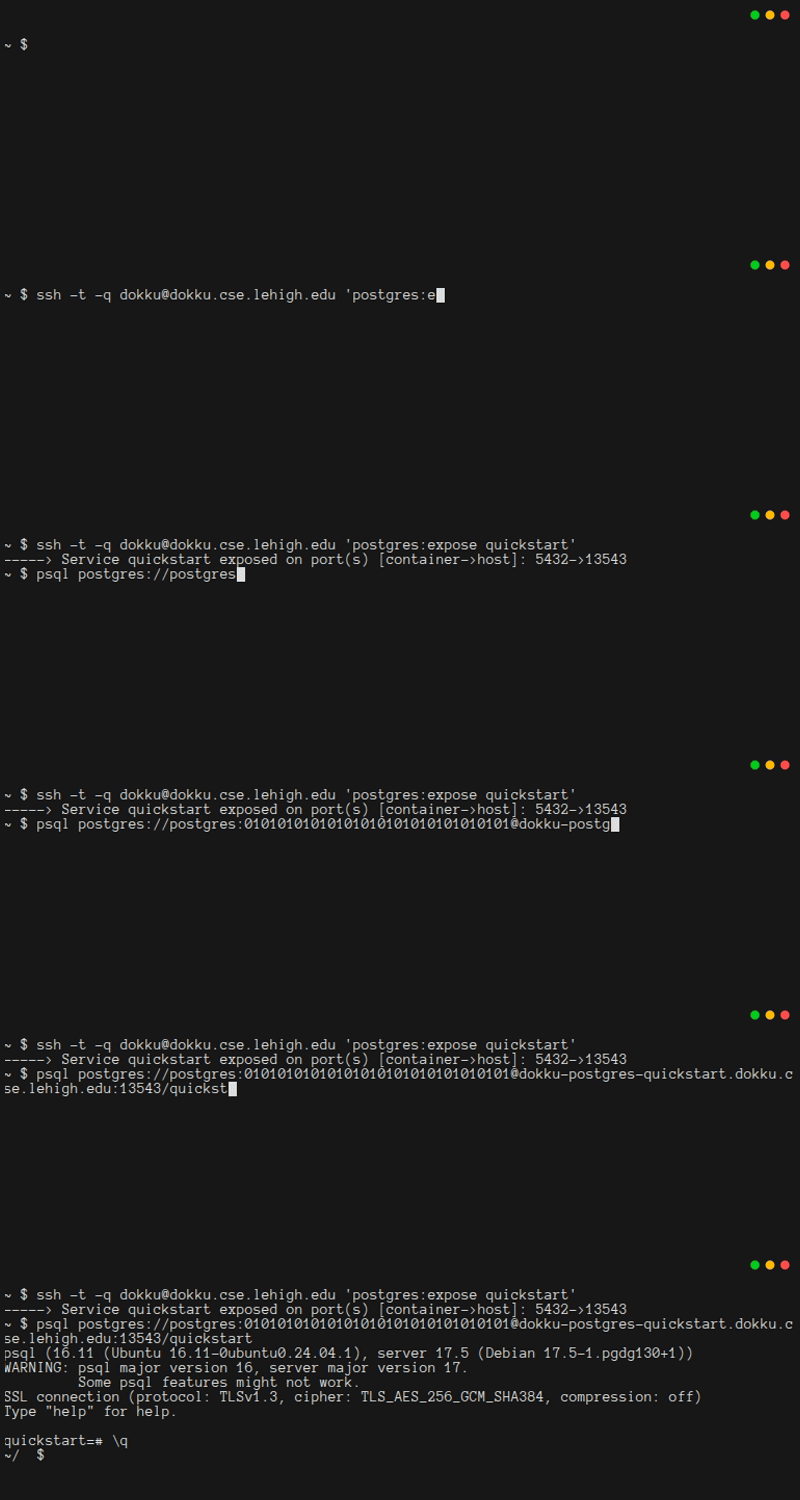
Note: If you forget your exposed port
If you forget which port was assigned for external access, you have three options:
- You could
postgres:unexposethe port and thenpostgres:exposeit again. This will result in a new port being assigned. - If you try to
postgres:exposethe port again, you'll get an error message that includes the currently assigned port. - Depending on how Dokku is configured, you might be able to run
postgres:infoto get the exposed port
Now that you know that it's possible to access your postgres database from anywhere, you can update the admin app to use it instead of a local sqlite file. First, edit pom.xml by adding a new dependency that provides the required jdbc postgresql driver. You can add it right after the SQLite dependency:
xml
<!-- https://mvnrepository.com/artifact/org.postgresql/postgresql -->
<dependency>
  <groupId>org.postgresql</groupId>
  <artifactId>postgresql</artifactId>
  <version>42.7.7</version>
</dependency>
Next, you'll want to update Database.java. First, update the static initializer to check for the postgresql driver (in addition to the sqlite driver):
java
Class.forName("org.sqlite.JDBC");
Class.forName("org.postgresql.Driver");
Then, add a new instance field, and change the constructor
java
/**
 * True if using a SQLite db, False if postgresql (meaningless when conn is
 * null)
 */
private boolean sqlite = true;

/**
 * Use dbStr to create a connection to a database, and store it in the
 * constructed Database object
 *
 * @param useSQLite true if using a local sqlite db, false if using postgresql
 * @param dbStr     the connection string for the database (path for sqlite,
 *                  DATABASE_URL for postgresql)
 * @throws SQLException if a connection cannot be created
 */
public Database(boolean useSQLite, String dbStr) throws SQLException {
    if (useSQLite) {
        this.sqlite = true;
        // Connect to the database or fail
        conn = DriverManager.getConnection("jdbc:sqlite:" + dbStr);
        System.out.printf("sqlite connected to file: %s%n", dbStr);
        // SQLite is odd: we need to opt-in for referential integrity
        try (var stmt = conn.prepareStatement("PRAGMA foreign_keys = ON;")) {
            stmt.execute();
            getPragmaForeignKeysStatus();
        }
    } else { // assume postgresql
        this.sqlite = false;
        // Connect to the database or fail
        conn = DriverManager.getConnection(dbStr);
    }
    if (conn == null) {
        throw new RuntimeException("Error: conn==null. (DriverManager.getConnection() returned a null object?)");
    }
}
In App.java, you'll need to add or modify four lines. First, add a line for reading the DATABASE_URL environment variable:
java
String dbUrl = System.getenv("DATABASE_URL");Then add a line for reporting the new environment variable:
java
System.out.println(" DATABASE_URL=" + dbUrl);Third, change the line that validates the environment variables:
java
if (dbFile == null && dbUrl == null) {Finally, change the line for constructing the database object:
java
try (Database db = new Database(dbUrl == null, (dbUrl == null ? dbFile : dbUrl))) {When you type mvn package, you'll discover that your unit tests are failing due to an "unresolved compilation problem". That makes sense, since your unit tests were designed for a SQLite database, and now your database is supposed to use PostgreSQL. You should not simply replace each unit test's body with assertTrue(true);.[4] Instead, you should mark the whole class with the @Disabled annotation:[5]
java
@Disabled("This class is part of a feature still in development")
// TODO: fixme
If you try to provide the DATABASE_URL as an environment variable, unfortunately, things still fail, because DATABASE_URL is not formatted in a way that the Java PostgreSQL driver understands:
Note: Is it worth creating local/admin.env?
You probably noticed that the DATABASE_URL is being provided on the command line, instead of in a .env file. In most cases, using an .env file is a better choice. Among other things, it would keep your DATABASE_URL from showing up in your shell history.
However, it's a good idea to postgres:unexpose any time you're not actively using your admin app. Every time you postgres:expose, your port is going to change, which means you'll need to also change your .env file. Whether using a .env file is worth it is up to you to decide.
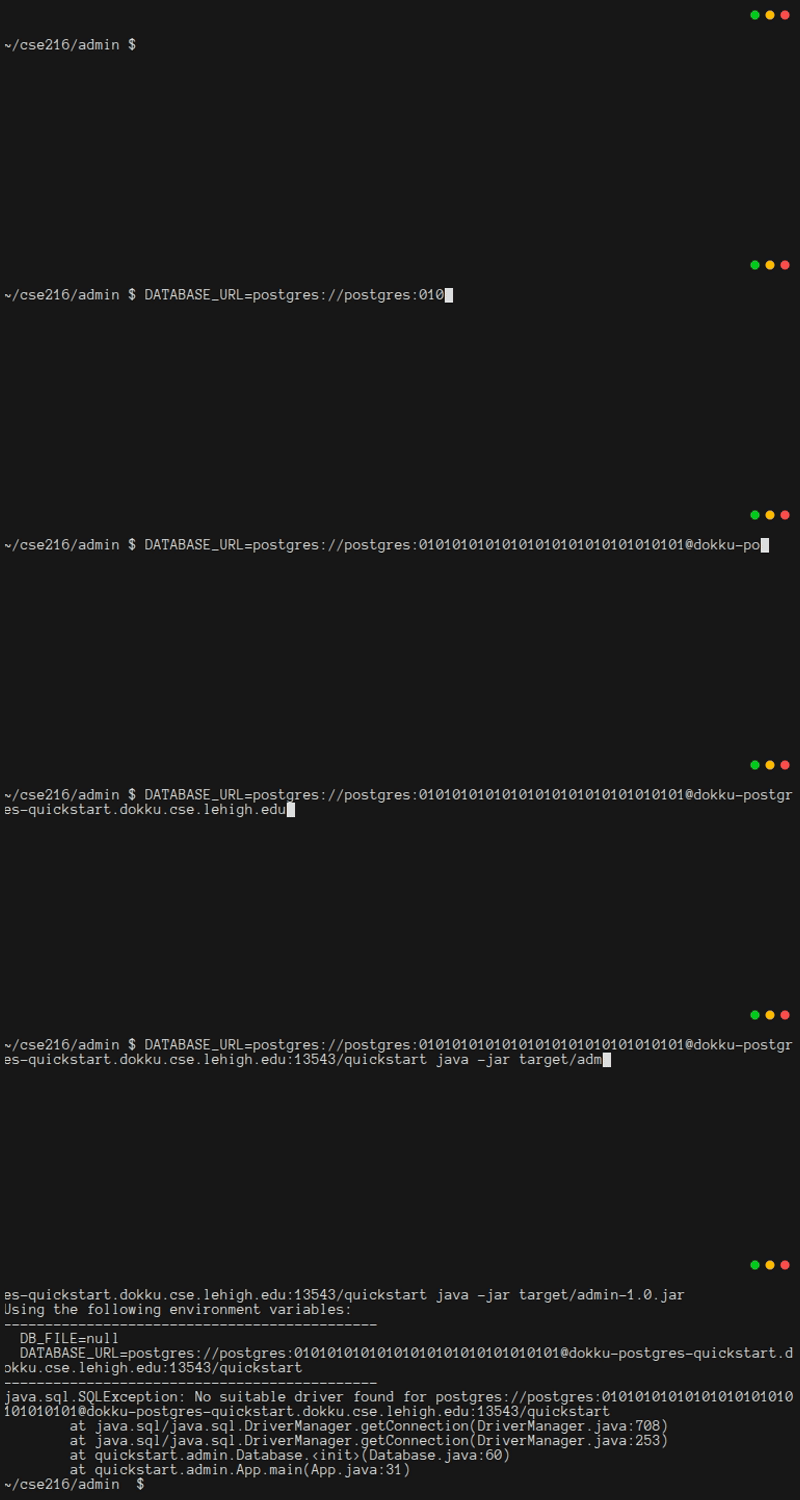
The solution is to split the DATABASE_URL and then connect differently:
java
/**
 * Use dbStr to create a connection to a database, and store it in the
 * constructed Database object
 *
 * @param useSQLite true if using a local sqlite db, false if using postgresql
 * @param dbStr     the connection string for the database (path for sqlite,
 *                  DATABASE_URL for postgresql)
 * @throws SQLException if a connection cannot be created
 */
public Database(boolean useSQLite, String dbStr) throws SQLException {
    if (useSQLite) {
        this.sqlite = true;
        // Connect to the database or fail
        conn = DriverManager.getConnection("jdbc:sqlite:" + dbStr);
        System.out.printf("sqlite connected to file: %s%n", dbStr);
        // SQLite is odd: we need to opt-in for referential integrity
        try (var stmt = conn.prepareStatement("PRAGMA foreign_keys = ON;")) {
            stmt.execute();
            getPragmaForeignKeysStatus();
        }
    } else { // assume postgresql
        this.sqlite = false;

        String jdbcUrl = null, username = null, password = null;
        try {
            java.net.URI dbUri = new java.net.URI(dbStr);
            jdbcUrl = String.format("jdbc:postgresql://%s:%d%s",
                    dbUri.getHost(), dbUri.getPort(), dbUri.getPath());
            String[] uname_pword = dbUri.getUserInfo().split(":");
            username = uname_pword[0];
            password = uname_pword[1];
        } catch (java.net.URISyntaxException e) {
            throw new RuntimeException("Critical problem parsing dbStr; cannot create postgresql connection.", e);
        }

        // Connect to the database or fail
        conn = DriverManager.getConnection(jdbcUrl, username, password);
    }
    if (conn == null) {
        throw new RuntimeException("Error: conn==null. (DriverManager.getConnection() returned a null object?)");
    }
}
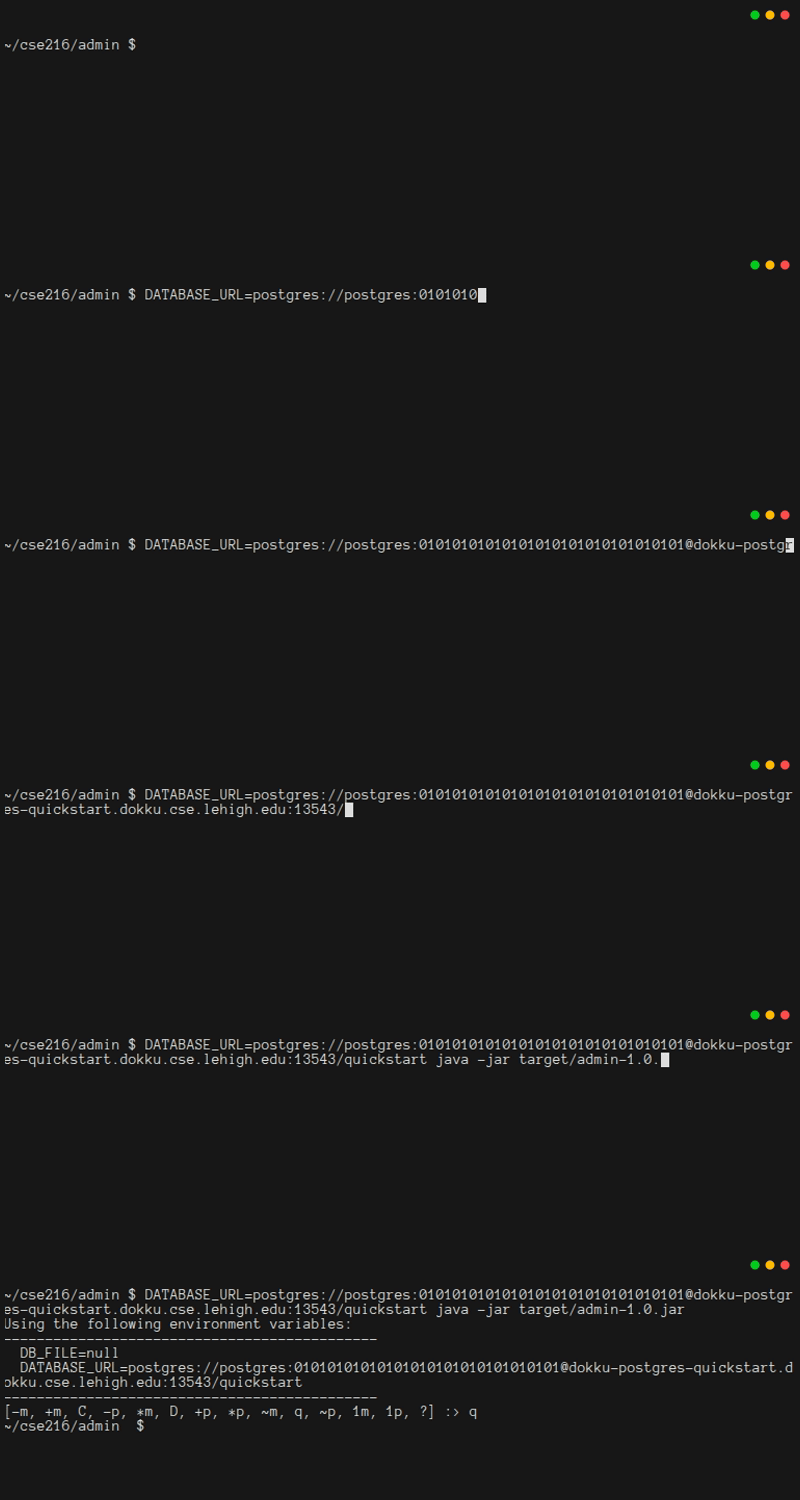
You should now be able to run the admin app. However, please do not create any tables yet:
There is one more issue in the admin app. SQLite and PostgreSQL have slightly different syntax for creating a table with an integer primary key. This means you'll need to modify the createTables method:
java
/**
 * Create the database tables
 *
 * @throws SQLException if any table cannot be created
 */
synchronized void createTables() throws SQLException {
    // postgres has different syntax for both id and email
    var createTblPerson = sqlite ? """
            CREATE TABLE tblPerson (
                id INTEGER PRIMARY KEY,
                email VARCHAR(30) NOT NULL UNIQUE COLLATE NOCASE,
                name VARCHAR(50)
            );""" : """
            CREATE TABLE tblPerson (
                id SERIAL PRIMARY KEY,
                email VARCHAR(30) NOT NULL UNIQUE CHECK (email = lower(email)),
                name VARCHAR(50)
            );""";
    try (var ps = conn.prepareStatement(createTblPerson)) {
        ps.execute();
    }
    // postgres has different syntax for id
    var createTblMessage = sqlite ? """
            CREATE TABLE tblMessage (
                id INTEGER PRIMARY KEY,
                subject VARCHAR(50) NOT NULL,
                details VARCHAR(500) NOT NULL,
                as_of DATE NOT NULL,
                creatorId INTEGER,
                FOREIGN KEY (creatorId) REFERENCES tblPerson(id)
            );""" : """
            CREATE TABLE tblMessage (
                id SERIAL PRIMARY KEY,
                subject VARCHAR(50) NOT NULL,
                details VARCHAR(500) NOT NULL,
                as_of DATE NOT NULL,
                creatorId INTEGER,
                FOREIGN KEY (creatorId) REFERENCES tblPerson(id)
            );""";
    try (var ps = conn.prepareStatement(createTblMessage)) {
        ps.execute();
    }
    System.out.println("Tables created successfully");
}
With that change in place, you should be able to run your admin app, create tables and views, and then create an entry in tblPerson with your Google-friendly email address.
4.6. Updating The Backend
The backend also needs to be updated to work with PostgreSQL. Fortunately, the changes are nearly the same as what you just did for the admin app. However, your backend will only support postgres. It will not support sqlite. That being the case, your backend should keep dependencies to a minimum to reduce build time and jar size. You can probably do these steps on your own, but they are listed below, just in case you need some help.
First, edit pom.xml by replacing the SQLite dependency with this:
xml
<dependency>
  <groupId>org.postgresql</groupId>
  <artifactId>postgresql</artifactId>
  <version>42.7.7</version>
</dependency>
Next, you'll want to update Database.java. First, change the static initializer:
java
Class.forName("org.postgresql.Driver");Then replace the constructor, so that it can correctly use the DATABASE_URL value:
java
/**
 * Use dbStr to create a connection to a database, and stores it in the
 * constructed Database object
 *
 * @param dbStr the connection string for the database
 * @throws SQLException if a connection cannot be created
 */
public Database(String dbStr) throws SQLException {
    String jdbcUrl = null, username = null, password = null;
    try {
        java.net.URI dbUri = new java.net.URI(dbStr);
        jdbcUrl = String.format("jdbc:postgresql://%s:%d%s",
                dbUri.getHost(), dbUri.getPort(), dbUri.getPath());
        String[] uname_pword = dbUri.getUserInfo().split(":");
        username = uname_pword[0];
        password = uname_pword[1];
    } catch (java.net.URISyntaxException e) {
        throw new RuntimeException("Critical problem parsing dbStr; cannot create postgresql connection.", e);
    }

    // Connect to the database or fail
    conn = DriverManager.getConnection(jdbcUrl, username, password);
    if (conn == null) {
        throw new RuntimeException("Error: conn==null. (DriverManager.getConnection() returned a null object?)");
    }
}
Finally, edit App.java. You'll need to edit four lines to go from DB_FILE to DATABASE_URL. First, change the line for reading the database environment variable:
java
String dbUrl = System.getenv("DATABASE_URL");Then change the line for reporting the environment variable:
java
System.out.println(" DATABASE_URL=" + dbUrl);Third, change the line that validates the environment variables:
java
if (dbUrl == null || serverName == null ||
        clientId == null || clientSecret == null ||
        port < 80 || port > 65535) {
Finally, change the line for constructing the database object:
java
db = new Database(dbUrl);Lastly, you'll want to modify local/backend.env, so that it provides the DATABASE_URL from Dokku instead of a DB_FILE for SQLite. Since you are likely to still do some development on your laptop, it is fine to leave the STATIC_LOCATION environment variable intact, even though you won't use it on Dokku.
Warning: postgres:expose
Right now, your Postgres database is accessible to anyone who knows the password, because you used postgres:expose earlier. When your app is running on Dokku and you are not actively working on it, you should un-expose it. The command to do that is ssh -t -q dokku@dokku.cse.lehigh.edu 'postgres:unexpose quickstart'
It's important to remember to re-expose any time you're planning on using the admin app, or running the backend from your laptop. When you do, be sure to note the new port!
4.7. OAuth Adjustments
Since the application is going to be visible as https://quickstart.dokku.cse.lehigh.edu, you need to update your Google OAuth configuration.
Log into the Google Cloud Console, locate your app, and navigate to the OAuth screen ("APIs & Services" -> "Credentials" -> Vue App client ID).
Add the origins
https://quickstart.dokku.cse.lehigh.eduandhttp://quickstart.dokku.cse.lehigh.edu.
Then add the redirects
https://quickstart.dokku.cse.lehigh.edu/auth/google/callbackandhttp://quickstart.dokku.cse.lehigh.edu/auth/google/callback.
When your app is live, you might decide to remove the localhost origin and callback. For now, they're worth keeping in place since there's more development work to be done. In general, you can add and delete origins and redirects at any time.
There is one last edit that you'll need to make, in App.java. To web browsers, and to Google OAuth, your app is accessible through an address that starts with https. The s means "secure", and all https traffic is encrypted. However, when your browser, or Google OAuth, communicates with your app, it goes through a reverse proxy called nginx. Nginx is the magic that lets one Dokku server manage hundreds of projects. For convenience, Lehigh's Dokku servers do not use https between nginx and your app. This means it's not quite a fully end-to-end encryption. For CSE 216, that's fine, and if you were on Heroku, you would have end-to-end encryption.
The reason this matters is that Google OAuth is going to send a message to Dokku via https, but your app will see it as http. Thus in the app.before handler in App.java, you'll need to modify the path you check, by replacing https with http:
java
if (ctx.url().equals(gOAuth.redirectUri.replace("https://", "http://"))) {4.8. Getting Ready To Run On Dokku
The way you will deploy your app is by copying files to your dokku-tutorial repository and then doing a git push. That will cause Dokku to run mvn package to build the jar. Then Dokku will try to run the jar. In order for this to work (and assuming your app's dokku environment variables are correct), two files must exist in the root of your dokku-tutorial repository: Procfile and system.properties. These file names are case sensitive. Please be sure to name them correctly.[6]
You will need to create, maintain, and version control these. The easiest thing to do is create them in the ./backend/ folder, so that they are easy to find when you are ready to copy files to the dokku-tutorial repository.
The first file you need is called Procfile; its line endings must be LF not CRLF. The Procfile tells Dokku that your program is a web application, so that Dokku opens the right ports for HTTP traffic. It also tells Dokku how to run your web application (i.e., using the java executable to run the quickstart.backend.App class from the target/backend-1.0.jar jar it will build).
txt
web: java $JAVA_OPTS -cp target/backend-1.0.jar quickstart.backend.AppBecause the line endings of Procfile are important for correctness, you should not leave its encoding to chance. If you have the wrong line endings, Dokku will not be able to correctly interpret the file. It will think your Java class name ends with \r. This will be hard to debug, because it is not easy for you to see when it is printing that "non-printing" character in a debug message. A best practice is to use a .gitattributes file. Below is backend/.gitattributes, which assumes that Procfile is also in the backend folder. You should be sure to git add and git commit this file alongside of your Procfile.
txt
# dokku requires that the Procfile have lf line endings
Procfile   text eol=lf
TIP
You probably will want to use .gitattributes to specify the line endings for any scripts you create, too.
The other file you need to add, system.properties, tells Dokku which version of Java to use.[7] It, too, is only one line:
properties
java.runtime.version=17Next, you'll want to set up your environment variables on Dokku. You only need to provide the variables that Dokku does not provide automatically. That means you don't need to provide DATABASE_URL or PORT. In addition to the OAuth information, make sure you provide the name of your server, since it is used to construct the callback URL for Google OAuth:
bash
ssh -t dokku@dokku.cse.lehigh.edu 'config:set quickstart CLIENT_ID=xxxxxxxxxxxx-xxxxxxxxxxxxxxxxxxxxxxxxxxxxxxxx.apps.googleusercontent.com'
ssh -t dokku@dokku.cse.lehigh.edu 'config:set quickstart CLIENT_SECRET=xxxxxx-xxxxxxxxxxxxxxxxxxxxxxxxxxxx'
ssh -t dokku@dokku.cse.lehigh.edu 'config:set quickstart SERVER_NAME=https://quickstart.dokku.cse.lehigh.edu'
You can see that these worked by typing:
bash
ssh -t dokku@dokku.cse.lehigh.edu 'config:export quickstart'4.9. Deploy To Dokku
At last, it is time to deploy to Dokku. Below is a script (local/push_dokku.sh) that you can edit. The first time you deploy your app, though, you should type each line, so that you can easily find bugs. Also, make sure you're on the Lehigh network or VPN when running these commands.
sh
#!/bin/bash

# Build everything and send it to Dokku
# - This should be run from the root folder of the developer git checkout
# - DIR_DOKKU should be the path to the Dokku-hosted repository for pushing code
# - ENV_BACKEND should be a file that can be sourced before running mvn (e.g. to provide env vars for unit tests)
# - Be sure that the Google Cloud Console has https://quickstart.dokku.cse.lehigh.edu as an Authorized JavaScript Origin
# - Be sure that the Google Cloud Console has https://quickstart.dokku.cse.lehigh.edu/auth/google/callback as an Authorized Redirect URI

# set -x  # un comment this line to get verbose script output
START_DIR="$PWD" && echo "dokku deploy script running from ${START_DIR}"

DIR_DOKKU='../dokku-tutorial'
ENV_BACKEND='./local/backend.env'

[ ! -d backend ] && echo "backend directory does not exist" && exit 1
[ ! -d frontend ] && echo "frontend directory does not exist" && exit 1
[ ! -d "${DIR_DOKKU}" ] && echo "Dokku deployment directory does not exist: '${DIR_DOKKU}'" && exit 1
[ ! -d "${DIR_DOKKU}/.git" ] && echo "Missing expected .git repo in Dokku deployment directory: '${DIR_DOKKU}'/.git" && exit 1
[ ! -f "${ENV_BACKEND}" ] && echo "Missing expected .env file for backend: '${ENV_BACKEND}'" && exit 1

# Build the frontend, copy it into the backend/resources folder
echo "Press <enter> to build frontend, or <ctrl-c> to quit"
read -r x
cd frontend || exit 1
npm run build
npm run deploy
cd ..

echo "Press <enter> to build backend, as a check that the code compiles, or <ctrl-c> to quit"
read -r x
source "${ENV_BACKEND}"
cd backend || exit 1
mvn package
cd ..

echo "Press <enter> to clear deploy folder, or <ctrl-c> to quit"
read -r x
rm -rf "${DIR_DOKKU}/src"
rm -f "${DIR_DOKKU}/pom.xml"
rm -f "${DIR_DOKKU}/Procfile"
rm -f "${DIR_DOKKU}/system.properties"

echo "Press <enter> to copy to deploy folder, or <ctrl-c> to quit"
read -r x
cp -R backend/src "${DIR_DOKKU}"
cp backend/pom.xml "${DIR_DOKKU}"
cp backend/Procfile "${DIR_DOKKU}"
cp backend/system.properties "${DIR_DOKKU}"

echo "Press <enter> to commit deploy folder, or <ctrl-c> to quit"
read -r x
cd "${DIR_DOKKU}" || exit 1
git add .
git commit -m "latest version"

echo "Press <enter> to push to Dokku, or <ctrl-c> to quit"
read -r x
git push
cd "${START_DIR}" || exit 1
Warning: Don't interrupt git push
Dokku is prone to misbehavior if you press ctrl-c in the middle of a git push. It usually takes intervention from the CSE System Administrator to get things back in order for your project. If you unintentionally git push, please do not interrupt it. Just let it finish, then fix your mistakes and push again.
If everything worked, then after a few seconds you should see a message that your app was built by the Dokku server, and was successfully started. If anything is wrong, you might see an error in your console, or you might need to check the logs by typing:
bash
ssh -t dokku@dokku.cse.lehigh.edu 'logs quickstart'Once everything is working, you should be able to visit your website, using an address that starts with https or http[8], and interact correctly with the program.
4.10. Finishing Up
The commit and push that sent your app to Dokku did not commit your code changes to your code repository, so if you haven't committed them and pushed, now is a good time to do that! When you do, remember that you will should not commit the resources/public folder in your backend. It gets re-built from the frontend any time you need it. But you probably don't want to use a .gitignore for that, since you want to push the resources to Dokku.
Warning: Security and Safety
If you haven't used postgres:unexpose to prevent access to your database, now is a good time to do so. You might also want to consider removing the localhost options in your Google OAuth configuration if you are done developing.
Once you've got everything in a good place, it's time to celebrate! You've successfully made a secure web application using PostgreSQL, Vue.js, and Javalin. You launched it to a cloud PaaS service. You have developed a satisfactory understanding of the "tech stack" so that you can make meaningful contributions to your team project. You should also have a solid code foundation that you can copy and paste in order to start new projects, unrelated to CSE 216.[9]
4.11. Getting Ready For Your Next Project
There are many exciting directions to take your code. But first, you might want to make sure you didn't miss anything. Here are the updated versions of files from admin:
xml
<?xml version="1.0" encoding="UTF-8"?>
<project xmlns="http://maven.apache.org/POM/4.0.0"
  xmlns:xsi="http://www.w3.org/2001/XMLSchema-instance"
  xsi:schemaLocation="http://maven.apache.org/POM/4.0.0 http://maven.apache.org/xsd/maven-4.0.0.xsd">
  <modelVersion>4.0.0</modelVersion>

  <groupId>quickstart.admin</groupId>
  <artifactId>admin</artifactId>
  <version>1.0-SNAPSHOT</version>

  <name>admin</name>
  <!-- FIXME change it to the project's website -->
  <url>http://www.example.com</url>

  <properties>
    <project.build.sourceEncoding>UTF-8</project.build.sourceEncoding>
    <maven.compiler.release>17</maven.compiler.release>
  </properties>

  <dependencyManagement>
    <dependencies>
      <dependency>
        <groupId>org.junit</groupId>
        <artifactId>junit-bom</artifactId>
        <version>5.11.0</version>
        <type>pom</type>
        <scope>import</scope>
      </dependency>
    </dependencies>
  </dependencyManagement>

  <dependencies>
    <dependency>
      <groupId>org.junit.jupiter</groupId>
      <artifactId>junit-jupiter-api</artifactId>
      <scope>test</scope>
    </dependency>
    <!-- Optionally: parameterized tests support -->
    <dependency>
      <groupId>org.junit.jupiter</groupId>
      <artifactId>junit-jupiter-params</artifactId>
      <scope>test</scope>
    </dependency>
    <dependency>
      <groupId>org.xerial</groupId>
      <artifactId>sqlite-jdbc</artifactId>
      <version>3.51.1.0</version>
    </dependency>
    <!-- https://mvnrepository.com/artifact/org.postgresql/postgresql -->
    <dependency>
      <groupId>org.postgresql</groupId>
      <artifactId>postgresql</artifactId>
      <version>42.7.7</version>
    </dependency>
  </dependencies>

  <build>
    <pluginManagement><!-- lock down plugins versions to avoid using Maven defaults (may be moved to
      parent pom) -->
      <plugins>
        <!-- clean lifecycle, see
        https://maven.apache.org/ref/current/maven-core/lifecycles.html#clean_Lifecycle -->
        <plugin>
          <artifactId>maven-clean-plugin</artifactId>
          <version>3.4.0</version>
        </plugin>
        <!-- default lifecycle, jar packaging: see
        https://maven.apache.org/ref/current/maven-core/default-bindings.html#Plugin_bindings_for_jar_packaging -->
        <plugin>
          <artifactId>maven-resources-plugin</artifactId>
          <version>3.3.1</version>
        </plugin>
        <plugin>
          <artifactId>maven-compiler-plugin</artifactId>
          <version>3.13.0</version>
        </plugin>
        <plugin>
          <artifactId>maven-surefire-plugin</artifactId>
          <version>3.3.0</version>
        </plugin>
        <plugin>
          <artifactId>maven-jar-plugin</artifactId>
          <version>3.4.2</version>
        </plugin>
        <plugin>
          <artifactId>maven-install-plugin</artifactId>
          <version>3.1.2</version>
        </plugin>
        <plugin>
          <artifactId>maven-deploy-plugin</artifactId>
          <version>3.1.2</version>
        </plugin>
        <!-- site lifecycle, see
        https://maven.apache.org/ref/current/maven-core/lifecycles.html#site_Lifecycle -->
        <plugin>
          <artifactId>maven-site-plugin</artifactId>
          <version>3.12.1</version>
        </plugin>
        <plugin>
          <artifactId>maven-project-info-reports-plugin</artifactId>
          <version>3.6.1</version>
        </plugin>
      </plugins>
    </pluginManagement>
    <plugins>
      <plugin>
        <artifactId>maven-assembly-plugin</artifactId>
        <executions>
          <execution>
            <phase>package</phase>
            <goals>
              <goal>single</goal>
            </goals>
          </execution>
        </executions>
        <configuration>
          <descriptorRefs>
            <descriptorRef>jar-with-dependencies</descriptorRef>
          </descriptorRefs>
          <appendAssemblyId>false</appendAssemblyId>
          <finalName>admin-1.0</finalName>
          <archive>
            <manifest>
              <mainClass>quickstart.admin.App</mainClass>
            </manifest>
          </archive>
        </configuration>
      </plugin>
    </plugins>
  </build>
</project>
java
package quickstart.admin;

import java.io.BufferedReader;
import java.io.IOException;
import java.io.InputStreamReader;
import java.util.Arrays;
import java.util.HashSet;
import java.util.List;

/**
 * App lets us manage the database schema and the data in it.
 */
public class App {
    public static void main(String[] argv) {
        // get the SQLite configuration from environment variables;
        String dbFile = System.getenv("DB_FILE");
        String dbUrl = System.getenv("DATABASE_URL");
        System.out.println("Using the following environment variables:");
        System.out.println("-".repeat(45));
        System.out.println("  DB_FILE=" + dbFile);
        System.out.println("  DATABASE_URL=" + dbUrl);
        System.out.println("-".repeat(45));

        if (dbFile == null && dbUrl == null) {
            // insufficient information to connect
            System.err.println("Insufficient information to connect. Bye.");
            return;
        }

        // Get a fully-configured connection to the database, or exit immediately
        try (Database db = new Database(dbUrl == null, (dbUrl == null ? dbFile : dbUrl))) {
            // Start reading requests and processing them
            BufferedReader in = new BufferedReader(new InputStreamReader(System.in));
            while (true) {
                switch (prompt(in)) {
                    case "?": // help
                        menu();
                        break;
                    case "q": // quit
                        return;
                    case "C": // create tables and views
                        db.createTables();
                        db.createViews();
                        break;
                    case "D": // drop tables and views
                        db.dropViews();
                        db.dropTables();
                        break;
                    case "1p": // query for one person row
                        var person = db.getOnePerson(getInt(in, "Enter the person ID"));
                        if (person != null) {
                            System.out.println(" " + person.id() + " | " + person.email() + " | " + person.name());
                        }
                        break;
                    case "*p": // query for all person rows
                        System.out.println("  tblPerson");
                        System.out.println("  -------------------------");
                        for (var row : db.getAllPerson()) {
                            System.out.println(" " + row.id() + " | " + row.email() + " | " + row.name());
                        }
                        break;
                    case "-p": // delete a person
                        db.deletePerson(getInt(in, "Enter the person ID"));
                        break;
                    case "+p": // insert a person
                        int newPid = db.insertPerson(
                                getString(in, "Enter the email"),
                                getString(in, "Enter the name"));
                        System.out.println("id of newly inserted person: " + newPid);
                        break;
                    case "~p": // update a person
                        db.updatePerson(
                                getInt(in, "Enter the person ID"),
                                getString(in, "Enter the new email"),
                                getString(in, "Enter the new name"));
                        break;
                    case "1m": // query for one message row
                        var msg = db.getOneMessage(getInt(in, "Enter the message ID"));
                        if (msg != null) {
                            System.out.println(" " + msg.id() + " | " + msg.subject() + " | " + msg.details() + " | "
                                    + new java.util.Date(msg.as_of().getTime()) + " | " + msg.creatorId() + " | "
                                    + msg.email() + " | " + msg.name());
                        }
                        break;
                    case "*m": // query for all message rows
                        System.out.println("  tblMessage");
                        System.out.println("  -------------------------");
                        for (var row : db.getAllMessage()) {
                            System.out.println(" " + row.id() + " | " + row.subject() + " | " + row.details() + " | "
                                    + new java.util.Date(row.as_of().getTime()) + " | " + row.creatorId() + " | "
                                    + row.email() + " | " + row.name());
                        }
                        break;
                    case "-m": // delete a message
                        db.deleteMessage(getInt(in, "Enter the message ID"));
                        break;
                    case "+m": // insert a message
                        db.insertMessage(getString(in, "Enter the subject"),
                                getString(in, "Enter the message"),
                                getInt(in, "Enter the person ID"));
                        break;
                    case "~m": // update a message
                        db.updateMessage(getInt(in, "Enter the message ID"),
                                getString(in, "Enter the subject"),
                                getString(in, "Enter the message"));
                        break;
                }
            }
        } catch (Exception e) {
            e.printStackTrace();
        }
    }

    /** All of the valid menu options of the program */
    static List<String> menuOptions = Arrays.asList("C", "D", "1p", "*p", "-p", "+p", "~p", "1m", "*m", "-m", "+m",
            "~m", "q", "?");

    /** Print the menu for the program */
    static void menu() {
        System.out.println("Main Menu");
        System.out.println("  [C] Create tables and views");
        System.out.println("  [D] Drop tables and views");
        System.out.println("  [1p] Query for a person");
        System.out.println("  [*p] Query for all person rows");
        System.out.println("  [-p] Delete a person");
        System.out.println("  [+p] Insert a new person");
        System.out.println("  [~p] Update a person");
        System.out.println("  [1m] Query for a specific message");
        System.out.println("  [*m] Query for all message rows");
        System.out.println("  [-m] Delete a message");
        System.out.println("  [+m] Insert a new message");
        System.out.println("  [~m] Update a message");
        System.out.println("  [q] Quit Program");
        System.out.println("  [?] Help (this message)");
    }

    /**
     * Ask the user to enter a menu option; repeat until we get a valid option
     *
     * @param in A BufferedReader, for reading from the keyboard
     *
     * @return The chosen menu option
     */
    static String prompt(BufferedReader in) {
        // Create a set with the valid actions, so it's easy to get the user's
        // request
        var options = new HashSet<String>(menuOptions);

        // Repeat until a valid option is selected
        while (true) {
            System.out.print("[" + String.join(", ", options) + "] :> ");
            try {
                String action = in.readLine();
                if (options.contains(action)) {
                    return action;
                } else if (action == null) {
                    return "q";
                }
            } catch (IOException e) {
                e.printStackTrace();
                continue;
            }
            System.out.println("Invalid Command");
        }
    }

    /**
     * Ask the user to enter a String message
     *
     * @param in      A BufferedReader, for reading from the keyboard
     * @param message A message to display when asking for input
     *
     * @return The string that the user provided. May be "".
     */
    static String getString(BufferedReader in, String message) {
        try {
            System.out.print(message + " :> ");
            return in.readLine();
        } catch (IOException e) {
            e.printStackTrace();
            return "";
        }
    }

    /**
     * Ask the user to enter an integer
     *
     * @param in      A BufferedReader, for reading from the keyboard
     * @param message A message to display when asking for input
     *
     * @return The integer that the user provided. On error, it will be -1
     */
    static int getInt(BufferedReader in, String message) {
        try {
            System.out.print(message + " :> ");
            return Integer.parseInt(in.readLine());
        } catch (Exception e) {
            e.printStackTrace();
            return -1;
        }
    }
}
java
package quickstart.admin;

import java.sql.Connection;
import java.sql.DriverManager;
import java.sql.SQLException;
import java.sql.ResultSet;
import java.util.ArrayList;
import java.util.List;
import java.sql.Date;

/**
 * Database has all the logic for connecting to and interacting with a database
 */
public class Database implements AutoCloseable {
    // Load the JDBC drivers when the class is initialized
    static {
        try {
            Class.forName("org.sqlite.JDBC");
            Class.forName("org.postgresql.Driver");
        } catch (java.lang.ClassNotFoundException e) {
            e.printStackTrace();
            System.exit(1);
        }
    }

    /** A connection to a SQLite db, or null */
    private Connection conn;

    /**
     * True if using a SQLite db, False if postgresql (meaningless when conn is
     * null)
     */
    private boolean sqlite = true;

    /**
     * Use dbStr to create a connection to a database, and store it in the
     * constructed Database object
     *
     * @param useSQLite true if using a local sqlite db, false if using postgresql
     * @param dbStr     the connection string for the database (path for sqlite,
     *                  DATABASE_URL for postgresql)
     * @throws SQLException if a connection cannot be created
     */
    public Database(boolean useSQLite, String dbStr) throws SQLException {
        if (useSQLite) {
            this.sqlite = true;
            // Connect to the database or fail
            conn = DriverManager.getConnection("jdbc:sqlite:" + dbStr);
            System.out.printf("sqlite connected to file: %s%n", dbStr);
            // SQLite is odd: we need to opt-in for referential integrity
            try (var stmt = conn.prepareStatement("PRAGMA foreign_keys = ON;")) {
                stmt.execute();
                getPragmaForeignKeysStatus();
            }
        } else { // assume postgresql
            this.sqlite = false;

            String jdbcUrl = null, username = null, password = null;
            try {
                java.net.URI dbUri = new java.net.URI(dbStr);
                jdbcUrl = String.format("jdbc:postgresql://%s:%d%s",
                        dbUri.getHost(), dbUri.getPort(), dbUri.getPath());
                String[] uname_pword = dbUri.getUserInfo().split(":");
                username = uname_pword[0];
                password = uname_pword[1];
            } catch (java.net.URISyntaxException e) {
                throw new RuntimeException("Critical problem parsing dbStr; cannot create postgresql connection.", e);
            }

            // Connect to the database or fail
            conn = DriverManager.getConnection(jdbcUrl, username, password);
        }
        if (conn == null) {
            throw new RuntimeException("Error: conn==null. (DriverManager.getConnection() returned a null object?)");
        }
    }

    /**
     * If connection isn't null, verifies that referential integrity is enabled
     *
     * @return true if enabled, false otherwise
     */
    synchronized boolean getPragmaForeignKeysStatus() throws SQLException {
        if (conn != null) {
            try (var stmt = conn.prepareStatement("PRAGMA foreign_keys;");
                    var rs = stmt.executeQuery();) {
                if (rs.next()) {
                    int status = rs.getInt(1);
                    if (status == 1)
                        System.out.println("sqlite referential integrity enabled");
                    else
                        System.out.println("WARNING: sqlite referential integrity is DISABLED");
                    return status == 1;
                } else {
                    System.err.println("ERROR: did not get a result set for PRAGMA foreign_keys when expected 0 or 1.");
                }
            }
        }
        return false;
    }

    /**
     * Close the current connection to the database, if one exists.
     *
     * NB: The connection will always be null after this call, even if an
     * error occurred during the closing operation.
     */
    @Override
    public void close() throws Exception {
        if (conn != null) {
            try {
                conn.close();
            } catch (SQLException e) {
                e.printStackTrace();
            } finally {
                conn = null;
            }
        }
    }

    /**
     * Create the database tables
     *
     * @throws SQLException if any table cannot be created
     */
    synchronized void createTables() throws SQLException {
        // postgres has different syntax for both id and email
        var createTblPerson = sqlite ? """
                CREATE TABLE tblPerson (
                    id INTEGER PRIMARY KEY,
                    email VARCHAR(30) NOT NULL UNIQUE COLLATE NOCASE,
                    name VARCHAR(50)
                );""" : """
                CREATE TABLE tblPerson (
                    id SERIAL PRIMARY KEY,
                    email VARCHAR(30) NOT NULL UNIQUE CHECK (email = lower(email)),
                    name VARCHAR(50)
                );""";
        try (var ps = conn.prepareStatement(createTblPerson)) {
            ps.execute();
        }
        // postgres has different syntax for id
        var createTblMessage = sqlite ? """
                CREATE TABLE tblMessage (
                    id INTEGER PRIMARY KEY,
                    subject VARCHAR(50) NOT NULL,
                    details VARCHAR(500) NOT NULL,
                    as_of DATE NOT NULL,
                    creatorId INTEGER,
                    FOREIGN KEY (creatorId) REFERENCES tblPerson(id)
                );""" : """
                CREATE TABLE tblMessage (
                    id SERIAL PRIMARY KEY,
                    subject VARCHAR(50) NOT NULL,
                    details VARCHAR(500) NOT NULL,
                    as_of DATE NOT NULL,
                    creatorId INTEGER,
                    FOREIGN KEY (creatorId) REFERENCES tblPerson(id)
                );""";
        try (var ps = conn.prepareStatement(createTblMessage)) {
            ps.execute();
        }
        System.out.println("Tables created successfully");
    }

    /**
     * Create the database views
     *
     * @throws SQLException if any view cannot be created
     */
    synchronized void createViews() throws SQLException {
        var createViewMessage = """
                CREATE VIEW viewMessage AS
                SELECT
                    tblMessage.id as id,
                    tblMessage.subject as subject,
                    tblMessage.details as details,
                    tblMessage.as_of as as_of,
                    tblMessage.creatorId as creatorId,
                    tblPerson.email as email,
                    tblPerson.name as name
                FROM tblMessage INNER JOIN tblPerson on
                    tblMessage.creatorId = tblPerson.id;""";
        try (var ps = conn.prepareStatement(createViewMessage)) {
            ps.execute();
        }
        System.out.println("Views created successfully");
    }

    /**
     * Remove all tables from the database
     *
     * @throws SQLException if any table cannot be dropped
     */
    synchronized void dropTables() throws SQLException {
        var dropTblMessage = "DROP TABLE tblMessage;";
        try (var ps = conn.prepareStatement(dropTblMessage)) {
            ps.execute();
        }
        var dropTblPerson = "DROP TABLE tblPerson;";
        try (var ps = conn.prepareStatement(dropTblPerson)) {
            ps.execute();
        }
        System.out.println("Tables dropped successfully");
    }

    /**
     * Remove all views from the database
     *
     * @throws SQLException if any view cannot be dropped
     */
    synchronized void dropViews() throws SQLException {
        var dropViewMessage = "DROP VIEW viewMessage;";
        try (var ps = conn.prepareStatement(dropViewMessage)) {
            ps.execute();
        }
        System.out.println("Views dropped successfully");
    }

    /**
     * Perform lightweight validation of the provided email address.
     *
     * @param email The address to validate
     *
     * @throws RuntimeException if the address does not meet length requirements
     */
    private static synchronized void validateEmail(String email) throws RuntimeException {
        if (email == null || email.length() < 3 || email.length() > 30) {
            throw new RuntimeException("Invalid email address");
        }
    }

    /**
     * Perform lightweight validation of the provided display name
     *
     * @param name The name to validate
     * @throws RuntimeException if the address does not meet length requirements
     */
    private static synchronized void validateName(String name) throws RuntimeException {
        if (name == null || name.length() < 1 || name.length() > 50) {
            throw new RuntimeException("Invalid name");
        }
    }

    /**
     * Create a new Person in the database. Note that uniqueness of email
     * addresses is enforced by the database itself, which lets this code remain
     * clean and simple.
     *
     * @param email The new person's email address
     * @param name  The new person's name
     *
     * @throws SQLException     If the person cannot be created
     * @throws RuntimeException If the provided data is invalid
     * @return the id of the new row upon success, Integer.MIN_VALUE on failure
     */
    synchronized int insertPerson(String email, String name) throws SQLException, RuntimeException {
        // Be sure to validate the email and name!
        Database.validateEmail(email);
        Database.validateName(name);

        // NB: The PreparedStatement uses a second parameter to request the row
        // Id of the created row
        try (var stmt = conn.prepareStatement("INSERT INTO tblPerson (email, name) VALUES (?, ?) RETURNING id;");) {
            stmt.setString(1, email);
            stmt.setString(2, name);
            if (stmt.execute()) {
                try (ResultSet rs = stmt.getResultSet()) {
                    if (rs.next()) { // retrieves the id of the new row
                        return rs.getInt(1);
                    }
                }
            }
        }
        return Integer.MIN_VALUE;
    }

    /**
     * Delete a person from the database
     *
     * @param id The Id of the person to delete
     *
     * @throws SQLException If the person cannot be deleted
     */
    synchronized void deletePerson(int id) throws SQLException {
        try (var stmt = conn.prepareStatement("DELETE FROM tblPerson WHERE id = ?");) {
            stmt.setInt(1, id);
            stmt.executeUpdate();
        }
    }

    /**
     * Update a person's data in the database
     *
     * @apiNote If this function throws a SQLException, the connection
     *          autocommit setting can be in an undefined or invalid state.
     *          Callers will not be able to recover in that case, so they should
     *          treat SQLExceptions as fatal.
     *
     * @param id    The Id of the person to update
     * @param email The email (might be the same as before)
     * @param name  The name (might be the same as before)
     *
     * @throws SQLException     If the person cannot be updated
     * @throws RuntimeException If the provided data is invalid
     */
    synchronized void updatePerson(int id, String email, String name) throws SQLException, RuntimeException {
        Database.validateEmail(email);
        Database.validateName(name);

        // Even though this is "demonstration" code, and not actually something
        // you'd want to have in a real system, it's important for it to be
        // correct. The issue is that technically, this code can change a user's
        // email address. When inserting, the code ensured that emails were
        // unique, using a transaction. That effort is useless unless this code
        // also enforces uniqueness. Hence a transaction is needed here, too.
        conn.setAutoCommit(false);

        try (var stmt = conn.prepareStatement("SELECT * FROM tblPerson WHERE email = ? and id <> ?");) {
            stmt.setString(1, email);
            stmt.setInt(2, id);
            try (var rs = stmt.executeQuery();) {
                if (rs.next()) {
                    conn.commit();
                    conn.setAutoCommit(true); // return to non-transaction mode
                    throw new RuntimeException("Email already in use");
                }
            }
        }
        try (var stmt = conn.prepareStatement("UPDATE tblPerson SET email = ?, name = ? WHERE id = ?;");) {
            stmt.setString(1, email);
            stmt.setString(2, name);
            stmt.setInt(3, id);
            stmt.executeUpdate();
            conn.commit();
            conn.setAutoCommit(true); // return to non-transaction mode
        }
    }

    /** Person is a Java object that matches the contents of tblPerson */
    public static record Person(int id, String email, String name) {
    }

    /**
     * Get all data for a single person
     *
     * @param id The Id of the person to get
     *
     * @return a Person object representing the data that was retrieved from the
     *         database, or null if no person was found
     *
     * @throws SQLException on any error
     */
    synchronized Person getOnePerson(int id) throws SQLException {
        try (var stmt = conn.prepareStatement("SELECT * FROM tblPerson WHERE id = ?;");) {
            stmt.setInt(1, id);
            try (var rs = stmt.executeQuery();) {
                if (rs.next()) {
                    return new Person(rs.getInt("id"), rs.getString("email"), rs.getString("name"));
                }
            }
        }
        return null;
    }

    /**
     * Get all data for all people in the database
     *
     * @return A List with zero or more Person objects
     *
     * @throws SQLException on any error
     */
    synchronized List<Person> getAllPerson() throws SQLException {
        try (var ps = conn.prepareStatement("SELECT * FROM tblPerson;");
                var rs = ps.executeQuery();) {
            var results = new ArrayList<Person>();
            while (rs.next()) {
                results.add(new Person(rs.getInt("id"), rs.getString("email"), rs.getString("name")));
            }
            return results;
        }
    }

    /**
     * Perform lightweight validation of the provided message subject
     *
     * @param subject The subject text to validate
     *
     * @throws RuntimeException if the subject does not meet length requirements
     */
    private static synchronized void validateSubject(String subject) throws RuntimeException {
        if (subject == null || subject.length() < 1 || subject.length() > 50) {
            throw new RuntimeException("Invalid subject");
        }
    }

    /**
     * Perform lightweight validation of the provided message details
     *
     * @param details The details text to validate
     *
     * @throws RuntimeException if the details do not meet length requirements
     */
    private static synchronized void validateDetails(String details) throws RuntimeException {
        if (details == null || details.length() < 1 || details.length() > 500) {
            throw new RuntimeException("Invalid details");
        }
    }

    /**
     * Create a new message in the database
     *
     * @param subject   The subject
     * @param details   The details
     * @param creatorId The Id of the user creating the message
     *
     * @throws SQLException     If the person cannot be created
     * @throws RuntimeException If the provided data is invalid
     */
    synchronized void insertMessage(String subject, String details, int creatorId)
            throws SQLException, RuntimeException {
        Database.validateSubject(subject);
        Database.validateDetails(details);
        try (var stmt = conn.prepareStatement(
                "INSERT INTO tblMessage (subject, details, as_of, creatorId) VALUES (?, ?, ?, ?);");) {
            stmt.setString(1, subject);
            stmt.setString(2, details);
            stmt.setDate(3, new java.sql.Date(new java.util.Date().getTime()));
            stmt.setInt(4, creatorId);
            stmt.executeUpdate();
        }
    }

    /**
     * Update a message in the database
     *
     * @param id      The Id of the message to update
     * @param subject The subject (might be the same as before)
     * @param details The details (might be the same as before)
     *
     * @throws SQLException     If the message cannot be updated
     * @throws RuntimeException If the provided data is invalid
     */
    synchronized void updateMessage(int id, String subject, String details) throws SQLException, RuntimeException {
        Database.validateSubject(subject);
        Database.validateDetails(details);
        try (var stmt = conn
                .prepareStatement("UPDATE tblMessage SET subject = ?, details = ?, as_of = ? WHERE id = ?;");) {
            stmt.setString(1, subject);
            stmt.setString(2, details);
            stmt.setDate(3, new java.sql.Date(new java.util.Date().getTime()));
            stmt.setInt(4, id);
            stmt.executeUpdate();
        }
    }

    /**
     * Delete a message from the database
     *
     * @param id The Id of the message to delete
     *
     * @throws SQLException If the message cannot be deleted
     */
    synchronized void deleteMessage(int id) throws SQLException {
        try (var stmt = conn.prepareStatement("DELETE FROM tblMessage WHERE id = ?");) {
            stmt.setInt(1, id);
            stmt.executeUpdate();
        }
    }

    /** Message is a Java object that matches the contents of viewMessage */
    public static record Message(int id, String subject, String details, Date as_of, int creatorId, String email,
            String name) {
    }

    /**
     * Get all data for a single message
     *
     * @param id The Id of the message to get
     *
     * @return a Message object representing the data that was retrieved from
     *         the database, or null if no message was found
     *
     * @throws SQLException on any error
     */
    synchronized Message getOneMessage(int id) throws SQLException {
        try (var stmt = conn.prepareStatement("SELECT * FROM viewMessage WHERE id = ?;");) {
            stmt.setInt(1, id);
            try (var rs = stmt.executeQuery();) {
                if (rs.next()) {
                    return new Message(rs.getInt("id"), rs.getString("subject"), rs.getString("details"),
                            rs.getDate("as_of"), rs.getInt("creatorId"), rs.getString("email"), rs.getString("name"));
                }
            }
        }
        return null;
    }

    /**
     * Get all data for all messages in the database
     *
     * @return a List with zero or more message objects
     *
     * @throws SQLException on any error
     */
    synchronized List<Message> getAllMessage() throws SQLException {
        try (var stmt = conn.prepareStatement("SELECT * FROM viewMessage;");
                var rs = stmt.executeQuery();) {
            var results = new ArrayList<Message>();
            while (rs.next()) {
                results.add(new Message(rs.getInt("id"), rs.getString("subject"), rs.getString("details"),
                        rs.getDate("as_of"), rs.getInt("creatorId"), rs.getString("email"), rs.getString("name")));
            }
            return results;
        }
    }
}
Here are the updated versions of files from backend:
xml
<?xml version="1.0" encoding="UTF-8"?>
<project xmlns="http://maven.apache.org/POM/4.0.0"
  xmlns:xsi="http://www.w3.org/2001/XMLSchema-instance"
  xsi:schemaLocation="http://maven.apache.org/POM/4.0.0 http://maven.apache.org/xsd/maven-4.0.0.xsd">
  <modelVersion>4.0.0</modelVersion>

  <groupId>quickstart.backend</groupId>
  <artifactId>backend</artifactId>
  <version>1.0-SNAPSHOT</version>

  <name>backend</name>
  <!-- FIXME change it to the project's website -->
  <url>http://www.example.com</url>

  <properties>
    <project.build.sourceEncoding>UTF-8</project.build.sourceEncoding>
    <maven.compiler.release>17</maven.compiler.release>
  </properties>

  <dependencyManagement>
    <dependencies>
      <dependency>
        <groupId>org.junit</groupId>
        <artifactId>junit-bom</artifactId>
        <version>5.11.0</version>
        <type>pom</type>
        <scope>import</scope>
      </dependency>
    </dependencies>
  </dependencyManagement>

  <dependencies>
    <dependency>
      <groupId>org.junit.jupiter</groupId>
      <artifactId>junit-jupiter-api</artifactId>
      <scope>test</scope>
    </dependency>
    <!-- Optionally: parameterized tests support -->
    <dependency>
      <groupId>org.junit.jupiter</groupId>
      <artifactId>junit-jupiter-params</artifactId>
      <scope>test</scope>
    </dependency>
    <dependency>
      <groupId>io.javalin</groupId>
      <artifactId>javalin</artifactId>
      <version>6.7.0</version>
    </dependency>
    <dependency>
      <groupId>org.slf4j</groupId>
      <artifactId>slf4j-simple</artifactId>
      <version>2.0.16</version>
    </dependency>
    <dependency>
      <groupId>org.postgresql</groupId>
      <artifactId>postgresql</artifactId>
      <version>42.7.7</version>
    </dependency>
    <dependency>
      <groupId>com.google.code.gson</groupId>
      <artifactId>gson</artifactId>
      <version>2.11.0</version>
    </dependency>
    <dependency>
      <groupId>org.apache.commons</groupId>
      <artifactId>commons-crypto</artifactId>
      <version>1.2.0</version>
    </dependency>
    <dependency>
      <groupId>com.google.api-client</groupId>
      <artifactId>google-api-client</artifactId>
      <version>2.0.0</version>
    </dependency>
    <dependency>
      <groupId>com.google.oauth-client</groupId>
      <artifactId>google-oauth-client-jetty</artifactId>
      <version>1.34.1</version>
    </dependency>
    <dependency>
      <groupId>com.google.apis</groupId>
      <artifactId>google-api-services-people</artifactId>
      <version>v1-rev20220531-2.0.0</version>
    </dependency>
  </dependencies>

  <build>
    <pluginManagement><!-- lock down plugins versions to avoid using Maven defaults (may be moved to
      parent pom) -->
      <plugins>
        <!-- clean lifecycle, see
        https://maven.apache.org/ref/current/maven-core/lifecycles.html#clean_Lifecycle -->
        <plugin>
          <artifactId>maven-clean-plugin</artifactId>
          <version>3.4.0</version>
        </plugin>
        <!-- default lifecycle, jar packaging: see
        https://maven.apache.org/ref/current/maven-core/default-bindings.html#Plugin_bindings_for_jar_packaging -->
        <plugin>
          <artifactId>maven-resources-plugin</artifactId>
          <version>3.3.1</version>
        </plugin>
        <plugin>
          <artifactId>maven-compiler-plugin</artifactId>
          <version>3.13.0</version>
        </plugin>
        <plugin>
          <artifactId>maven-surefire-plugin</artifactId>
          <version>3.3.0</version>
        </plugin>
        <plugin>
          <artifactId>maven-jar-plugin</artifactId>
          <version>3.4.2</version>
        </plugin>
        <plugin>
          <artifactId>maven-install-plugin</artifactId>
          <version>3.1.2</version>
        </plugin>
        <plugin>
          <artifactId>maven-deploy-plugin</artifactId>
          <version>3.1.2</version>
        </plugin>
        <!-- site lifecycle, see
        https://maven.apache.org/ref/current/maven-core/lifecycles.html#site_Lifecycle -->
        <plugin>
          <artifactId>maven-site-plugin</artifactId>
          <version>3.12.1</version>
        </plugin>
        <plugin>
          <artifactId>maven-project-info-reports-plugin</artifactId>
          <version>3.6.1</version>
        </plugin>
      </plugins>
    </pluginManagement>
    <plugins>
      <plugin>
        <artifactId>maven-assembly-plugin</artifactId>
        <executions>
          <execution>
            <phase>package</phase>
            <goals>
              <goal>single</goal>
            </goals>
          </execution>
        </executions>
        <configuration>
          <descriptorRefs>
            <descriptorRef>jar-with-dependencies</descriptorRef>
          </descriptorRefs>
          <appendAssemblyId>false</appendAssemblyId>
          <finalName>backend-1.0</finalName>
          <archive>
            <manifest>
              <mainClass>quickstart.backend.App</mainClass>
            </manifest>
          </archive>
        </configuration>
      </plugin>
    </plugins>
  </build>
</project>
java
package quickstart.backend;

import io.javalin.Javalin;
import io.javalin.http.staticfiles.Location;
import java.sql.SQLException;

import com.google.gson.*;

/** A backend built with the Javalin framework */
public class App {
    public static void main(String[] args) {
        // get the port on which to listen. If this crashes the program, that's
        // fine... it means "configuration error".
        int port = Integer.parseInt(System.getenv("PORT"));
        String dbUrl = System.getenv("DATABASE_URL");
        String clientId = System.getenv("CLIENT_ID");
        String clientSecret = System.getenv("CLIENT_SECRET");
        String serverName = System.getenv("SERVER_NAME");
        String staticLocation = System.getenv("STATIC_LOCATION");

        System.out.println("-".repeat(45));
        System.out.println("Using the following environment variables:");
        System.out.println("  PORT=" + port);
        System.out.println("  DATABASE_URL=" + dbUrl);
        System.out.println("  CLIENT_ID=" + clientId);
        // Warning: you probably don't want to put the secret into the logs!
        System.out.printf("  CLIENT_SECRET=%s%s%n", "*".repeat(clientSecret.length() - 5),
                clientSecret.substring(clientSecret.length() - 5, clientSecret.length()));
        System.out.println("  SERVER_NAME=" + serverName);
        System.out.println("  STATIC_LOCATION=" + staticLocation);
        System.out.println("-".repeat(45));

        // Do some quick validation to ensure the port is in range
        if (dbUrl == null || serverName == null ||
                clientId == null || clientSecret == null ||
                port < 80 || port > 65535) {
            System.err.println("Error in environment configuration");
            return;
        }

        // Create the database interface and Gson object. We do this before
        // setting up the server, because failures will be fatal
        Database db;
        try {
            db = new Database(dbUrl);
        } catch (SQLException e) {
            e.printStackTrace();
            return;
        }
        // gson lets us easily turn objects into JSON
        // This date format works nicely with SQLite and PostgreSQL
        Gson gson = new GsonBuilder().setDateFormat("yyyy-MM-dd'T'HH:mm:ss.SSS'Z'").create();

        // Create the web server. This doesn't start it yet!
        var app = Javalin.create(config -> {
            // Attach a logger
            config.requestLogger.http((ctx, ms) -> {
                System.out.println("=".repeat(80));
                System.out.printf("%-6s%-8s%-25s%s%n", ctx.scheme(), ctx.method().name(), ctx.path(),
                        ctx.fullUrl());
                if (ctx.queryString() != null)
                    System.out.printf("query string:%s%n", ctx.queryString());
                if (ctx.body().length() > 0)
                    System.out.printf("request body:%s%n", ctx.body());
            });
            // Serve static files from JAR or FileSystem
            config.staticFiles.add(staticFiles -> {
                // This path is in the JAR, under main/resources
                if (staticLocation == null) {
                    System.out.println("Serving files from JAR");
                    staticFiles.location = Location.CLASSPATH;
                    staticFiles.directory = "/public";
                }
                // This path is in the file system
                else {
                    System.out.println("Serving files from EXTERNAL LOCATION");
                    staticFiles.location = Location.EXTERNAL;
                    staticFiles.directory = staticLocation;
                }
                System.out.printf("Using staticFiles.directory=%s%n", staticFiles.directory);
                staticFiles.precompress = false; // Don't compress/cache in mem
            });
            // Support single-page apps
            if (staticLocation == null) {
                String defaultPage = "public/index.html";
                System.out.println(
                        "********************** STATIC_LOCATION == null --> setting spaRoot to " + defaultPage);
                config.spaRoot.addFile("/", defaultPage, Location.CLASSPATH);
            } else {
                String defaultPage = staticLocation + "/index.html";
                System.out.println(
                        "********************** STATIC_LOCATION != null --> setting spaRoot to " + defaultPage);
                config.spaRoot.addFile("/", defaultPage, Location.EXTERNAL);
            }
        });

        // NB: `Sessions` makes the back end stateful. This should get migrated
        // to a separate component, such as a memcache, so that it's possible to
        // scale out the backend to multiple servers without users getting
        // accidental logouts.
        var sessions = new Sessions();
        var gOAuth = new GoogleOAuth(serverName, port, clientId, clientSecret, Routes.RT_AUTH_GOOGLE_CALLBACK);

        // Every interaction with the server requires the user to be
        // authenticated
        app.before(ctx -> {
            // To avoid an infinite loop, we don't cry havoc if the user is in
            // the middle of an auth flow
            if (ctx.url().equals(gOAuth.redirectUri.replace("https://", "http://"))) {
                System.out.println(">>>>>>> SETTING UP A NEW SESSION, at " + gOAuth.redirectUri);
                return;
            }
            String gId = ctx.cookie("auth.gId");
            String key = ctx.cookie("auth.key");
            // We also don't cry havoc if the user is logged in
            if (sessions.checkValid(gId, key)) {
                return;
            }
            System.out.println(">>>>>>> INVALID SESSION, redirecting to " + gOAuth.newAuthUrl);
            ctx.redirect(gOAuth.newAuthUrl);
        });

        // All routes go here
        // Handle Google oauth by extracting the "code" and authenticating it,
        // then redirecting
        app.get(Routes.RT_AUTH_GOOGLE_CALLBACK,
                ctx -> Routes.authCallback(ctx, db, gson, sessions, gOAuth));
        // Log out
        app.get("/logout", ctx -> Routes.authLogout(ctx, gson, sessions));
        // Get a list of all the people in the system
        app.get("/people", ctx -> Routes.readPersonAll(ctx, db, gson));
        // Get all details for a specific person
        app.get("/people/{id}", ctx -> Routes.readPersonOne(ctx, db, gson));
        // Update the current user's name
        app.put("/people", ctx -> Routes.updatePerson(ctx, db, gson, sessions));
        // Create a message
        app.post("/messages", ctx -> Routes.createMessage(ctx, db, gson, sessions));
        // Get a list of all the messages in the system
        app.get("/messages", ctx -> Routes.readMessageAll(ctx, db, gson));
        // Get all details for a specific message
        app.get("/messages/{id}", ctx -> Routes.readMessageOne(ctx, db, gson));
        // Update a message's fields
        app.put("/messages/{id}", ctx -> Routes.updateMessage(ctx, db, gson, sessions));
        // Delete a message
        app.delete("/messages/{id}", ctx -> Routes.deleteMessage(ctx, db, gson, sessions));

        // The only way to stop the server is by pressing ctrl-c. At that point,
        // the server should try to clean up as best it can.
        Runtime.getRuntime().addShutdownHook(new Thread(() -> {
            // Try to shut down Javalin before the database, because the
            // database shouldn't shut down until it's 100% certain that no more
            // requests will be sent to it.
            try {
                System.out.println("Shutting down Javalin...");
                app.stop(); // Stops the Javalin instance gracefully
            } catch (Exception e) {
                e.printStackTrace();
            }
            // If Javalin didn't shut down nicely, and the Database shuts down,
            // then some Javalin threads might crash when they try to use a null
            // connection. Javalin shutdown failures are highly unlikely, and
            // almost impossible to solve, so once a Javalin shutdown has been
            // attempted, go ahead and try to shut down the database.
            try {
                System.out.println("Shutting down Database...");
                db.close();
                System.out.println("Done");
            } catch (Exception e) {
                // Database shutdown failures are almost impossible to solve,
                // too, so if this happens, the best thing to do is print a
                // message and return.
                e.printStackTrace();
            }
        }));

        // This next line launches the server, so it can start receiving
        // requests. Note that main will return, but the server keeps running.
        app.start(port);
    }
}
java
package quickstart.backend;

import java.sql.Connection;
import java.sql.Date;
import java.sql.PreparedStatement;
import java.sql.DriverManager;
import java.sql.SQLException;
import java.util.ArrayList;
import java.util.List;

/**
 * Database has all our logic for connecting to and interacting with SQLite
 *
 * NB: Since the backend is concurrent, this class needs to be thread-safe,
 * achieved by making all methods "synchronized".
 */
public class Database implements AutoCloseable {
    // load the sqlite-JDBC driver using the current class loader
    static {
        try {
            Class.forName("org.postgresql.Driver");
        } catch (java.lang.ClassNotFoundException e) {
            e.printStackTrace();
            System.exit(1);
        }
    }

    /** A connection to a SQLite db, or null */
    private Connection conn;

    /**
     * Use dbStr to create a connection to a database, and stores it in the
     * constructed Database object
     *
     * @param dbStr the connection string for the database
     * @throws SQLException if a connection cannot be created
     */
    public Database(String dbStr) throws SQLException {
        String jdbcUrl = null, username = null, password = null;
        try {
            java.net.URI dbUri = new java.net.URI(dbStr);
            jdbcUrl = String.format("jdbc:postgresql://%s:%d%s",
                    dbUri.getHost(), dbUri.getPort(), dbUri.getPath());
            String[] uname_pword = dbUri.getUserInfo().split(":");
            username = uname_pword[0];
            password = uname_pword[1];
        } catch (java.net.URISyntaxException e) {
            throw new RuntimeException("Critical problem parsing dbStr; cannot create postgresql connection.", e);
        }

        // Connect to the database or fail
        conn = DriverManager.getConnection(jdbcUrl, username, password);
        if (conn == null) {
            throw new RuntimeException("Error: conn==null. (DriverManager.getConnection() returned a null object?)");
        }
    }

    /**
     * Close the current connection to the database, if one exists. The
     * connection will always be null after this call, even if an error occurred
     * during the closing operation.
     */
    @Override
    public void close() throws Exception {
        if (conn != null) {
            try {
                conn.close();
            } catch (SQLException e) {
                e.printStackTrace();
            } finally {
                conn = null;
            }
        }
    }

    /**
     * PersonShort is a Java object with just the data we want to return when
     * getting a list of all people
     */
    public static record PersonShort(int id, String name) {
    }

    /**
     * Get a list of all people in the database
     *
     * @return A List with zero or more PersonShort objects
     *
     * @throws SQLException on any error
     */
    public synchronized List<PersonShort> getAllPerson() throws SQLException {
        try (var ps = conn.prepareStatement("SELECT id, name FROM tblPerson ORDER BY name;");
                var rs = ps.executeQuery();) {
            var results = new ArrayList<PersonShort>();
            while (rs.next()) {
                results.add(new PersonShort(rs.getInt("id"), rs.getString("name")));
            }
            return results;
        }
    }

    /** Person is a Java object with all the data from a row of tblPerson */
    public static record Person(int id, String email, String name) {
    }

    /**
     * Look up a user by their email address, to support start-of-session
     * authentication
     */
    public synchronized Person getPersonByEmail(String email) throws SQLException {
        try (var stmt = conn.prepareStatement("SELECT * FROM tblPerson WHERE email = ?;")) {
            stmt.setString(1, email);
            try (var rs = stmt.executeQuery()) {
                if (rs.next()) {
                    return new Person(rs.getInt("id"), rs.getString("email"), rs.getString("name"));
                }
                return null;
            }
        }
    }

    /**
     * Get all data for a single person
     *
     * @param id The Id of the person to get
     *
     * @return a Person object representing the data that was retrieved from the
     *         database, or null if no person was found
     *
     * @throws SQLException on any error
     */
    public synchronized Person getOnePerson(int id) throws SQLException {
        try (var stmt = conn.prepareStatement("SELECT * FROM tblPerson WHERE id = ?;")) {
            stmt.setInt(1, id);
            try (var rs = stmt.executeQuery()) {
                if (rs.next()) {
                    return new Person(rs.getInt("id"), rs.getString("email"), rs.getString("name"));
                }
                return null;
            }
        }
    }

    /**
     * NameChangeRequest is a Java object containing the contents of a request to
     * change a person's name
     */
    public static record NameChangeRequest(String name) {
        /**
         * Verify that the name matches some basic length requirements
         */
        void validate() {
            if (name == null || name.length() < 1 || name.length() > 50)
                throw new RuntimeException("Invalid name");
        }
    }

    /**
     * Update a person's name
     *
     * @param req The request, as a NameChangeRequest
     *
     * @throws SQLException     If the person cannot be updated
     * @throws RuntimeException If the provided data is invalid
     */
    public synchronized void updatePersonName(int id, NameChangeRequest req) throws SQLException, RuntimeException {
        req.validate();
        try (var stmt = conn.prepareStatement("UPDATE tblPerson SET name = ? WHERE id = ?;")) {
            stmt.setString(1, req.name);
            stmt.setInt(2, id);
            stmt.executeUpdate();
        }
    }

    /**
     * NewMessageRequest is a java object containing the contents of a request
     * to create a new Message
     */
    public static record NewMessageRequest(String subject, String details) {
        /**
         * Verify that the message subject and body meet some basic requirements
         * about length
         */
        void validate() {
            if (subject == null || subject.length() < 1 || subject.length() > 50)
                throw new RuntimeException("Invalid subject");
            if (details == null || details.length() < 1 || details.length() > 500)
                throw new RuntimeException("Invalid details");
        }
    }

    /**
     * Create a new message
     *
     * @param req The request, as a NewMessageRequest
     *
     * @throws SQLException     If the message cannot be created
     * @throws RuntimeException If the provided data is invalid
     */
    public synchronized long insertMessage(NewMessageRequest req, int creatorId) throws SQLException, RuntimeException {
        req.validate();
        try (
                var stmt = conn.prepareStatement("""
                        INSERT INTO tblMessage
                            (subject, details, as_of, creatorId)
                        VALUES (?, ?, ?, ?);
                        """,
                        PreparedStatement.RETURN_GENERATED_KEYS)) {
            stmt.setString(1, req.subject);
            stmt.setString(2, req.details);
            stmt.setDate(3, new java.sql.Date(new java.util.Date().getTime()));
            stmt.setInt(4, creatorId);
            stmt.executeUpdate();
            try (var rs = stmt.getGeneratedKeys()) {
                if (rs.next()) {
                    return rs.getLong(1);
                }
            }
        }
        return -1;
    }

    /**
     * MessageShort is a Java object with just the data we want to return when
     * getting a list of all messages
     */
    public static record MessageShort(int id, String subject, Date as_of) {
    }

    /**
     * Get a list of all messages in the database
     *
     * @return a List with zero or more MessageShort objects
     *
     * @throws SQLException on any error
     */
    public synchronized List<MessageShort> getAllMessage() throws SQLException {
        var results = new ArrayList<MessageShort>();
        try (var ps = conn.prepareStatement("SELECT * FROM viewMessage ORDER BY as_of DESC;");
                var rs = ps.executeQuery()) {
            while (rs.next()) {
                results.add(new MessageShort(rs.getInt("id"), rs.getString("subject"), rs.getDate("as_of")));
            }
            return results;
        }
    }

    /** Message is a Java object with all the data from a row of tblMessage */
    public static record Message(int id, String subject, String details, Date as_of, int creatorId, String email,
            String name) {
    }

    /**
     * Get all data for a single message
     *
     * @param id The Id of the message to get
     *
     * @return a Message object representing the data that was retrieved from
     *         the database, or null if no message was found
     *
     * @throws SQLException on any error
     */
    public synchronized Message getOneMessage(int id) throws SQLException {
        try (var stmt = conn.prepareStatement("SELECT * FROM viewMessage WHERE id = ?;")) {
            stmt.setInt(1, id);
            try (var rs = stmt.executeQuery()) {
                if (rs.next()) {
                    return new Message(rs.getInt("id"), rs.getString("subject"), rs.getString("details"),
                            rs.getDate("as_of"), rs.getInt("creatorId"), rs.getString("email"), rs.getString("name"));
                }
            }
            return null;
        }
    }

    /**
     * UpdateMessageRequest is a java object containing the contents of a request
     * to update a Message
     */
    public static record UpdateMessageRequest(String details) {
        /**
         * Verify that the message body meets some basic legth requirements
         *
         * NB: We don't have an easy way to validate that creatorId is valid, so
         * we will count on SQL to get that right
         */
        void validate() {
            if (details == null || details.length() < 1 || details.length() > 500)
                throw new RuntimeException("Invalid details");
        }
    }

    /**
     * Update a message in the database
     *
     * @param req The request, as an UpdateMessageRequest
     *
     * @throws SQLException     If the message cannot be updated
     * @throws RuntimeException If the provided data is invalid
     */
    public synchronized void updateMessage(int id, UpdateMessageRequest req, int creatorId)
            throws SQLException, RuntimeException {
        req.validate();
        try (var stmt = conn.prepareStatement("""
                UPDATE tblMessage
                SET
                  details = ?,
                  as_of = ?
                WHERE
                  id = ? AND
                  creatorId = ?;
                """);) {
            stmt.setString(1, req.details);
            stmt.setDate(2, new java.sql.Date(new java.util.Date().getTime()));
            stmt.setInt(3, id);
            stmt.setInt(4, creatorId);
            stmt.executeUpdate();
        }
    }

    /**
     * Delete a message
     *
     * @param id        The Id of the message to delete
     * @param creatorId The creatorId, so we can ensure the user is allowed to
     *                  delete
     *
     * @throws SQLException If the message cannot be deleted
     */
    public synchronized void deleteMessage(int id, int creatorId) throws SQLException {
        try (var stmt = conn.prepareStatement("DELETE FROM tblMessage WHERE id = ? and creatorId = ?");) {
            stmt.setInt(1, id);
            stmt.setInt(2, creatorId);
            stmt.executeUpdate();
        }
    }
}
In addition, you needed these three files in your backend folder:
txt
web: java $JAVA_OPTS -cp target/backend-1.0.jar quickstart.backend.Appproperties
java.runtime.version=17txt
# dokku requires that the Procfile have lf line endings
Procfile   text eol=lf
As you move forward, there are many things to keep in mind.
- The code in this tutorial is secure and thread-safe, but it is not concurrency-optimal. You might want to look into connection pooling to improve the performance of the database.
- The tutorial did not get into scale-out. Dokku will let you run multiple instances of the backend, if demand gets too high.
- The app is reliant on the
Sessionsobject, though. If you want to have more than one instance of the backend, you'll want to migrateSessionsto a memory cache. - If you're going to start working on a team, you'll want to give some thought to how to organize your code repository. You may want separate branches for
frontend,backend, andadminwork. - If you're going to add a lot of features, you'll definitely need better unit tests for the backend and admin apps. In addition, you'll need to develop a plan and choose a framework for unit testing the frontend code.
Footnotes
For example with name
2026sp-tutorial-sml3:http://quickstart.dokku.cse.lehigh.edu- becomes
http://2026sp-tutorial-sml3.dokku.cse.lehigh.edu
- becomes
ssh -t dokku@dokku.cse.lehigh.edu 'config:export quickstart'- becomes
ssh -t dokku@dokku.cse.lehigh.edu 'config:export 2026sp-tutorial-sml3'
- becomes
ssh -t dokku@dokku.cse.lehigh.edu 'config:set quickstart DATABASE_FILE=db.db'- becomes
ssh -t dokku@dokku.cse.lehigh.edu 'config:set 2026sp-tutorial-sml3 DATABASE_FILE=db.db'
- becomes
ssh -t dokku@dokku.cse.lehigh.edu 'config:unset quickstart DATABASE_FILE'- becomes
ssh -t dokku@dokku.cse.lehigh.edu 'config:unset 2026sp-tutorial-sml3 DATABASE_FILE'
- becomes
git clone dokku@dokku.cse.lehigh.edu:quickstart dokku-tutorial- becomes
git clone dokku@dokku.cse.lehigh.edu:2026sp-tutorial-sml3 dokku-tutorial
- becomes
ssh -t -q dokku@dokku.cse.lehigh.edu 'postgres:expose quickstart'- becomes
ssh -t -q dokku@dokku.cse.lehigh.edu 'postgres:expose 2026sp-tutorial-sml3'
- becomes
ssh -t -q dokku@dokku.cse.lehigh.edu 'postgres:unexpose quickstart'- becomes
ssh -t -q dokku@dokku.cse.lehigh.edu 'postgres:unexpose 2026sp-tutorial-sml3'
- becomes
ssh -t dokku@dokku.cse.lehigh.edu 'logs quickstart'- becomes
ssh -t dokku@dokku.cse.lehigh.edu 'logs 2026sp-tutorial-sml3'
- becomes
- ... and so on
At the time this tutorial was written, Dokku Access Control Lists (ACLs) did not work correctly for student accounts unless the app name and the database name were the same. For readers who need to administer a Dokku server, the following commands should suffice for creating projects (no additional
dokku acl:addcommands required):ssh -t dokku@dokku.cse.lehigh.edu 'apps:create quickstart'ssh -t dokku@dokku.cse.lehigh.edu 'postgres:create quickstart'ssh -t dokku@dokku.cse.lehigh.edu 'postgres:link quickstart quickstart'
Note that
psqlis installed on the sunlab, so you should be able to use it even if you are having trouble installing it on your laptop. ↩︎At a minimum, if you used the
asserTrue(true);approach it would be wise to mark each change as// TODO: fixmeand/or add to the backlog the need to redesign the unit testing ofAppTest.java. ↩︎AppTest.javais really testing your database, not your command line application. Most ofAppTest.javawould be more appropriate inDatabaseTest.java. Then, you could abstract-away database access to aninterfaceimplemented byDatabaseSqlite.javafor sqlite (formerlyDatabase.java) and a hypotheticalDatabasePostgres.javafor Postgresql. Doing so would allow each to be developed and tested independently, andApp.javawould simply use the interface type. Another option would be to use a Factory or Builder pattern. With any of these approaches, your tests inAppTest.javawould ensure correct app behavior regardless of the database used. ↩︎You should generally assume that filenames are case-sensitive (e.g. it would be incorrect to use
procfilewhenProcfileis specified) ↩︎Without this file, Dokku picks its Java 8. Your backend's
pom.xmlis already following best practice in specifying a recent LTS version:<maven.compiler.release>17</maven.compiler.release>. Choosing an older LTS version helps to minimize hosting requirements, if you ever deploy your app somewhere other than the CSE Dokku servers. If your backend or its dependencies need newer features, you'll need to updatepom.xmland alsosystem.properties. ↩︎You can use
httpsif your app supports it,httpif it does not -- see the=====> Application deployed:section of your server output to be sure. ↩︎You should always pay attention to the licensing of any code you are given or code samples you are using. As a general rule of thumb, always provide clear attribution for anything that is not your own, or on which your work is substantially derived. ↩︎