Appearance
2. Web Back-Ends with Javalin
2.1. Introduction
Now that you've got some experience writing Java code that interacts with a database, it's time to create a web server that can interact with the same database. This server will fill the middle position in the n-tier software architecture, of your program:
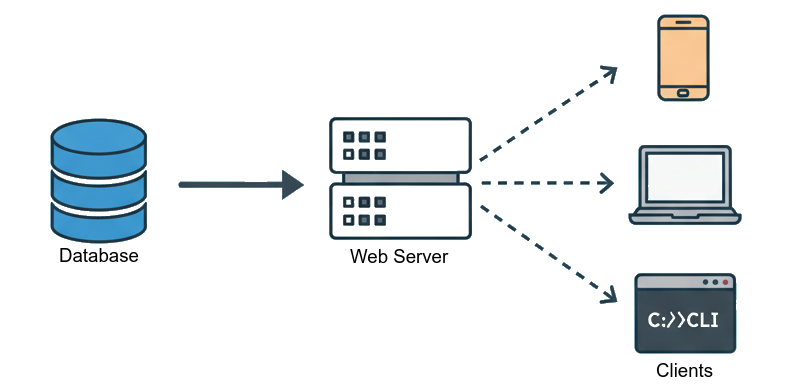
The server's main role is to mediate all interaction between the "clients" (such as web browsers and mobile apps) and the database. This is going to include authenticating users, issuing queries, formatting data, and sending the static files that represent the actual web site.
There are a few tricky issues to keep in mind.
- The server should be "stateless". Every time a web browser makes a request, it should include all the information the server needs to handle the request. As much as possible the server shouldn't "remember" anything about prior interactions with a client.
- Malicious users could use a hacked web browser, or a tool that knows how to interact with servers without actually being a browser. This means the server cannot trust that requests are well-formed and legal. It has to do some validation and checking.
- The server should send data in a format that works with different languages and programs. The server will be written in Java. The browser will be running JavaScript. A good option is to use the JSON format.
- The server should follow best practices when defining how clients interact with it. A good option is to create a RESTful API.
That might seem like a lot to keep track of. Don't fear. As you work through this tutorial, you'll find that these requirements work together nicely, and everything is going to make sense.
Reminder
At the end of Chapter 1, you should have entered yourself as a user in a SQLite database. This chapter will use that database, so be sure you know where it is.
2.2. A Simple Web Server
Javalin is an easy, efficient framework for building web servers. To begin, navigate to the root of the folder where you're keeping your work, and use Maven to create a new project, as a sibling of your admin project. The package should be quickstart.backend, and the folder should be called backend:
bash
mvn archetype:generate \
    -DarchetypeGroupId=org.apache.maven.archetypes \
    -DarchetypeArtifactId=maven-archetype-quickstart \
    -DarchetypeVersion=1.5 \
    -DinteractiveMode=false \
    -DartifactId=backend \
    -DgroupId=quickstart.backend \
    -Dpackage=quickstart.backend
As in Chapter 1, you'll need to edit pom.xml. This time, you'll need to add a dependency to the Javalin Library. It's worth adding a few other libraries now, so also pull in the libraries for Gson (which converts between Java objects and JSON), SLF4J (a simple logging framework), and SQLite. Add the highlighted lines from the code block below to <dependencies> (not <dependencyManagement>):
xml
  <dependency>
    <groupId>io.javalin</groupId>
    <artifactId>javalin</artifactId>
    <version>6.7.0</version>
  </dependency>
  <dependency>
    <groupId>org.slf4j</groupId>
    <artifactId>slf4j-simple</artifactId>
    <version>2.0.16</version>
  </dependency>
  <dependency>
    <groupId>org.xerial</groupId>
    <artifactId>sqlite-jdbc</artifactId>
    <version>3.49.1.0</version>
  </dependency>
  <dependency>
    <groupId>com.google.code.gson</groupId>
    <artifactId>gson</artifactId>
    <version>2.11.0</version>
  </dependency>
</dependencies>

<build>
You should also set up the plugin for making an executable jar file, by adding the highlighted lines to the <build> section (not <pluginManagement>):
xml
    <plugins>
      <plugin>
        <artifactId>maven-assembly-plugin</artifactId>
        <executions>
          <execution>
            <phase>package</phase>
            <goals>
              <goal>single</goal>
            </goals>
          </execution>
        </executions>
        <configuration>
          <descriptorRefs>
            <descriptorRef>jar-with-dependencies</descriptorRef>
          </descriptorRefs>
          <appendAssemblyId>false</appendAssemblyId>
          <finalName>backend-1.0</finalName>
          <archive>
            <manifest>
              <mainClass>quickstart.backend.App</mainClass>
            </manifest>
          </archive>
        </configuration>
      </plugin>
    </plugins>
  </build>
</project>
Finally, edit App.java so it runs a basic web server:
java
package quickstart.backend;

import io.javalin.Javalin;
import io.javalin.http.ContentType;

/** A backend built with the Javalin framework */
public class App {
    public static void main(String[] args) {
        // get the port on which to listen. If this crashes the program, that's
        // fine... it means "configuration error".
        int port = Integer.parseInt(System.getenv("PORT"));

        System.out.println("-".repeat(45));
        System.out.println("Using the following environment variables:");
        System.out.println("  PORT=" + port);
        System.out.println("-".repeat(45));

        // Do some quick validation to ensure the port is in range
        if (port < 80 || port > 65535) {
            System.err.println("Error in environment configuration");
            return;
        }

        // Create the web server. This doesn't start it yet!
        var app = Javalin.create();

        // When a client requests the root resource ('/'), return "hello"
        app.get("/", ctx -> {
            ctx.status(200);
            ctx.contentType(ContentType.TEXT_PLAIN);
            ctx.result("hello");
        });

        // This next line launches the server, so it can start receiving
        // requests. Note that main will return, but the server keeps running.
        app.start(port);
    }
}
You'll notice that this code gets its configuration from the environment. That's no different from the admin app you wrote in Chapter 1. But now the code is a bit more explicit about printing out its configuration. This is a surprisingly nuanced issue. Logging can add run-time overhead to your program, so there's an incentive to skip logging. But once you stop running your server from your computer, and start running it from a world-accessible server, it's going to become tricky to debug your program. At that point, logging can help a lot. So for now, while you're still getting everything to work, you should do lots of logging. If you determine that the overhead of logging becomes burdensome, you can always introduce an environment variable that controls the log level.
Right now there is only one environment variable, the port. Your computer has an IP address, such as 128.180.1.81. A computer can run many services, so many machines might try to contact the same address, for different purposes. Associating each service with a different port makes this whole process work. Some ports are standard, like 80 for unencrypted web traffic and 443 for encrypted web traffic. In this chapter, the only requirement is that you choose a port that isn't already in use on your computer. 3000, 5000, and 8000 are common choices.
Finally, you'll see that there are three steps to use Javalin.
- You
createan app. Right now, your app doesn't take any configuration information. - You configure the different resources that the app provides, and how it provides them. For now, there is just one resource, the root resource (
/). - You call
app.start(port)so your app will start responding to requests
In the code for handling requests for the root resource, you might be confused by the -> syntax. This is known as a lambda expression. Almost every major programming language has lambdas.
In the Handlers section of the Javalin documentation, you'll see that this syntax is common in Javalin. The main idea is that you can write a function on the fly and pass it to Javalin. Javalin will run that function when it needs to (e.g., in response to a GET request). You can read the code like this:
java
// in response to a GET request for '/', run a function that takes a single
// argument called `ctx`, of type `Context`
app.get("/", ctx -> {
    // This is inside the function to run.  It modifies ctx by setting the HTTP
    // status code and HTTP content type for the response
    ctx.status(200);
    ctx.contentType(ContentType.TEXT_PLAIN);
    // ctx.result() sets some text that makes up the response to send back to
    // the machine that made the request
    ctx.result("hello");
}); // '}' ended the function, and ')' ended the call to app.get().
So then app.get("/", ctx -> { /* ... */ }) is really saying "when there is a request for the root document, run the function between the {} braces, and pass in ctx as an argument to it." What makes lambdas so powerful is that they capture their local context. That is, your lambda can access some of the local variables that are defined in enclosing scopes. You'll see this ability very soon.
Notice that the call to app.start() returns, so main() will also return. Javalin is a multithreaded server, and it keeps running. To see this in action, type mvn package, and then PORT=3000 java -jar target/backend-1.0.jar. You'll see that the app doesn't return. To stop it, you'll need to press ctrl-c.
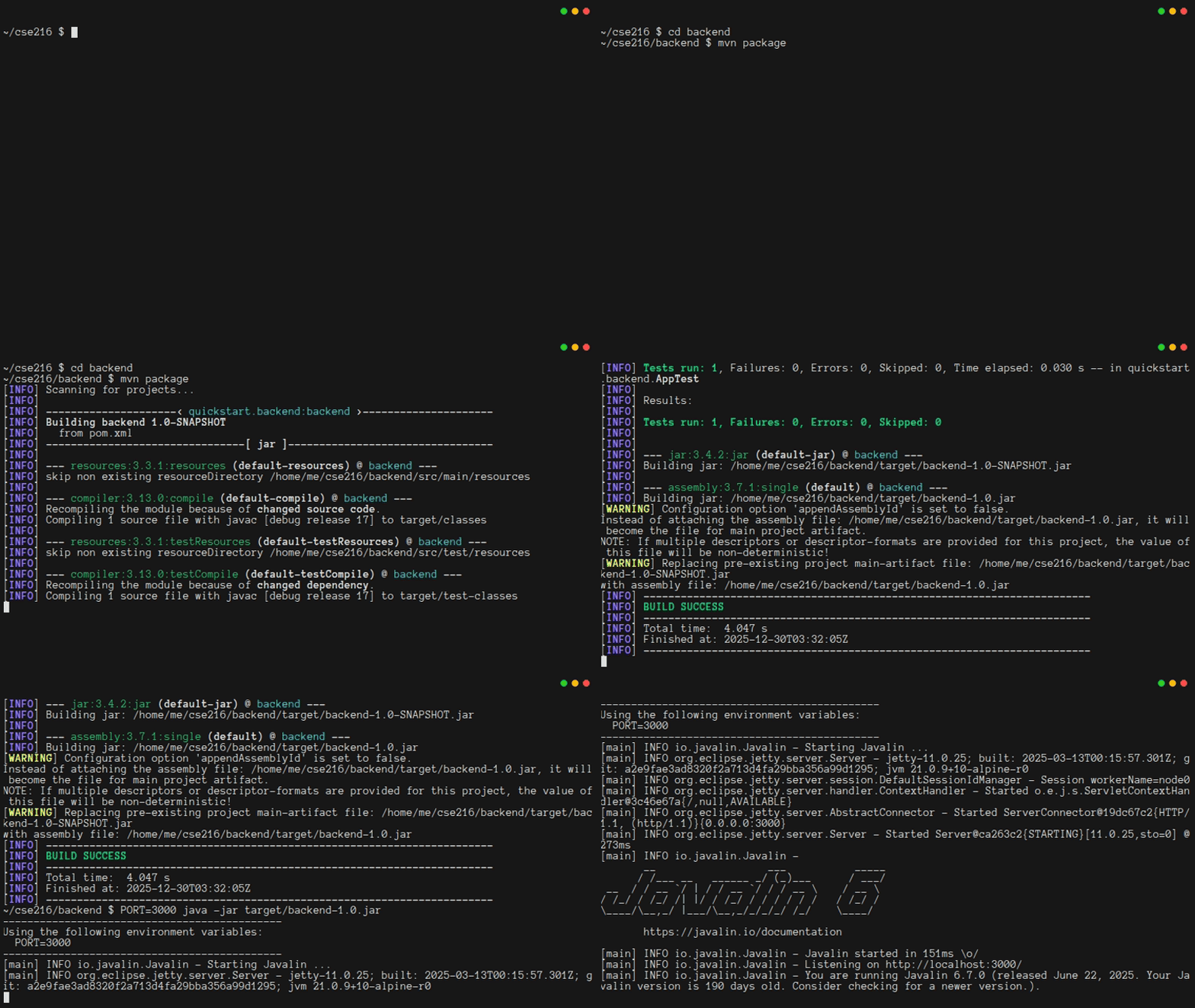
If you point your web browser at http://localhost:3000, you should see something like this:
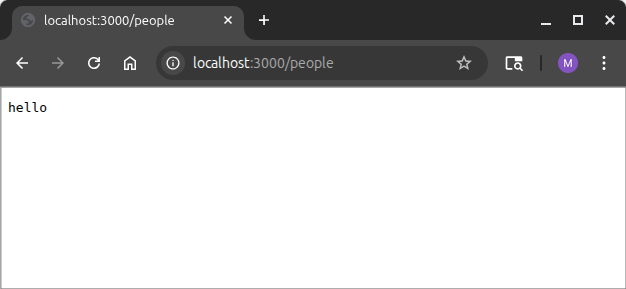
Of course, if you try other addresses, like http://localhost:3000/people, you should see an error, because you haven't set up a route for that yet.
Remember: you'll need to press ctrl-c from the terminal to stop your web server in order to re-build it after you edit code.
2.3. REST Routes
REST is a design philosophy for creating web services, in which the server does not keep track of the state of the application. With REST, developers think of the server as maintaining a directory-like structure for all of the resources it manages:
- To perform an action on a resource, a client sends the server a message that includes the resource name, a "verb" describing the action to perform, and some optional additional information
- The server then replies with a result
REST-based designs decouple the server from the various front ends of your program. A mobile app, web site, and command-line tool can all use the same REST API to request service. Put another way, REST discourages programmers from coupling the interface with the server. This makes maintenance, testing, and upgrading much easier.
REST is also good for "scale out". Since the server is stateless, REST designs make it easy to start a few more servers when demand is high. Clients can seamlessly send requests to one server, or another, without there appearing to be any interruption in service.
REST works because the HTTP protocol supports several verbs. Most notably, REST maps the post, get, put, and delete verbs of the HTTP Protocol to create, read, update, and delete operations (CRUD). As you saw in Chapter 1, these correspond to the SQL commands INSERT, SELECT, UPDATE, and DELETE. The app you make in this chapter will use these four verbs.[1] Any request to read a resource, whether a web page or a computed value, uses get. And any program that can speak the HTTP language can issue get, post, put, and delete commands.
In order to really see how everything is working, you should modify the way that you create your server, so that it does some more verbose logging. The code below configures the server to print the scheme, name, path, and fullUrl on any request. If there is a query string or request body, that will be printed, too. This is almost certainly too much logging for a production service. In particular, it risks putting secure information into the logs. You'll want to turn this off eventually, but for now it will make debugging a lot easier.
java
// Create the web server. This doesn't start it yet!
var app = Javalin.create(config -> {
    // Attach a logger
    config.requestLogger.http((ctx, ms) -> {
        System.out.println("=".repeat(80));
        System.out.printf("%-6s%-8s%-25s%s%n", ctx.scheme(), ctx.method().name(), ctx.path(),
                ctx.fullUrl());
        if (ctx.queryString() != null)
            System.out.printf("query string:%s%n", ctx.queryString());
        if (ctx.body().length() > 0)
            System.out.printf("request body:%s%n", ctx.body());
    });
});
If you re-compile and re-start your server, and then visit http://localhost:3000, you should see a log message in your terminal. You should also see log messages when there are requests for non-existent resources, like http://localhost:3000/phony.file
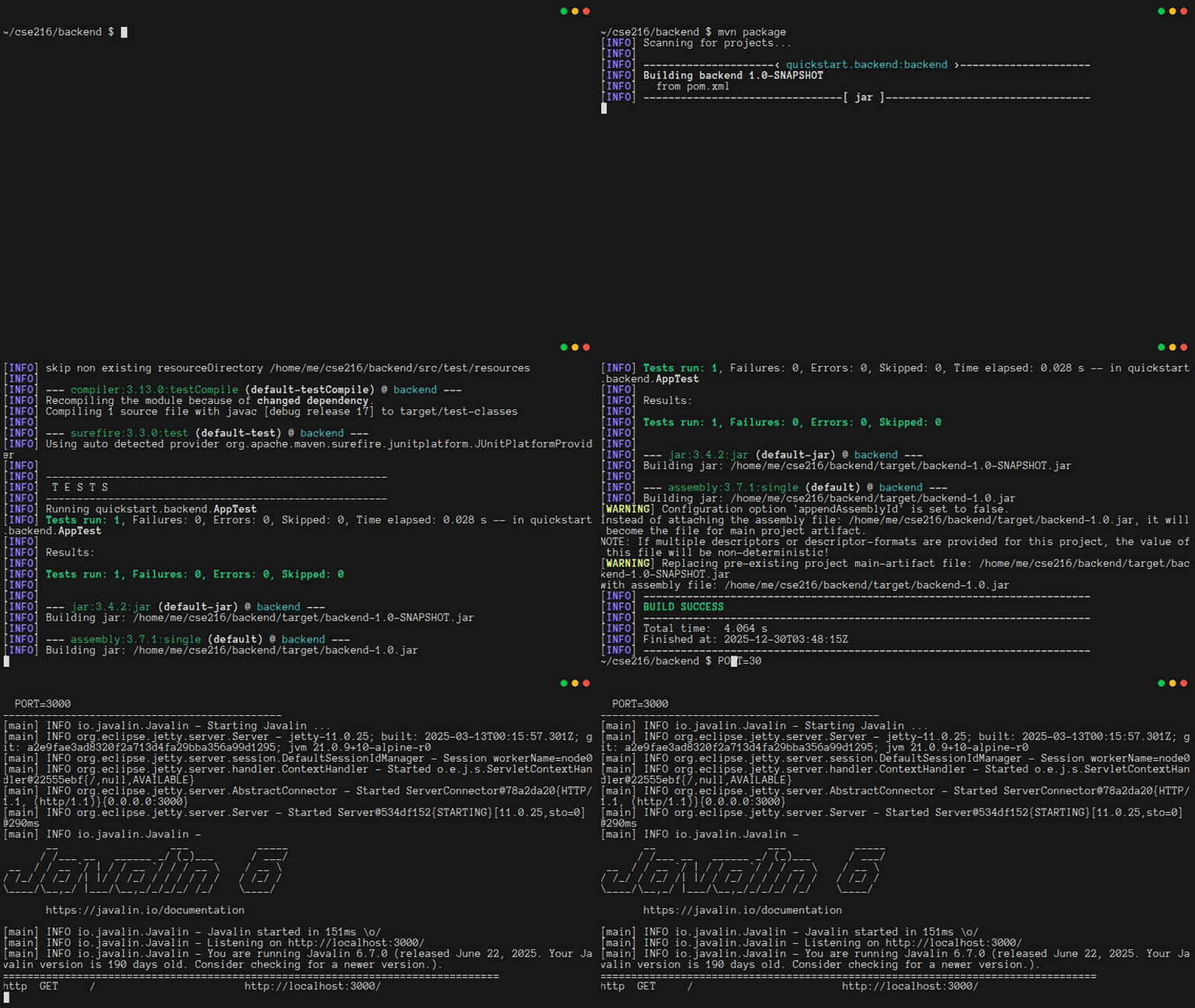
It is even more informative if you use the curl program to interact with your web server. curl lets you use get, post, put, and delete verbs, and supports query strings and request bodies. Even when you make requests for things that don't exist, they will show up in the logs.
You can see this in action, by using the curl program to interact with your web server. Try issuing each of the following six commands in another terminal (you may need to use curl -i to see more detailed response information):
text
curl http://localhost:3000/people
curl http://localhost:3000/people -X POST -d "{'name':'PROF. Parse'}"
curl http://localhost:3000/people/1 -X PUT -d "{'name':'Prof. Parse'}"
curl http://localhost:3000/people/1 -X DELETE
curl http://localhost:3000/people?key=value
curl "http://localhost:3000/people?format=json&colorize=true"
Your Javalin logs should show something like this:
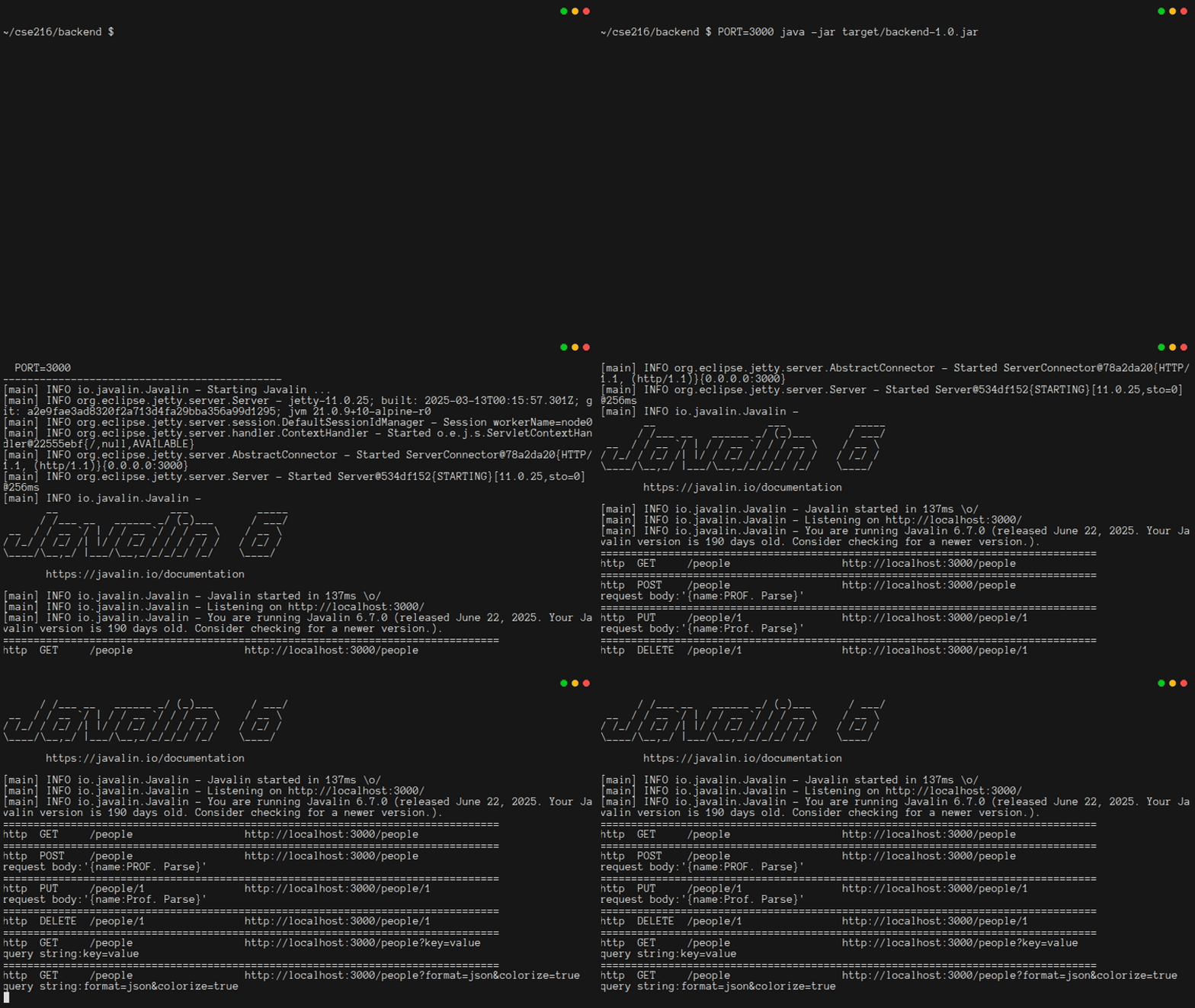
Note: HTTP Status Codes
HTTP uses status codes to indicate whether a verb succeeded or failed in its attempt to operate on a resource. For now, you'll see the error codes (if curl is not showing them to you, consider use of -i option). Eventually, the backend will switch to using use 200 (OK) almost all the time, and provide error details as part of the response.
You should stop and think for a moment about what just happened. You interacted with a web server without using a web browser. That also means you interacted with your backend without having a frontend. While developing, this is great, because it means you can build and test your backend independently from the frontend. But it also means that at any time, a malicious user could use curl (or any other program that can communicate via HTTP) to interact with your server. You will need to make sure that doing so doesn't break your program's security guarantees.
2.4. Your First Data Route
It's time to modify the server so that it can interact with the database in response to a GET request. This is going to end up being the foundation for quite a bit of code, so it's important to organize things carefully right from the start.
You'll need some code for interacting with a SQLite database. It would not be a good idea to use the Database.java file from Chapter 1, because it has code for creating and dropping tables, and for modifying tblPerson. That code should not be in the backend. So instead, you should make a new Database.java file:
java
package quickstart.backend;

import java.sql.Connection;
import java.sql.DriverManager;
import java.sql.SQLException;
import java.util.ArrayList;
import java.util.List;

/**
 * Database has all our logic for connecting to and interacting with SQLite
 *
 * NB: Since the backend is concurrent, this class needs to be thread-safe,
 * achieved by making all methods "synchronized".
 */
public class Database implements AutoCloseable {
    // load the sqlite-JDBC driver using the current class loader
    static {
        try {
            Class.forName("org.sqlite.JDBC");
        } catch (java.lang.ClassNotFoundException e) {
            e.printStackTrace();
            System.exit(1);
        }
    }

    /** A connection to a SQLite db, or null */
    private Connection conn;

    /**
     * Use dbFile to create a connection to a database, and stores it in the
     * constructed Database object
     *
     * @param dbFile the connection string for the database
     * @throws SQLException if a connection cannot be created
     */
    public Database(String dbFile) throws SQLException {
        if (dbFile == null)
            throw new RuntimeException("Insufficient information to connect to database. Bye.");
        conn = DriverManager.getConnection("jdbc:sqlite:" + dbFile);
        // NB: SQLite is odd: we need to opt-in for referential integrity
        try (var ps = conn.prepareStatement("PRAGMA foreign_keys = ON;")) {
            ps.execute();
        }
    }

    /**
     * Close the current connection to the database, if one exists. The
     * connection will always be null after this call, even if an error occurred
     * during the closing operation.
     */
    @Override
    public void close() throws Exception {
        if (conn != null) {
            try {
                conn.close();
            } catch (SQLException e) {
                e.printStackTrace();
            } finally {
                conn = null;
            }
        }
    }

    /**
     * PersonShort is a Java object with just the data we want to return when
     * getting a list of all people
     */
    public static record PersonShort(int id, String name) {
    }

    /**
     * Get a list of all people in the database
     *
     * @return A List with zero or more PersonShort objects
     *
     * @throws SQLException on any error
     */
    public synchronized List<PersonShort> getAllPerson() throws SQLException {
        try (var ps = conn.prepareStatement("SELECT id, name FROM tblPerson ORDER BY name;");
                var rs = ps.executeQuery();) {
            var results = new ArrayList<PersonShort>();
            while (rs.next()) {
                results.add(new PersonShort(rs.getInt("id"), rs.getString("name")));
            }
            return results;
        }
    }
}
The next step is to write the handler for a GET request. That code will call getAllPerson. You could put the code directly in App.java, but in the long run, that will lead to App.java being a huge and un-testable mess. Instead, make a file called Routes.java:
java
package quickstart.backend;

import io.javalin.http.ContentType;
import io.javalin.http.Context;

import com.google.gson.*;

/**
 * All of the routing logic for the app is stored in Routes, so that the code
 * will be easier to keep organized, and so that it will be easier to test.
 */
public class Routes {
    /**
     * StructuredResponse provides a common format for success and failure
     * messages, with an optional payload of type Object that can be converted
     * into JSON.
     *
     * @param status  for applications to determine if response indicates an
     *                error
     * @param message only useful when status indicates an error, or when data
     *                is null
     * @param data    any JSON-friendly object can be referenced here, so a
     *                client gets a rich reply
     */
    static record StructuredResponse(String status, String message, Object data) {
    }

    /**
     * Get a list of all people, return it as JSON in ctx.result
     *
     * @param ctx  The HTTP context, with cookies, querystring, etc
     * @param db   The database
     * @param gson A thread-safe object for converting to/from JSON
     */
    public static void readPersonAll(Context ctx, Database db, Gson gson) {
        ctx.status(200);
        ctx.contentType(ContentType.APPLICATION_JSON);
        try {
            ctx.result(gson.toJson(new StructuredResponse("ok", null, db.getAllPerson())));
        } catch (Exception e) {
            ctx.result(gson.toJson(new StructuredResponse("error", e.getMessage(), null)));
        }
    }
}
The code above might seem like magic. Somehow, Gson knows how to turn your objects into text that can be given to ctx.result(). Under the hood, it's using a technique known as reflection to analyze the records while the program is running, figure out the field names, and make the text, in a standard format known as JSON.[2]
Now you can rewrite App.java to make use of the Routes and Database classes. Start by adding a few imports:
java
import java.sql.SQLException;
import com.google.gson.*;
Then start accepting a second environment variable, for database configuration. This requires two changes. You can get the environment variable like this:
java
int port = Integer.parseInt(System.getenv("PORT"));
String dbFile = System.getenv("DB_FILE");
Then you can print it to the log like this:
java
System.out.println("  PORT=" + port);
System.out.println("  DB_FILE=" + dbFile);
It is a good idea to set up your database before calling Javalin.create(), because you want it to be fully configured before the app starts listening for requests. At the same time, you can make the global Gson instance that your routes will use to turn objects into JSON text.
java
// Create the database interface and Gson object. We do this before
// setting up the server, because failures will be fatal
Database db;
try {
    db = new Database(dbFile);
} catch (SQLException e) {
    e.printStackTrace();
    return;
}
// gson lets us easily turn objects into JSON
// This date format works nicely with SQLite and PostgreSQL
Gson gson = new GsonBuilder().setDateFormat("yyyy-MM-dd'T'HH:mm:ss.SSS'Z'").create();
Finally, remove the get route for "/", and then add a new routing section:
java
// All routes go here
// Get a list of all the people in the system
app.get("/people", ctx -> Routes.readPersonAll(ctx, db, gson));
At this point, your server should be able to run. Before testing it, it would be good to add one more feature. You probably noticed that in Chapter 1, the Database was AutoCloseable, but for the backend, it isn't. That's necessary, because the server keeps running after main returns. It would still be nice to clean up the database properly. To do that, you can set up some code to run when ctrl-c is pressed. This should go right before app.start():
java
// The only way to stop the server is by pressing ctrl-c. At that point,
// the server should try to clean up as best it can.
Runtime.getRuntime().addShutdownHook(new Thread(() -> {
    // Try to shut down Javalin before the database, because the
    // database shouldn't shut down until it's 100% certain that no more
    // requests will be sent to it.
    try {
        System.out.println("Shutting down Javalin...");
        app.stop(); // Stops the Javalin instance gracefully
    } catch (Exception e) {
        e.printStackTrace();
    }
    // If Javalin didn't shut down nicely, and the Database shuts down,
    // then some Javalin threads might crash when they try to use a null
    // connection. Javalin shutdown failures are highly unlikely, and
    // almost impossible to solve, so once a Javalin shutdown has been
    // attempted, go ahead and try to shut down the database.
    try {
        System.out.println("Shutting down Database...");
        db.close();
        System.out.println("Done");
    } catch (Exception e) {
        // Database shutdown failures are almost impossible to solve,
        // too, so if this happens, the best thing to do is print a
        // message and return.
        e.printStackTrace();
    }
}));
It's time to test the code. If your server is still running, press ctrl-c. Then re-compile with mvn package, and then run the new version of your code with a command like PORT=3000 DB_FILE=../db.db java -jar target/backend-1.0.jar (make sure to use the path to your database from the previous tutorial step)!
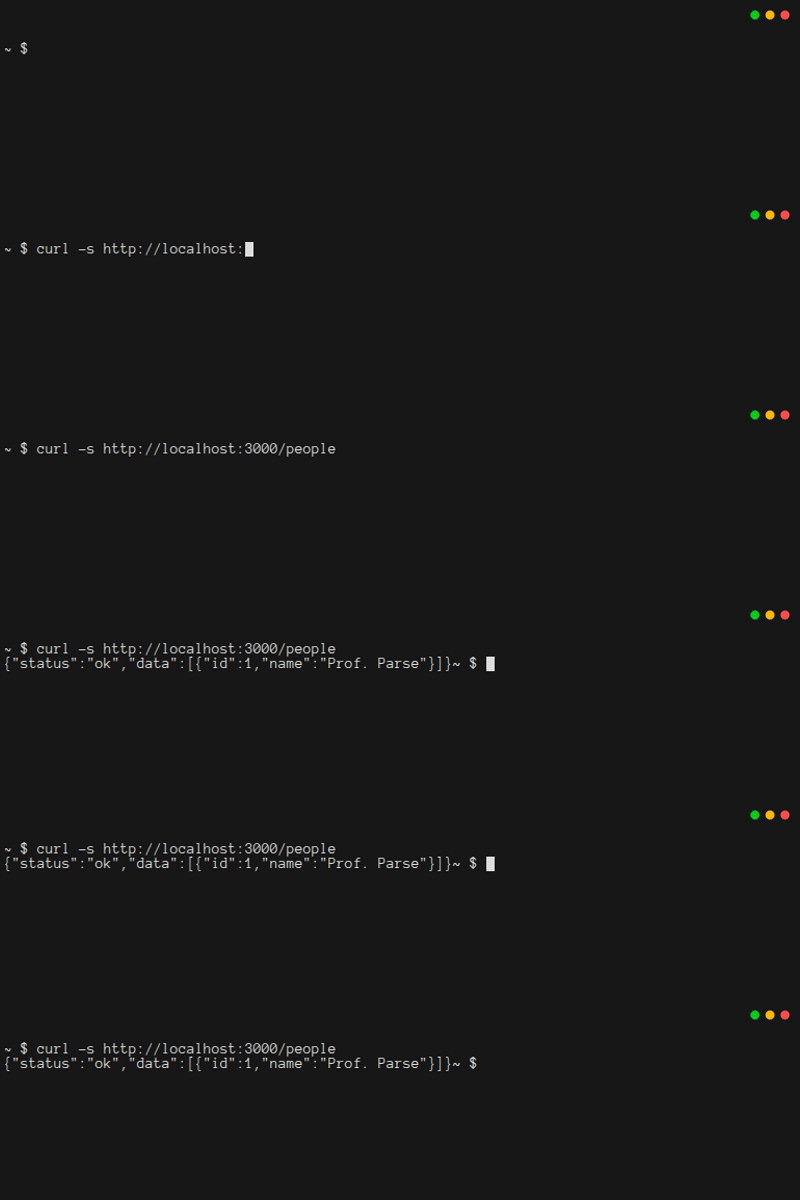
Using another terminal window, try using curl to get the /people route:
2.5. Setting Up Google OAuth
The previous step was pretty amazing. The web server accessed the database to get a list of all the users, and it sent that list back to the client as a JSON object. But there's something scary here, too. Anyone with internet access can get that list. If you were to make it possible to change a display name, or do CRUD operations on messages, then how could you ensure that only authorized users can access the system?
There are actually two parts to this problem. One is the need to limit system access, so only authorized users can do anything. The other is the need to be careful in the application logic (Routes.java), so that authorized users only access data they are supposed to access.
The first step toward solving this problem is to provide a way for people to log in. But how? Managing passwords for users is a bad idea. It is a sure-fire way to become complicit in some security breach. Instead, you should delegate authentication to a trusted third party. This tutorial relies on Google.
In more detail, Google is one of many companies that supports OAuth 2.0 Authentication. There are many different ways that OAuth can be implemented. In this app, it's going to work like this:
- On any access, the server will check if the user has successfully logged in.
- If not, the server will redirect to a special page at Google, and pass a special token along with the redirect.
- Upon authenticating with Google (probably using a username and password, plus some kind of two-factor phone-based authentication), the user will be redirected back to your website (at a special route you set up for this).
- The web server will work with Google to finish the log-in operation.
In order to get this to work, the first step is to visit the Google Cloud Console and set up a new project. Click on "Create Project" and give your project a name like "CSE 216 Tutorial Web App". It is best if you use your "@lehigh.edu" account, so that you can use "lehigh.edu" as your Organization and Location. When done, click "Create".
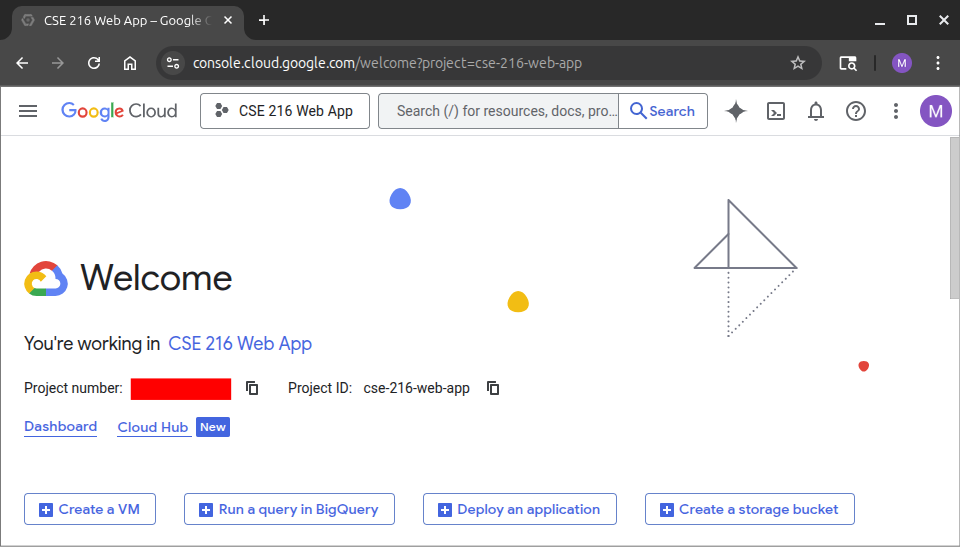
Now, if you click on "Google Cloud" in the top left, you should be redirected to a page like this:
From the hamburger menu in the top left, choose "APIs and Services/Enabled APIs and services", then search for the "People" API and enable it. Then click "Credentials" on the left sidebar. Choose "Create Credentials" and then "OAuth Client Id". Start following the prompts, making sure to pick an "External" audience for now. Then click "Create OAuth client" and choose "Web application". Add an origin of http://localhost:3000 and a redirect URI of http://localhost:3000/auth/google/callback.
Warning
You need to be very careful about this next step!
You will be instructed to securely record your Client Id and Client Secret. If you lose this information, you can't get it back, and you will need to generate a new OAuth client. But these are supposed to be secrets. You definitely do not want to check them into your repository. For the time being, save them into a file on your desktop.
The secrets will need to be transmitted to your Javalin program through environment variables. That being the case, a common approach is to have a special .env file that contains all of your environment configuration. A best practice is to make a folder that is not checked into your repository, and keep your .env files in it. In this way, the secrets will be conveniently located for running unit tests, but not uploaded to any server.
To set this up, from the root of your repository, type the following commands:
bash
mkdir local
echo local/ >> .gitignore
echo '*.env' >> .gitignore
touch local/backend.env
To ensure that you've done this correctly, type git status. You should see that your .gitignore has been modified, but your backend.env file should not appear in the listing.
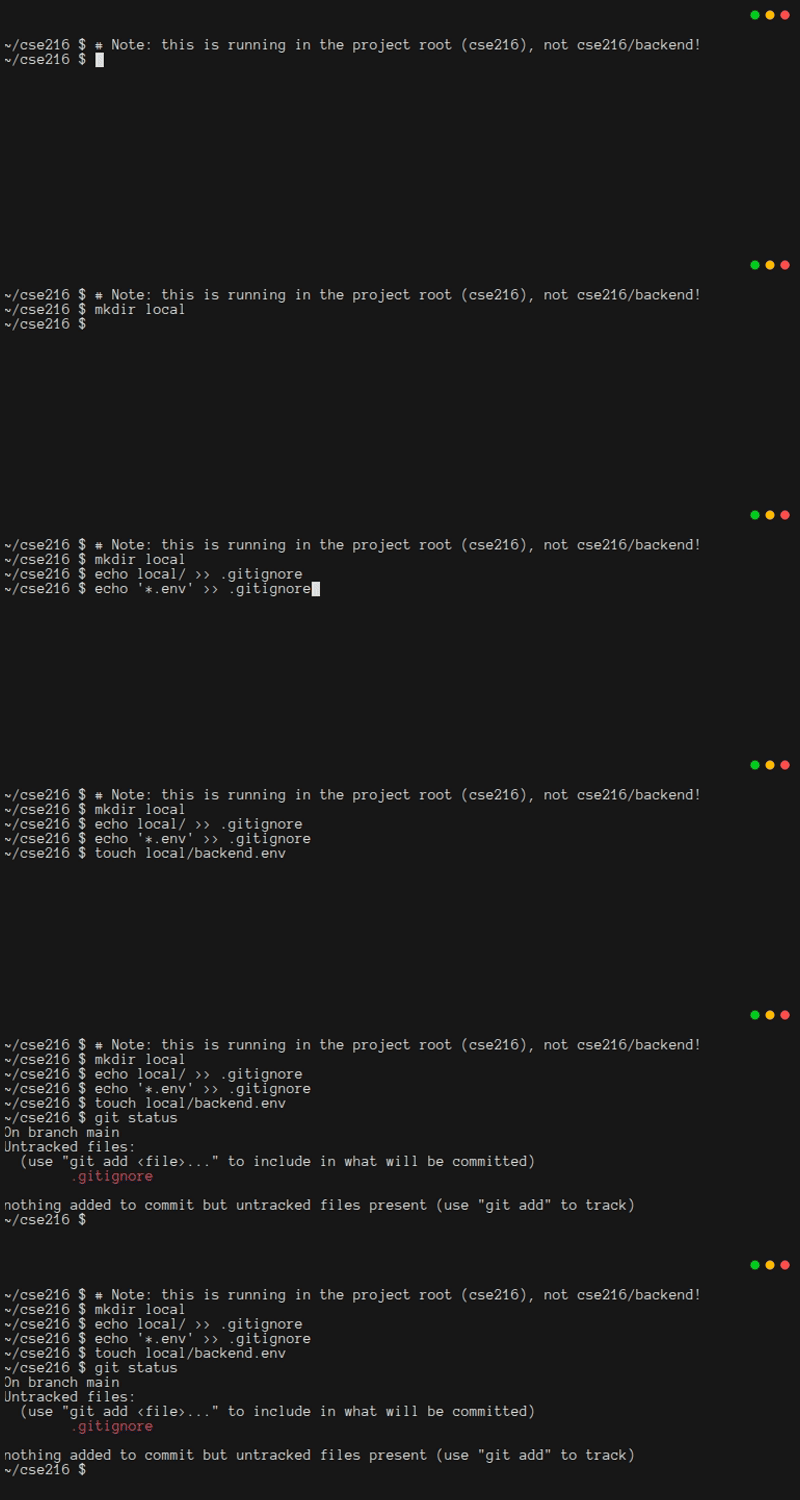
Next, add your configuration to local/backend.env. Instead of xxx, be sure to include your secrets. Also, notice that there als now a SERVER_NAME variable. Google OAuth will need this:
bash
# MAKE SURE THIS .env FILE IS **NEVER** CHECKED INTO THE REPOSITORY
export PORT='3000'
export DB_FILE='../db.db'
export CLIENT_ID='xxxxxxxxxxxx-xxxxxxxxxxxxxxxxxxxxxxxxxxxxxxxx.apps.googleusercontent.com'
export CLIENT_SECRET='XXXXXX-XXXXXXXXXXXXXXXXXXXXXXXXXXXX'
export SERVER_NAME='http://localhost'
With this in place, you can run source ../local/backend.env from the backend folder, and any program you run from the current shell instance will have access to your configuration. That is, instead of typing things like this:
bash
PORT=3000 DB_FILE=../db.db java -jar target/backend-1.0.jarNow you'll type things like this:
bash
source ../local/backend.env
java -jar target/backend-1.0.jar
2.6. Managing Logged-In Users With A Stateful Session Store
When a user logs in, they shouldn't need to keep on re-entering their login credentials. They should stay logged in for a while. But how long? And can they be logged in on several devices at the same time?
This is an important security decision. It also affects some deep aspects of how you will write the code. If you want a user to be able to stay logged in on several machines at once, you might want to consider using Javalin's built-in "session" feature. But if you want a user to be able to log out of all devices by logging in to a new device, Javalin's "session" is not going to work. Also, if you are eventually going to "scale out" and have many servers to satisfy all your clients, then using the built-in "session" feature will prove tricky.
This tutorial uses a hash table to store all session information. This fits the "one device at a time" strategy. It also works nicely with scale out, because you could easily replace the hash table with a Memory Cache. The session hash table requires some cryptographic features, and the interaction with Google requires some other features. To get all of that, update your pom.xml file with the highlighted dependencies:
xml
  <dependency>
    <groupId>org.apache.commons</groupId>
    <artifactId>commons-crypto</artifactId>
    <version>1.2.0</version>
  </dependency>
  <dependency>
    <groupId>com.google.api-client</groupId>
    <artifactId>google-api-client</artifactId>
    <version>2.0.0</version>
  </dependency>
  <dependency>
    <groupId>com.google.oauth-client</groupId>
    <artifactId>google-oauth-client-jetty</artifactId>
    <version>1.34.1</version>
  </dependency>
  <dependency>
    <groupId>com.google.apis</groupId>
    <artifactId>google-api-services-people</artifactId>
    <version>v1-rev20220531-2.0.0</version>
  </dependency>
</dependencies>

<build>
Warning: Stay Up To Date!
You should regularly check the Maven Repository to ensure you've got the latest versions of any libraries in your pom.xml file.
Next, you will need to add some code to Database.java. This code checks the database when a user logs in, and rejects anyone who doesn't have a registered email:
java
/** Person is a Java object with all the data from a row of tblPerson */
public static record Person(int id, String email, String name) {
}

/**
 * Look up a user by their email address, to support start-of-session
 * authentication
 */
public synchronized Person getPersonByEmail(String email) throws SQLException {
    try (var stmt = conn.prepareStatement("SELECT * FROM tblPerson WHERE email = ?;")) {
        stmt.setString(1, email);
        try (var rs = stmt.executeQuery()) {
            if (rs.next()) {
                return new Person(rs.getInt("id"), rs.getString("email"), rs.getString("name"));
            }
            return null;
        }
    }
}
Now it's time to create Sessions.java. This is where the server will store information about logged-in users.
java
package quickstart.backend;

import java.util.concurrent.ConcurrentHashMap;
import java.security.SecureRandom;

/**
 * Create random strings using a cryptographically good RNG
 *
 * Details at:
 * https://stackoverflow.com/questions/41107/how-to-generate-a-random-alpha-numeric-string
 */
class RandStringCreator {
    /** Uppercase Characters */
    private static final String uppers = "ABCDEFGHIJKLMNOPQRSTUVWXYZ";

    /** Lowercase Characters */
    private static final String lowers = "abcdefghijklmnopqrstuvwxyz";

    /** Numerical Characters */
    private static final String nums = "0123456789";

    /** All Valid Characters */
    private static char[] chars = (uppers + lowers + nums).toCharArray();

    /** A random number generator */
    private final SecureRandom rng;

    /** Construct the generator by creating a secure RNG */
    RandStringCreator() {
        this.rng = new SecureRandom();
    }

    /** Create a session key by getting a 21-character random string */
    public String createSessionKey() {
        return getRandString(21);
    }

    /** Get a random string of the requested length (must be >0) */
    private synchronized String getRandString(int length) {
        if (length < 1)
            return null;
        char[] buf = new char[length];
        for (int idx = 0; idx < buf.length; ++idx)
            buf[idx] = chars[rng.nextInt(chars.length)];
        return new String(buf);
    }
}

/**
 * Session table entries contain the table's row Id, session key, email, and
 * display name
 */
record UserRecord(int id, String sessionKey, String emailAddress, String displayName) {
}

/** Sessions maintains a key/value store for tracking logged-in users */
public class Sessions {
    /** The ids and tokens for all active users */
    ConcurrentHashMap<String, UserRecord> activeSessions = new ConcurrentHashMap<String, UserRecord>();

    /** A random string generator for making session keys */
    RandStringCreator rsc = new RandStringCreator();

    /**
     * When a user successfully logs in via OAuth, we must create (or update) a
     * pair in mActiveSessions so that we can handle subsequent requests by the
     * user without needing to hit the database again.
     */
    String onLogin(String googleId, int id, String email, String name) {
        // Get a session key
        String sessionKey = rsc.createSessionKey();
        // pair the uid with this key... this invalidates all other logins by
        // this user
        activeSessions.put(googleId, new UserRecord(id, sessionKey, email, name));
        return sessionKey;
    }

    /**
     * Check if the provided uid/session pair corresponds to a valid active
     * login.
     */
    boolean checkValid(String id, String session) {
        if (id == null || session == null || session.equals(""))
            return false;
        var foundSession = activeSessions.get(id);
        return (foundSession != null) && foundSession.sessionKey().equals(session);
    }

    /** Return the whole packet of info for the user given by `id` */
    UserRecord get(String id) {
        return activeSessions.get(id);
    }

    /** Log a user out by removing its email/session mapping */
    boolean logOut(String mId) {
        return activeSessions.remove(mId) != null;
    }
}
You should make sure you understand this code, since it's the backbone of your app's security. The RandStringCreator uses a cryptographically secure pseudorandom number generator to create a random sequence of characters, which serves as a user's "secret". The Sessions object maps a user's Google Id to a secret (and also some other information). The secret gets made, and added to Sessions, on a successful login. If every subsequent interaction with the server includes the user's Google Id and the secret, then the server can prove that a user is valid by observing that the Google Id maps to the secret in the Sessions object. Logging out simply removes the mapping from Sessions.
2.7. Interacting With Google OAuth From Javalin
It turns out that the code for interacting with Google from Javalin requires some significant configuration. The code for getting the environment variables should go in App.java. The rest of the Google OAuth configuration will go in a new GoogleOAuth.java file. When it comes to the actual routes, those will go in Routes.java.
Since the CLIENT_ID and CLIENT_SECRET are in an environment variables, you should add these lines to App.java right after the line for getting DB_FILE from the environment. Note that you'll also need the name of the server, in order for Google OAuth to work nicely.
java
String clientId = System.getenv("CLIENT_ID");
String clientSecret = System.getenv("CLIENT_SECRET");
String serverName = System.getenv("SERVER_NAME");
In the subsequent debug code that prints environment variable configuration, you might want to display these lines. Remember that printing secrets to the log is probably a bad idea!
java
System.out.println("  CLIENT_ID=" + clientId);
// Warning: you probably don't want to put the secret into the logs!
System.out.printf("  CLIENT_SECRET=%s%s%n", "*".repeat(clientSecret.length() - 5),
        clientSecret.substring(clientSecret.length() - 5, clientSecret.length()));
System.out.println("  SERVER_NAME=" + serverName);
Of course, any time you get environment variables, you should check them. Doing so will require you to change the lines that do the check:
java
if (dbFile == null || serverName == null ||
        clientId == null || clientSecret == null ||
        port < 80 || port > 65535) {
    System.err.println("Error in environment configuration");
    return;
}
Next, start writing GoogleOAuth.java by adding some imports:
java
import java.io.IOException;
import java.util.ArrayList;
import java.util.Arrays;

import com.google.api.client.googleapis.auth.oauth2.GoogleAuthorizationCodeFlow;
import com.google.api.client.http.javanet.NetHttpTransport;
import com.google.api.client.json.gson.GsonFactory;
import com.google.api.services.people.v1.PeopleService;
You're going to need to set up quite a few objects in GoogleOAuth.java in order for Google OAuth to be usable. It's probably not important that you understand this code yet. But you need all of it.
java
/**
 * URI google redirects to after login event, equal to 'serverName + ":" + port
 * + "/auth/google/callback"'
 */
public final String redirectUri;

/** URL to redirect a user to when authenticating them for the first time */
public final String newAuthUrl;

/** used by the PeopleService builder */
public static final String APPLICATION_NAME = "CSE216 Tutorials";

/** The object used for sending HTTP requests to Google */
private NetHttpTransport httpTransport;

/** The flow object for managing credentials */
private GoogleAuthorizationCodeFlow flow;

/**
 * Utility class for performing google oauth operations.
 * This sets up Google OAuth so we can get users email and profile data. It also
 * creates the URI where google returns after an auth, the redirectUri, as well
 * as the URI to redirect a user to to log them in, the newAuthUrl.
 *
 * @param serverName           the host on which this is running, e.g.
 *                             'http://localhost'
 * @param port                 the port on which the webserver is running, e.g.
 *                             3000
 * @param clientId             the web client id from
 *                             https://console.cloud.google.com/
 * @param clientSecret         the secret associated with clientId
 * @param authCallbackEndpoint the callback endpoint used by google after signin
 *                             event, e.g. '/auth/google/callback'
 */
public GoogleOAuth(String serverName, int port, String clientId, String clientSecret, String authCallbackEndpoint) {
    var gApis = new ArrayList<String>(Arrays.asList(
            "https://www.googleapis.com/auth/userinfo.email",
            "https://www.googleapis.com/auth/userinfo.profile"));
    if (serverName.toLowerCase().endsWith("dokku.cse.lehigh.edu"))
        this.redirectUri = serverName + authCallbackEndpoint;
    else // only specify the port when the host isn't dokku.cse.lehigh.edu
        this.redirectUri = serverName + ":" + port + authCallbackEndpoint;
    this.httpTransport = new NetHttpTransport();
    this.flow = new GoogleAuthorizationCodeFlow.Builder(httpTransport, GsonFactory.getDefaultInstance(), clientId,
            clientSecret, gApis)
            .setAccessType("offline").build();
    this.newAuthUrl = flow.newAuthorizationUrl().setRedirectUri(redirectUri).build();
    System.out.println("<".repeat(45));
    System.out.println("Using the following oauth information:");
    System.out.println("  redirectURI: " + redirectUri);
    System.out.println("  newAuthUrl: " + newAuthUrl);
    System.out.println(">".repeat(45));
}

/** An object holding the user's user information from Google */
public static record OAuthProfile(String gId, String email, String name) {
}

/**
 * Use the People API to get a user's information from Google
 *
 * @param queryParamCode The data that Google returned after a successful OAuth
 *                       flow
 *
 * @return The user's information as an OAuthProfile object
 *
 * @throws IOException if there is an issue interacting with Google
 */
public OAuthProfile getProfileInformation(String queryParamCode) throws IOException {
    // Use PeopleService to ask Google for the user's name and email
    var ps = new PeopleService.Builder(
            httpTransport,
            GsonFactory.getDefaultInstance(),
            flow.createAndStoreCredential(
                    flow.newTokenRequest(queryParamCode).setRedirectUri(redirectUri).execute(),
                    null))
            .setApplicationName(APPLICATION_NAME)
            .build();
    // Extract fields
    var profile = ps.people().get("people/me").setPersonFields("names,emailAddresses").execute();
    String email = profile.getEmailAddresses().get(0).getValue();
    String name = profile.getNames().get(0).getDisplayName();
    String gId = profile.getEmailAddresses().get(0).getMetadata().getSource().getId();
    return new OAuthProfile(gId, email, name);
}
Because you will need the routes used for authentication in a couple places, you should define them as constants in Routes.java:
java
/** The path for the callback from Google OAuth */
public static final String RT_AUTH_GOOGLE_CALLBACK = "/auth/google/callback";

/**
 * The path to use when OAuth fails. There won't be a handler for this
 * route, which means that going to it will simply restart the OAuth flow.
 */
public static final String RT_AUTHERROR = "/autherror";
And now in App.java you can create the Sessions object and the GoogleOauth object. It doesn't matter too much where you put this code, as long as it comes before the code that you're about to write. After the call to Javalin.create() is a good location.
java
// NB: `Sessions` makes the back end stateful. This should get migrated
// to a separate component, such as a memcache, so that it's possible to
// scale out the backend to multiple servers without users getting
// accidental logouts.
var sessions = new Sessions();
var gOAuth = new GoogleOAuth(serverName, port, clientId, clientSecret, Routes.RT_AUTH_GOOGLE_CALLBACK);
Next comes the part of the code that actually enforces authentication. Javalin supports before handlers, which run before any get/post/put/delete is serviced. In this case, the before code extracts the user's Google Id and secret from cookies sent by the browser. These cookies will be sent on every request from the browser, so they're always available to check. It uses them to check sessions. On a match, the request continues. Otherwise, it redirects to the Google address for logging in. Note that there's also a special case for when Google redirects back. In that case, you need to let the request fall through to some code that you'll add next.
java
// Every interaction with the server requires the user to be
// authenticated
app.before(ctx -> {
    // To avoid an infinite loop, we don't cry havoc if the user is in
    // the middle of an auth flow
    if (ctx.url().equals(gOAuth.redirectUri)) {
        System.out.println(">>>>>>> SETTING UP A NEW SESSION, at " + gOAuth.redirectUri);
        return;
    }
    String gId = ctx.cookie("auth.gId");
    String key = ctx.cookie("auth.key");
    // We also don't cry havoc if the user is logged in
    if (sessions.checkValid(gId, key)) {
        return;
    }
    System.out.println(">>>>>>> INVALID SESSION, redirecting to " + gOAuth.newAuthUrl);
    ctx.redirect(gOAuth.newAuthUrl);
});
The last change to App.java is to set up routing for logging in and logging out. When a user logs in, Google will redirect the browser to SERVER_NAME:PORT/auth/google/callback. To log out, the user will try to read /logout. These routes can go immediately before the route for getting /people:
java
package quickstart.backend;

import io.javalin.Javalin;
import java.sql.SQLException;

import com.google.gson.*;

/** A backend built with the Javalin framework */
public class App {
    public static void main(String[] args) {
        // get the port on which to listen. If this crashes the program, that's
        // fine... it means "configuration error".
        int port = Integer.parseInt(System.getenv("PORT"));
        String dbFile = System.getenv("DB_FILE");
        // #region new_env
        String clientId = System.getenv("CLIENT_ID");
        String clientSecret = System.getenv("CLIENT_SECRET");
        String serverName = System.getenv("SERVER_NAME");
        // #endregion new_env

        System.out.println("-".repeat(45));
        System.out.println("Using the following environment variables:");
        System.out.println("  PORT=" + port);
        System.out.println("  DB_FILE=" + dbFile);
        // #region print_env
        System.out.println("  CLIENT_ID=" + clientId);
        // Warning: you probably don't want to put the secret into the logs!
        System.out.printf("  CLIENT_SECRET=%s%s%n", "*".repeat(clientSecret.length() - 5),
                clientSecret.substring(clientSecret.length() - 5, clientSecret.length()));
        System.out.println("  SERVER_NAME=" + serverName);
        // #endregion print_env
        System.out.println("-".repeat(45));

        // Do some quick validation to ensure the port is in range
        // #region validation
        if (dbFile == null || serverName == null ||
                clientId == null || clientSecret == null ||
                port < 80 || port > 65535) {
            System.err.println("Error in environment configuration");
            return;
        }
        // #endregion validation

        // Create the database interface and Gson object. We do this before
        // setting up the server, because failures will be fatal
        Database db;
        try {
            db = new Database(dbFile);
        } catch (SQLException e) {
            e.printStackTrace();
            return;
        }
        // gson lets us easily turn objects into JSON
        // This date format works nicely with SQLite and PostgreSQL
        Gson gson = new GsonBuilder().setDateFormat("yyyy-MM-dd'T'HH:mm:ss.SSS'Z'").create();

        // Create the web server. This doesn't start it yet!
        var app = Javalin.create(config -> {
            // Attach a logger
            config.requestLogger.http((ctx, ms) -> {
                System.out.println("=".repeat(80));
                System.out.printf("%-6s%-8s%-25s%s%n", ctx.scheme(), ctx.method().name(), ctx.path(),
                        ctx.fullUrl());
                if (ctx.queryString() != null)
                    System.out.printf("query string:%s%n", ctx.queryString());
                if (ctx.body().length() > 0)
                    System.out.printf("request body:%s%n", ctx.body());
            });
        });

        // #region sessions
        // NB: `Sessions` makes the back end stateful. This should get migrated
        // to a separate component, such as a memcache, so that it's possible to
        // scale out the backend to multiple servers without users getting
        // accidental logouts.
        var sessions = new Sessions();
        var gOAuth = new GoogleOAuth(serverName, port, clientId, clientSecret, Routes.RT_AUTH_GOOGLE_CALLBACK);
        // #endregion sessions

        // #region before
        // Every interaction with the server requires the user to be
        // authenticated
        app.before(ctx -> {
            // To avoid an infinite loop, we don't cry havoc if the user is in
            // the middle of an auth flow
            if (ctx.url().equals(gOAuth.redirectUri)) {
                System.out.println(">>>>>>> SETTING UP A NEW SESSION, at " + gOAuth.redirectUri);
                return;
            }
            String gId = ctx.cookie("auth.gId");
            String key = ctx.cookie("auth.key");
            // We also don't cry havoc if the user is logged in
            if (sessions.checkValid(gId, key)) {
                return;
            }
            System.out.println(">>>>>>> INVALID SESSION, redirecting to " + gOAuth.newAuthUrl);
            ctx.redirect(gOAuth.newAuthUrl);
        });
        // #endregion before

        // All routes go here
        // #region new_routes
        // Handle Google oauth by extracting the "code" and authenticating it,
        // then redirecting
        app.get(Routes.RT_AUTH_GOOGLE_CALLBACK,
                ctx -> Routes.authCallback(ctx, db, gson, sessions, gOAuth));
        // Log out
        app.get("/logout", ctx -> Routes.authLogout(ctx, gson, sessions));
        // #endr egion new_routes
        // Get a list of all the people in the system
        app.get("/people", ctx -> Routes.readPersonAll(ctx, db, gson));

        // The only way to stop the server is by pressing ctrl-c. At that point,
        // the server should try to clean up as best it can.
        Runtime.getRuntime().addShutdownHook(new Thread(() -> {
            // Try to shut down Javalin before the database, because the
            // database shouldn't shut down until it's 100% certain that no more
            // requests will be sent to it.
            try {
                System.out.println("Shutting down Javalin...");
                app.stop(); // Stops the Javalin instance gracefully
            } catch (Exception e) {
                e.printStackTrace();
            }
            // If Javalin didn't shut down nicely, and the Database shuts down,
            // then some Javalin threads might crash when they try to use a null
            // connection. Javalin shutdown failures are highly unlikely, and
            // almost impossible to solve, so once a Javalin shutdown has been
            // attempted, go ahead and try to shut down the database.
            try {
                System.out.println("Shutting down Database...");
                db.close();
                System.out.println("Done");
            } catch (Exception e) {
                // Database shutdown failures are almost impossible to solve,
                // too, so if this happens, the best thing to do is print a
                // message and return.
                e.printStackTrace();
            }
        }));

        // This next line launches the server, so it can start receiving
        // requests. Note that main will return, but the server keeps running.
        app.start(port);
    }
}
Finally, it's time to update Routes.java. You should add two new routes. The route for authCallback is tricky. It needs to extract a message that Google embedded in the query string, and then send that back to Google to finish the authentication. If it works, then this code queries Google again, to get the user's email address and name. Then it makes sure the user is allowed (in the database). If anything fails, redirecting to the fake /autherror route will re-start the login process. If everything works, then the server will make a secret for the user, and attach it to the context as a cookie. The cookie will be sent back to the user as part of the response, and then the user's browser will send it on every subsequent request.
Compared to that, the code for logging out is simple: it just drops the user's info from the session table.
java
/**
 * Handle a code returned from Google during OAuth flow
 *
 * @param ctx      The HTTP context, with cookies, querystring, etc
 * @param db       The database
 * @param gson     A thread-safe object for converting to/from JSON
 * @param sessions The session store
 * @param gOAuth   A fully configured GoogleOAuth object
 */
public static void authCallback(Context ctx, Database db, Gson gson, Sessions sessions, GoogleOAuth gOAuth) {
    System.out.println(">>>>>>>>>>>>>> invoking authCallBack");
    ctx.status(200);
    ctx.contentType(ContentType.APPLICATION_JSON);
    try {
        GoogleOAuth.OAuthProfile profile = gOAuth.getProfileInformation(ctx.queryParam("code"));

        // Make sure they're in the database
        var user = db.getPersonByEmail(profile.email());
        if (user == null) {
            // NB: "/autherror" is not a valid path, but using it will
            // redirect to login
            ctx.redirect(Routes.RT_AUTHERROR);
            return;
        }

        // Set up a cookie with the user's important info, put the user in
        // the session store, and redirect to the home page
        var key = sessions.onLogin(profile.gId(), user.id(), profile.email(), profile.name());
        ctx.cookie("auth.gId", profile.gId());
        ctx.cookie("auth.key", key);
        ctx.cookie("auth.email", profile.email());
        ctx.cookie("auth.name", Base64.getEncoder().encodeToString(profile.name().getBytes()));
        ctx.cookie("auth.id", "" + user.id());
        ctx.redirect("/");
    } catch (Exception e) {
        System.out.println("Authentication Error" + e);
        // NB: This actually redirects to OAuth login screen
        ctx.redirect(Routes.RT_AUTHERROR);
    }
}

/**
 * Log out by dropping a user's entry in the sessions table, which makes
 * their cookie invalid
 *
 * @param ctx      The HTTP context, with cookies, querystring, etc
 * @param gson     A thread-safe object for converting to/from JSON
 * @param sessions The session store
 */
public static void authLogout(Context ctx, Gson gson, Sessions sessions) {
    String gId = ctx.cookie("auth.gId");
    if (sessions.logOut(gId)) {
        ctx.result(gson.toJson("ok"));
    } else {
        ctx.result(gson.toJson("error logging out"));
    }
}
As is so often the case, this code won't work unless you add a few imports. If you're using your IDE well, it probably added these for you when you entered the code for the routes, but just in case it didn't, here they are:
java
import java.util.Base64;Warning: Cookie Security
It's important to reiterate a that if a bad actor can learn a user's gId (which is not secret) and key (which is), they can impersonate the user. You will learn how to do that impersonation in just a moment. Keeping cookies secure is a responsibility that all users ought to take very seriously.
2.8. Testing OAuth
Reminder
Your CLIENT_SECRET should never appear anywhere in your git repository (e.g. as a constant in a .java file).
With your local/backend.env file in place, you can start your server like this:
bash
cd ~/cse216/backend
mvn package
source ../local/backend.env
java -jar target/backend-1.0.jar
If you run mvn package and then re-start your backend, it should look something like this:

To stop your server, press ctrl-c.
It's possible to test your server right now, by following these instructions:
- Make sure your backend is running
- In your browser, go to http://localhost:3000
- You will be automatically redirected to Google to authenticate
- Log in, making sure to use the email address that you set up at the end of Chapter 1
- Google will redirect to
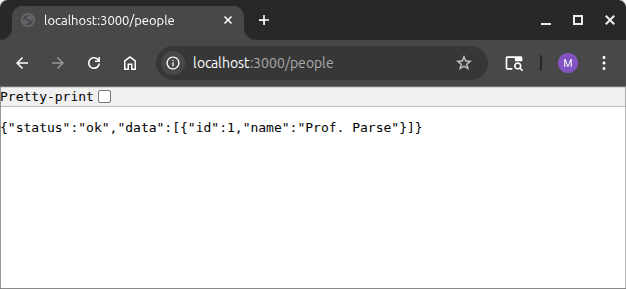
/, where you should see the error messageEndpoint GET / not found. That's expected, because you deleted the route for/. - Change the address to http://localhost:3000/people. You should not be asked to log in again, and you should see something like this:
Now it's time to explore how cookies work. Open the "developer console" in your web browser (pressing F12 usually does this in Chrome and Firefox) and type document.cookie. You should see something like this. Note that the order of key-value pairs is not important, and some of your values will be different:
text
'auth.gId=111044916034782695562; auth.email=mfs409@lehigh.edu; auth.name=TWljaGFlbCBTcGVhcg==; auth.id=1; auth.key=MubUx0dYdU6ahZV5u2hNx'If you try to access your backend by typing curl http://localhost:3000/people, you'll get the response Redirected. You've locked out anyone who isn't logged in! Try it again, this time with verbose output: curl --verbose http://localhost:3000/people. Among other things, you'll see that your CLIENT_ID is definitely not being kept secret! Finally, try running curl but providing the cookies via the -b flag. This should successfully get the data from the server, as if curl had done an OAuth-based login:
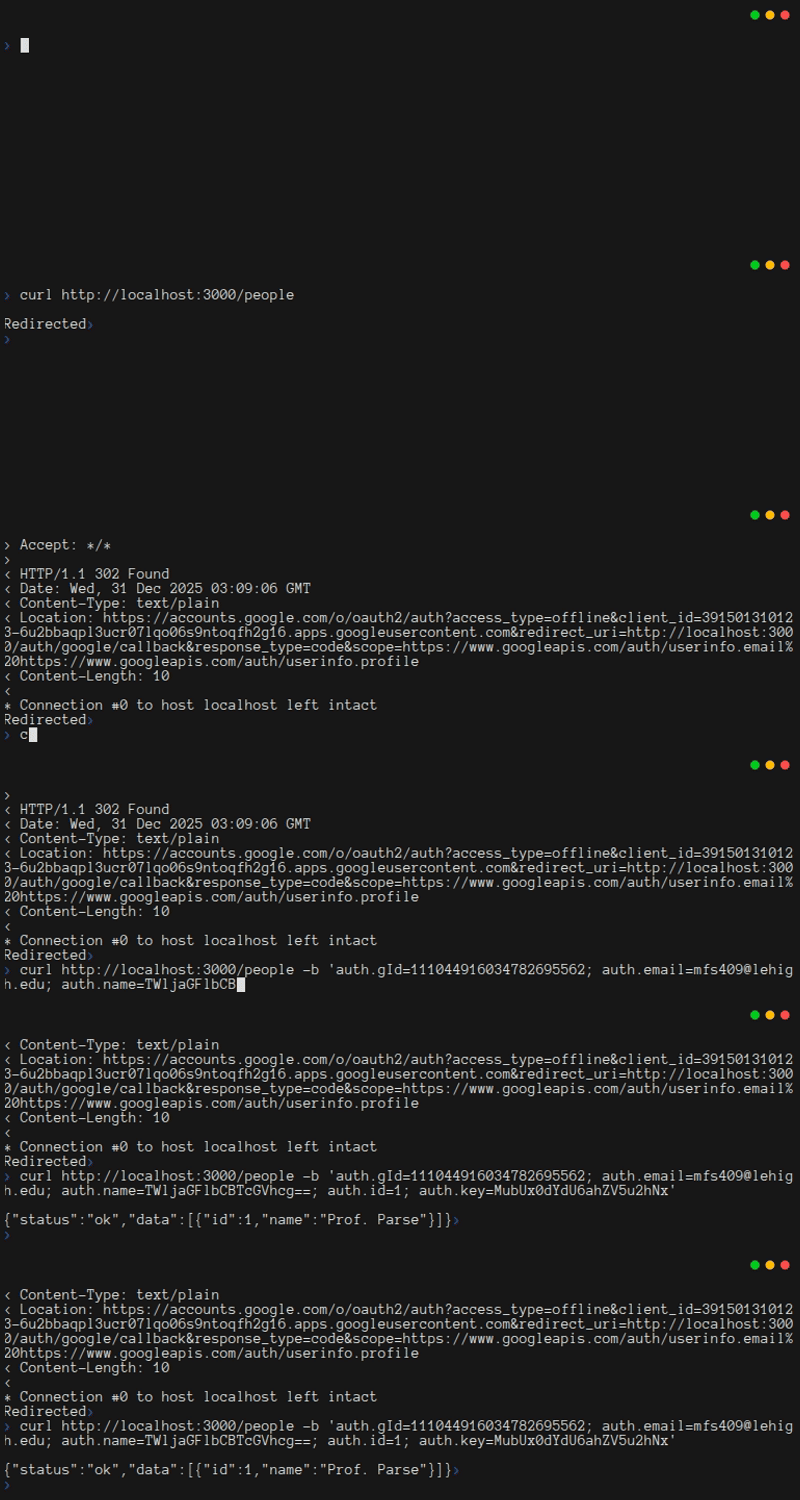
At this point, you should look through the code, and figure out which cookies are essential for authentication. Try changing one cookie or another in the curl command, until you know which matter the most. Note that the "non-essential" cookies will still be important for the user experience in your frontend.
2.9. Protecting Data From Authorized Users
Now it's time to implement some access controls within the application itself. Broadly, this step relates to IAM. The key idea here is that it's not enough to make sure that the system is only accessible to logged-in users. You also need to make sure that logged-in users can't do things that are inappropriate. For example, a user should be able to change their own display name, but they should not be able to change another user's display name. And as before, you need to remember that you cannot trust the frontend to provide this protection. A valid user who extracts their cookie from the browser and then uses curl must not be able to use the fact that they are authorized as a back-door that lets them impersonate another valid user.
The good news is that the objects in Session storage do not change. If a user is logged in, you know it because their auth.gId maps to an object whose key matches their auth.key. When you first put an object into the session storage, you also set a few other fields that will never change. Thus at any time, you can use auth.gId to do a lookup in Session, get back an object, and even if the auth.id says otherwise, that object's id will be the true id of the user.
To explore this idea of authorization, follow these steps to enable a person to change their name, and to view any person's name. First, add the names of two new routes to App.java.
java
// Get all details for a specific person
app.get("/people/{id}", ctx -> Routes.readPersonOne(ctx, db, gson));
// Update the current user's name
app.put("/people", ctx -> Routes.updatePerson(ctx, db, gson, sessions));
Next, implement the routes in Routes.java. Notice how predictable this code is, even though you haven't written the database code yet. By sticking to common patterns, your code will be repetitive, but easy to maintain.
java
/**
 * Get all data for one person, return it as JSON
 *
 * @param ctx  The HTTP context, with cookies, querystring, etc
 * @param db   The database
 * @param gson A thread-safe object for converting to/from JSON
 */
public static void readPersonOne(Context ctx, Database db, Gson gson) {
    ctx.status(200);
    ctx.contentType(ContentType.APPLICATION_JSON);
    try {
        var data = db.getOnePerson(Integer.parseInt(ctx.pathParam("id")));
        if (data == null)
            throw new Exception("No data found");
        ctx.result(gson.toJson(new StructuredResponse("ok", null, data)));
    } catch (Exception e) {
        ctx.result(gson.toJson(new StructuredResponse("error", e.getMessage(), null)));
    }
}

/**
 * Update the name for the current user
 *
 * @param ctx      The HTTP context, with cookies, querystring, etc
 * @param db       The database
 * @param gson     A thread-safe object for converting to/from JSON
 * @param sessions The session store
 */
public static void updatePerson(Context ctx, Database db, Gson gson, Sessions sessions) {
    ctx.status(200);
    ctx.contentType(ContentType.APPLICATION_JSON);
    try {
        var req = gson.fromJson(ctx.body(), Database.NameChangeRequest.class);
        db.updatePersonName(sessions.get(ctx.cookie("auth.gId")).id(), req);
        ctx.result(gson.toJson(new StructuredResponse("ok", null, null)));
    } catch (Exception e) {
        ctx.result(gson.toJson(new StructuredResponse("error", e.getMessage(), null)));
    }
}
Finally, update Database.java to create the database operations. Notice that this code adds a validate() method to the record. The record holds data provided by the user, not by the database, and your code should not trust the frontend. Thus you'll need to make sure the input is legitimate before you use it. Wrapping that logic in validate() makes it easy to write the code once, and use it any time you need it, without cluttering the updatePersonName code.
java
/**
 * Get all data for a single person
 *
 * @param id The Id of the person to get
 *
 * @return a Person object representing the data that was retrieved from the
 *         database, or null if no person was found
 *
 * @throws SQLException on any error
 */
public synchronized Person getOnePerson(int id) throws SQLException {
    try (var stmt = conn.prepareStatement("SELECT * FROM tblPerson WHERE id = ?;")) {
        stmt.setInt(1, id);
        try (var rs = stmt.executeQuery()) {
            if (rs.next()) {
                return new Person(rs.getInt("id"), rs.getString("email"), rs.getString("name"));
            }
            return null;
        }
    }
}

/**
 * NameChangeRequest is a Java object containing the contents of a request to
 * change a person's name
 */
public static record NameChangeRequest(String name) {
    /**
     * Verify that the name matches some basic length requirements
     */
    void validate() {
        if (name == null || name.length() < 1 || name.length() > 50)
            throw new RuntimeException("Invalid name");
    }
}

/**
 * Update a person's name
 *
 * @param req The request, as a NameChangeRequest
 *
 * @throws SQLException     If the person cannot be updated
 * @throws RuntimeException If the provided data is invalid
 */
public synchronized void updatePersonName(int id, NameChangeRequest req) throws SQLException, RuntimeException {
    req.validate();
    try (var stmt = conn.prepareStatement("UPDATE tblPerson SET name = ? WHERE id = ?;")) {
        stmt.setString(1, req.name);
        stmt.setInt(2, id);
        stmt.executeUpdate();
    }
}
At this point, you should stop your server, recompile it (mvn package), and then use your script to re-start it (or otherwise set environment variables and launch manually). On any restart, you'll need to log in again (i.e. get a new auth.gId). Then use curl to interact with these routes (changing the argument to -b appropriately):
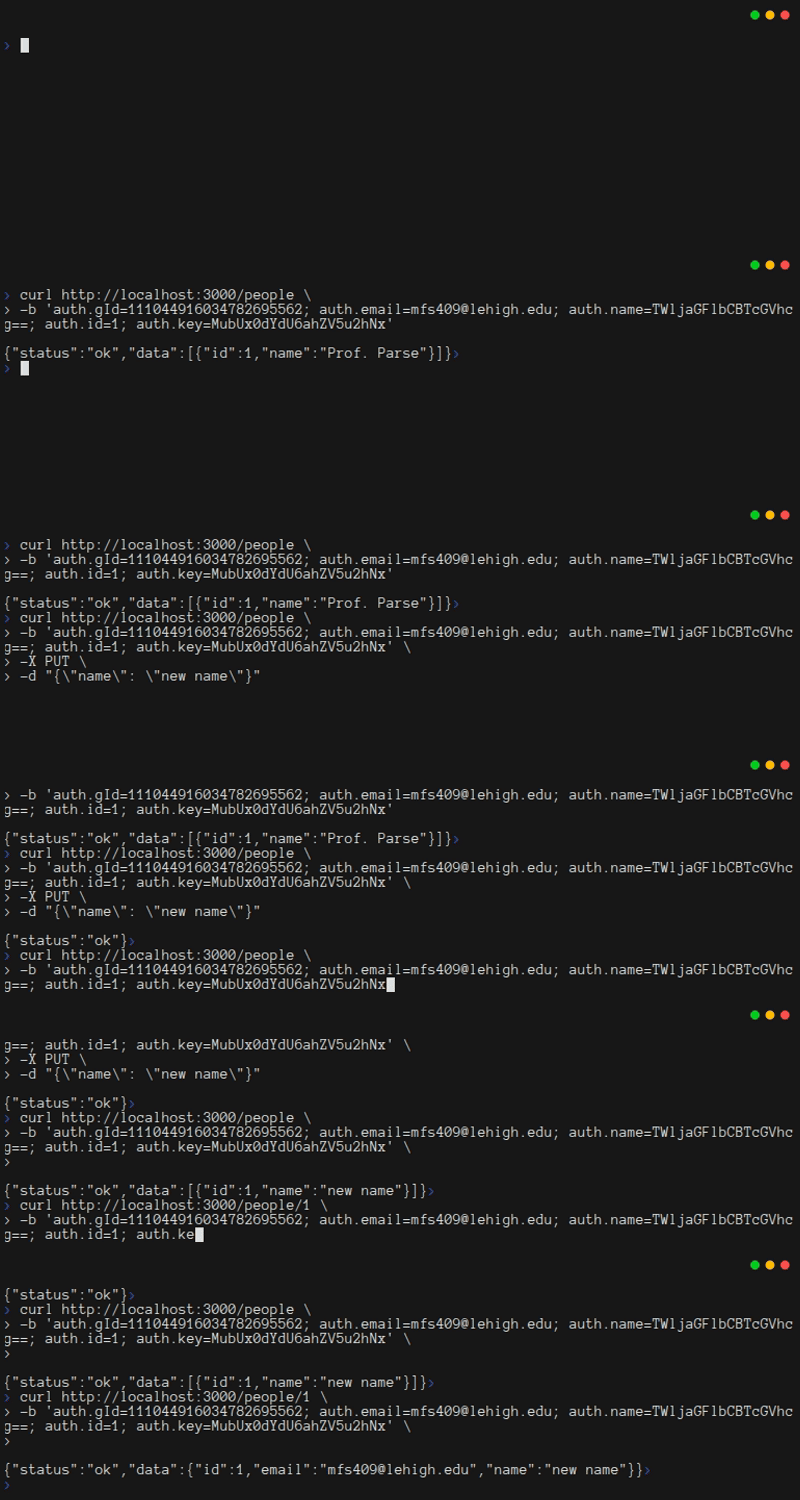
Your ids and values will change based on your login information and prior interactions with your database. Be sure you do a GET on the /people route with the id that matches the auth.id you logged in with (i.e. curl http://localhost:3000/people/YOUR_ID_HERE)!
2.10. CRUD Operations For Messages
Though it may not seem like it, your server is almost done. Now that authentication is in place, and you have a way of interacting with the database, all that remains is to wire up a few more routes for performing CRUD operations on tblMessages. The changes you make at this point should feel familiar. By following a pattern as you add features, it becomes much easier to understand your code, even as the number of lines increases quickly.
To begin add four new records and five new methods to Database.java. Two of the records will let your code return versions of a message appropriate for when you want to show the details or just a summary. The other two will hold input from the client. Of course, those two will require validate methods. In addition, the insertMessage method now passes an extra parameter when constructing the statement. Then it can use getGeneratedKeys() to get the id of the row that was created.
java
/**
 * NewMessageRequest is a java object containing the contents of a request
 * to create a new Message
 */
public static record NewMessageRequest(String subject, String details) {
    /**
     * Verify that the message subject and body meet some basic requirements
     * about length
     */
    void validate() {
        if (subject == null || subject.length() < 1 || subject.length() > 50)
            throw new RuntimeException("Invalid subject");
        if (details == null || details.length() < 1 || details.length() > 500)
            throw new RuntimeException("Invalid details");
    }
}

/**
 * Create a new message
 *
 * @param req The request, as a NewMessageRequest
 *
 * @throws SQLException     If the message cannot be created
 * @throws RuntimeException If the provided data is invalid
 */
public synchronized long insertMessage(NewMessageRequest req, int creatorId) throws SQLException, RuntimeException {
    req.validate();
    try (
            var stmt = conn.prepareStatement("""
                    INSERT INTO tblMessage
                        (subject, details, as_of, creatorId)
                    VALUES (?, ?, ?, ?);
                    """,
                    PreparedStatement.RETURN_GENERATED_KEYS)) {
        stmt.setString(1, req.subject);
        stmt.setString(2, req.details);
        stmt.setDate(3, new java.sql.Date(new java.util.Date().getTime()));
        stmt.setInt(4, creatorId);
        stmt.executeUpdate();
        try (var rs = stmt.getGeneratedKeys()) {
            if (rs.next()) {
                return rs.getLong(1);
            }
        }
    }
    return -1;
}

/**
 * MessageShort is a Java object with just the data we want to return when
 * getting a list of all messages
 */
public static record MessageShort(int id, String subject, Date as_of) {
}

/**
 * Get a list of all messages in the database
 *
 * @return a List with zero or more MessageShort objects
 *
 * @throws SQLException on any error
 */
public synchronized List<MessageShort> getAllMessage() throws SQLException {
    var results = new ArrayList<MessageShort>();
    try (var ps = conn.prepareStatement("SELECT * FROM viewMessage ORDER BY as_of DESC;");
            var rs = ps.executeQuery()) {
        while (rs.next()) {
            results.add(new MessageShort(rs.getInt("id"), rs.getString("subject"), rs.getDate("as_of")));
        }
        return results;
    }
}

/** Message is a Java object with all the data from a row of tblMessage */
public static record Message(int id, String subject, String details, Date as_of, int creatorId, String email,
        String name) {
}

/**
 * Get all data for a single message
 *
 * @param id The Id of the message to get
 *
 * @return a Message object representing the data that was retrieved from
 *         the database, or null if no message was found
 *
 * @throws SQLException on any error
 */
public synchronized Message getOneMessage(int id) throws SQLException {
    try (var stmt = conn.prepareStatement("SELECT * FROM viewMessage WHERE id = ?;")) {
        stmt.setInt(1, id);
        try (var rs = stmt.executeQuery()) {
            if (rs.next()) {
                return new Message(rs.getInt("id"), rs.getString("subject"), rs.getString("details"),
                        rs.getDate("as_of"), rs.getInt("creatorId"), rs.getString("email"), rs.getString("name"));
            }
        }
        return null;
    }
}

/**
 * UpdateMessageRequest is a java object containing the contents of a request
 * to update a Message
 */
public static record UpdateMessageRequest(String details) {
    /**
     * Verify that the message body meets some basic legth requirements
     *
     * NB: We don't have an easy way to validate that creatorId is valid, so
     * we will count on SQL to get that right
     */
    void validate() {
        if (details == null || details.length() < 1 || details.length() > 500)
            throw new RuntimeException("Invalid details");
    }
}

/**
 * Update a message in the database
 *
 * @param req The request, as an UpdateMessageRequest
 *
 * @throws SQLException     If the message cannot be updated
 * @throws RuntimeException If the provided data is invalid
 */
public synchronized void updateMessage(int id, UpdateMessageRequest req, int creatorId)
        throws SQLException, RuntimeException {
    req.validate();
    try (var stmt = conn.prepareStatement("""
            UPDATE tblMessage
            SET
              details = ?,
              as_of = ?
            WHERE
              id = ? AND
              creatorId = ?;
            """);) {
        stmt.setString(1, req.details);
        stmt.setDate(2, new java.sql.Date(new java.util.Date().getTime()));
        stmt.setInt(3, id);
        stmt.setInt(4, creatorId);
        stmt.executeUpdate();
    }
}

/**
 * Delete a message
 *
 * @param id        The Id of the message to delete
 * @param creatorId The creatorId, so we can ensure the user is allowed to
 *                  delete
 *
 * @throws SQLException If the message cannot be deleted
 */
public synchronized void deleteMessage(int id, int creatorId) throws SQLException {
    try (var stmt = conn.prepareStatement("DELETE FROM tblMessage WHERE id = ? and creatorId = ?");) {
        stmt.setInt(1, id);
        stmt.setInt(2, creatorId);
        stmt.executeUpdate();
    }
}
Note: you might need to add these imports:
java
import java.sql.Date;
import java.sql.PreparedStatement;
Next, update Routes.java with five new methods that perform access management before calling your Database methods. In this code, you'll notice that the user is not providing their id from tblPerson. The code is also not accessing tblPerson to get that id, and it is not trusting the cookie. Instead, it is using the Sessions object to get the id, using the only piece of the cookie that can be trusted: the Google Id (gId).
You should also pay attention to how this code works with Database.java to handle access management. Consider updating a message: First, Routes.updateMessage passes the client's id to Database.updateMessage as the creatorId. Then Database.updateMessage uses that creatorId in the SQL statement. If the user tries to update a message they didn't create, the database will produce an error, because there is a mismatch: the row id and the creatorId must both match.
java
/**
 * Create a new message
 *
 * @param ctx      The HTTP context, with cookies, querystring, etc
 * @param db       The database
 * @param gson     A thread-safe object for converting to/from JSON
 * @param sessions The session store
 */
public static void createMessage(Context ctx, Database db, Gson gson, Sessions sessions) {
    ctx.status(200); // status 200 OK
    ctx.contentType(ContentType.APPLICATION_JSON); // MIME type of JSON
    try {
        var req = gson.fromJson(ctx.body(), Database.NewMessageRequest.class);
        long id = db.insertMessage(req, sessions.get(ctx.cookie("auth.gId")).id());
        if (id == -1)
            throw new Exception("Error inserting");
        ctx.result(gson.toJson(new StructuredResponse("ok", null, "" + id)));
    } catch (Exception e) {
        ctx.result(gson.toJson(new StructuredResponse("error", e.getMessage(), null)));
    }
}

/**
 * Get a summary of all the messages
 *
 * @param ctx  The HTTP context, with cookies, querystring, etc
 * @param db   The database
 * @param gson A thread-safe object for converting to/from JSON
 */
public static void readMessageAll(Context ctx, Database db, Gson gson) {
    ctx.status(200);
    ctx.contentType(ContentType.APPLICATION_JSON); // MIME type of JSON
    try {
        ctx.result(gson.toJson(new StructuredResponse("ok", null, db.getAllMessage())));
    } catch (Exception e) {
        ctx.result(gson.toJson(new StructuredResponse("error", e.getMessage(), null)));
    }
}

/**
 * Get everything about a single message
 *
 * @param ctx  The HTTP context, with cookies, querystring, etc
 * @param db   The database
 * @param gson A thread-safe object for converting to/from JSON
 */
public static void readMessageOne(Context ctx, Database db, Gson gson) {
    ctx.status(200);
    ctx.contentType(ContentType.APPLICATION_JSON);
    try {
        var data = db.getOneMessage(Integer.parseInt(ctx.pathParam("id")));
        if (data == null)
            throw new Exception("No data found");
        ctx.result(gson.toJson(new StructuredResponse("ok", null, data)));
    } catch (Exception e) {
        ctx.result(gson.toJson(new StructuredResponse("error", e.getMessage(), null)));
    }
}

/**
 * Update the details (and date) for a message, but only if the current user
 * created it
 *
 * @param ctx      The HTTP context, with cookies, querystring, etc
 * @param db       The database
 * @param gson     A thread-safe object for converting to/from JSON
 * @param sessions The session store
 */
public static void updateMessage(Context ctx, Database db, Gson gson, Sessions sessions) {
    ctx.status(200);
    ctx.contentType(ContentType.APPLICATION_JSON);
    try {
        var req = gson.fromJson(ctx.body(), Database.UpdateMessageRequest.class);
        db.updateMessage(Integer.parseInt(ctx.pathParam("id")), req, sessions.get(ctx.cookie("auth.gId")).id());
        ctx.result(gson.toJson(new StructuredResponse("ok", null, null)));
    } catch (Exception e) {
        ctx.result(gson.toJson(new StructuredResponse("error", e.getMessage(), null)));
    }
}

/**
 * Delete a message, but only if the current user created it
 *
 * @param ctx      The HTTP context, with cookies, querystring, etc
 * @param db       The database
 * @param gson     A thread-safe object for converting to/from JSON
 * @param sessions The session store
 */
public static void deleteMessage(Context ctx, Database db, Gson gson, Sessions sessions) {
    ctx.status(200);
    ctx.contentType(ContentType.APPLICATION_JSON);
    try {
        db.deleteMessage(Integer.parseInt(ctx.pathParam("id")), sessions.get(ctx.cookie("auth.gId")).id());
        ctx.result(gson.toJson(new StructuredResponse("ok", null, null)));
    } catch (Exception e) {
        ctx.result(gson.toJson(new StructuredResponse("error", e.getMessage(), null)));
    }
}
Finally, add the needed routes to App.java. In these routes, notice how {id} serves as a wildcard. Specifying the parameter in the route like this makes it available in Routes.java through ctx.paramPath("id").
java
// Create a message
app.post("/messages", ctx -> Routes.createMessage(ctx, db, gson, sessions));
// Get a list of all the messages in the system
app.get("/messages", ctx -> Routes.readMessageAll(ctx, db, gson));
// Get all details for a specific message
app.get("/messages/{id}", ctx -> Routes.readMessageOne(ctx, db, gson));
// Update a message's fields
app.put("/messages/{id}", ctx -> Routes.updateMessage(ctx, db, gson, sessions));
// Delete a message
app.delete("/messages/{id}", ctx -> Routes.deleteMessage(ctx, db, gson, sessions));
At this point, you should run mvn package and then re-start your server. Then log in through your browser and get your the new cookie. Once you have it, try to perform malicious deletions and updates using curl. Try changing the id in the cookie. Try sending a DELETE for a message that the logged-in user did not create. In all cases, you should find that your backend prevents the bad behavior, without crashing.
2.11. Finishing Up
At this point, it would be a good idea to commit your work to your git repository. You also should be thinking about how to write unit tests for your routes. Based on how the code is organized, it shouldn't be too hard to test the database. To test the routes separately, you'll need to mock the database. In addition, since you know how to provide cookie data to curl, it should be possible to test the code in App.java, too.
You should take a moment to think about the code in this tutorial. It has comments at the top of every method, and in any place where the logic isn't obvious. That's not because it's a tutorial. You should always comment your code well. Keep in mind that on any real project, new people could join the team at any time. You want the code to explain itself to them. In addition, you are probably noticing that the functions are all staying pretty short. Doing that makes your code easier to extend, and easier to verify with unit tests.
Before moving to the next tutorial, it's useful to reflect on one final point. You are going to learn how to make a web front-end that looks nice. When a well-behaved user interacts with that front-end, it should be impossible to send invalid messages to the server. But that's not enough security. You saw that with curl, you could easily send messages to the server without a front-end. The server needed to protect itself, and not merely trust the front-end. It did not take a lot of code to get this protection, but you needed to think about protecting every route, from App.java all the way through to the database. This was a lot easier since your code followed a pattern: authenticate, transform JSON request to a record, validate the record, and then use Java or SQL constraints to ensure the request does not touch data that it should not touch.
Imagine if you hadn't implemented security right away. How hard would it be to retrofit security after you've added 10 more tables and 50 more routes? How much code would you need to rewrite? As you move through these tutorials, please do not forget that security cannot be an afterthought!
2.12. Getting Ready For Chapter 3
Before you move on to Chapter 3, you should make sure the code in your backend folder matches the code below:
xml
<?xml version="1.0" encoding="UTF-8"?>
<project xmlns="http://maven.apache.org/POM/4.0.0"
  xmlns:xsi="http://www.w3.org/2001/XMLSchema-instance"
  xsi:schemaLocation="http://maven.apache.org/POM/4.0.0 http://maven.apache.org/xsd/maven-4.0.0.xsd">
  <modelVersion>4.0.0</modelVersion>

  <groupId>quickstart.backend</groupId>
  <artifactId>backend</artifactId>
  <version>1.0-SNAPSHOT</version>

  <name>backend</name>
  <!-- FIXME change it to the project's website -->
  <url>http://www.example.com</url>

  <properties>
    <project.build.sourceEncoding>UTF-8</project.build.sourceEncoding>
    <maven.compiler.release>17</maven.compiler.release>
  </properties>

  <dependencyManagement>
    <dependencies>
      <dependency>
        <groupId>org.junit</groupId>
        <artifactId>junit-bom</artifactId>
        <version>5.11.0</version>
        <type>pom</type>
        <scope>import</scope>
      </dependency>
    </dependencies>
  </dependencyManagement>

  <dependencies>
    <dependency>
      <groupId>org.junit.jupiter</groupId>
      <artifactId>junit-jupiter-api</artifactId>
      <scope>test</scope>
    </dependency>
    <!-- Optionally: parameterized tests support -->
    <dependency>
      <groupId>org.junit.jupiter</groupId>
      <artifactId>junit-jupiter-params</artifactId>
      <scope>test</scope>
    </dependency>
    <dependency>
      <groupId>io.javalin</groupId>
      <artifactId>javalin</artifactId>
      <version>6.7.0</version>
    </dependency>
    <dependency>
      <groupId>org.slf4j</groupId>
      <artifactId>slf4j-simple</artifactId>
      <version>2.0.16</version>
    </dependency>
    <dependency>
      <groupId>org.xerial</groupId>
      <artifactId>sqlite-jdbc</artifactId>
      <version>3.49.1.0</version>
    </dependency>
    <dependency>
      <groupId>com.google.code.gson</groupId>
      <artifactId>gson</artifactId>
      <version>2.11.0</version>
    </dependency>
    <dependency>
      <groupId>org.apache.commons</groupId>
      <artifactId>commons-crypto</artifactId>
      <version>1.2.0</version>
    </dependency>
    <dependency>
      <groupId>com.google.api-client</groupId>
      <artifactId>google-api-client</artifactId>
      <version>2.0.0</version>
    </dependency>
    <dependency>
      <groupId>com.google.oauth-client</groupId>
      <artifactId>google-oauth-client-jetty</artifactId>
      <version>1.34.1</version>
    </dependency>
    <dependency>
      <groupId>com.google.apis</groupId>
      <artifactId>google-api-services-people</artifactId>
      <version>v1-rev20220531-2.0.0</version>
    </dependency>
  </dependencies>

  <build>
    <pluginManagement><!-- lock down plugins versions to avoid using Maven defaults (may be moved to
      parent pom) -->
      <plugins>
        <!-- clean lifecycle, see
        https://maven.apache.org/ref/current/maven-core/lifecycles.html#clean_Lifecycle -->
        <plugin>
          <artifactId>maven-clean-plugin</artifactId>
          <version>3.4.0</version>
        </plugin>
        <!-- default lifecycle, jar packaging: see
        https://maven.apache.org/ref/current/maven-core/default-bindings.html#Plugin_bindings_for_jar_packaging -->
        <plugin>
          <artifactId>maven-resources-plugin</artifactId>
          <version>3.3.1</version>
        </plugin>
        <plugin>
          <artifactId>maven-compiler-plugin</artifactId>
          <version>3.13.0</version>
        </plugin>
        <plugin>
          <artifactId>maven-surefire-plugin</artifactId>
          <version>3.3.0</version>
        </plugin>
        <plugin>
          <artifactId>maven-jar-plugin</artifactId>
          <version>3.4.2</version>
        </plugin>
        <plugin>
          <artifactId>maven-install-plugin</artifactId>
          <version>3.1.2</version>
        </plugin>
        <plugin>
          <artifactId>maven-deploy-plugin</artifactId>
          <version>3.1.2</version>
        </plugin>
        <!-- site lifecycle, see
        https://maven.apache.org/ref/current/maven-core/lifecycles.html#site_Lifecycle -->
        <plugin>
          <artifactId>maven-site-plugin</artifactId>
          <version>3.12.1</version>
        </plugin>
        <plugin>
          <artifactId>maven-project-info-reports-plugin</artifactId>
          <version>3.6.1</version>
        </plugin>
      </plugins>
    </pluginManagement>
    <plugins>
      <plugin>
        <artifactId>maven-assembly-plugin</artifactId>
        <executions>
          <execution>
            <phase>package</phase>
            <goals>
              <goal>single</goal>
            </goals>
          </execution>
        </executions>
        <configuration>
          <descriptorRefs>
            <descriptorRef>jar-with-dependencies</descriptorRef>
          </descriptorRefs>
          <appendAssemblyId>false</appendAssemblyId>
          <finalName>backend-1.0</finalName>
          <archive>
            <manifest>
              <mainClass>quickstart.backend.App</mainClass>
            </manifest>
          </archive>
        </configuration>
      </plugin>
    </plugins>
  </build>
</project>
java
package quickstart.backend;

import io.javalin.Javalin;
import java.sql.SQLException;

import com.google.gson.*;

/** A backend built with the Javalin framework */
public class App {
    public static void main(String[] args) {
        // get the port on which to listen. If this crashes the program, that's
        // fine... it means "configuration error".
        int port = Integer.parseInt(System.getenv("PORT"));
        String dbFile = System.getenv("DB_FILE");
        String clientId = System.getenv("CLIENT_ID");
        String clientSecret = System.getenv("CLIENT_SECRET");
        String serverName = System.getenv("SERVER_NAME");

        System.out.println("-".repeat(45));
        System.out.println("Using the following environment variables:");
        System.out.println("  PORT=" + port);
        System.out.println("  DB_FILE=" + dbFile);
        System.out.println("  CLIENT_ID=" + clientId);
        // Warning: you probably don't want to put the secret into the logs!
        System.out.printf("  CLIENT_SECRET=%s%s%n", "*".repeat(clientSecret.length() - 5),
                clientSecret.substring(clientSecret.length() - 5, clientSecret.length()));
        System.out.println("  SERVER_NAME=" + serverName);
        System.out.println("-".repeat(45));

        // Do some quick validation to ensure the port is in range
        if (dbFile == null || serverName == null ||
                clientId == null || clientSecret == null ||
                port < 80 || port > 65535) {
            System.err.println("Error in environment configuration");
            return;
        }

        // Create the database interface and Gson object. We do this before
        // setting up the server, because failures will be fatal
        Database db;
        try {
            db = new Database(dbFile);
        } catch (SQLException e) {
            e.printStackTrace();
            return;
        }
        // gson lets us easily turn objects into JSON
        // This date format works nicely with SQLite and PostgreSQL
        Gson gson = new GsonBuilder().setDateFormat("yyyy-MM-dd'T'HH:mm:ss.SSS'Z'").create();

        // Create the web server. This doesn't start it yet!
        var app = Javalin.create(config -> {
            // Attach a logger
            config.requestLogger.http((ctx, ms) -> {
                System.out.println("=".repeat(80));
                System.out.printf("%-6s%-8s%-25s%s%n", ctx.scheme(), ctx.method().name(), ctx.path(),
                        ctx.fullUrl());
                if (ctx.queryString() != null)
                    System.out.printf("query string:%s%n", ctx.queryString());
                if (ctx.body().length() > 0)
                    System.out.printf("request body:%s%n", ctx.body());
            });
        });

        // NB: `Sessions` makes the back end stateful. This should get migrated
        // to a separate component, such as a memcache, so that it's possible to
        // scale out the backend to multiple servers without users getting
        // accidental logouts.
        var sessions = new Sessions();
        var gOAuth = new GoogleOAuth(serverName, port, clientId, clientSecret, Routes.RT_AUTH_GOOGLE_CALLBACK);

        // Every interaction with the server requires the user to be
        // authenticated
        app.before(ctx -> {
            // To avoid an infinite loop, we don't cry havoc if the user is in
            // the middle of an auth flow
            if (ctx.url().equals(gOAuth.redirectUri)) {
                System.out.println(">>>>>>> SETTING UP A NEW SESSION, at " + gOAuth.redirectUri);
                return;
            }
            String gId = ctx.cookie("auth.gId");
            String key = ctx.cookie("auth.key");
            // We also don't cry havoc if the user is logged in
            if (sessions.checkValid(gId, key)) {
                return;
            }
            System.out.println(">>>>>>> INVALID SESSION, redirecting to " + gOAuth.newAuthUrl);
            ctx.redirect(gOAuth.newAuthUrl);
        });

        // All routes go here
        // Handle Google oauth by extracting the "code" and authenticating it,
        // then redirecting
        app.get(Routes.RT_AUTH_GOOGLE_CALLBACK,
                ctx -> Routes.authCallback(ctx, db, gson, sessions, gOAuth));
        // Log out
        app.get("/logout", ctx -> Routes.authLogout(ctx, gson, sessions));
        // Get a list of all the people in the system
        app.get("/people", ctx -> Routes.readPersonAll(ctx, db, gson));
        // Get all details for a specific person
        app.get("/people/{id}", ctx -> Routes.readPersonOne(ctx, db, gson));
        // Update the current user's name
        app.put("/people", ctx -> Routes.updatePerson(ctx, db, gson, sessions));
        // Create a message
        app.post("/messages", ctx -> Routes.createMessage(ctx, db, gson, sessions));
        // Get a list of all the messages in the system
        app.get("/messages", ctx -> Routes.readMessageAll(ctx, db, gson));
        // Get all details for a specific message
        app.get("/messages/{id}", ctx -> Routes.readMessageOne(ctx, db, gson));
        // Update a message's fields
        app.put("/messages/{id}", ctx -> Routes.updateMessage(ctx, db, gson, sessions));
        // Delete a message
        app.delete("/messages/{id}", ctx -> Routes.deleteMessage(ctx, db, gson, sessions));

        // The only way to stop the server is by pressing ctrl-c. At that point,
        // the server should try to clean up as best it can.
        Runtime.getRuntime().addShutdownHook(new Thread(() -> {
            // Try to shut down Javalin before the database, because the
            // database shouldn't shut down until it's 100% certain that no more
            // requests will be sent to it.
            try {
                System.out.println("Shutting down Javalin...");
                app.stop(); // Stops the Javalin instance gracefully
            } catch (Exception e) {
                e.printStackTrace();
            }
            // If Javalin didn't shut down nicely, and the Database shuts down,
            // then some Javalin threads might crash when they try to use a null
            // connection. Javalin shutdown failures are highly unlikely, and
            // almost impossible to solve, so once a Javalin shutdown has been
            // attempted, go ahead and try to shut down the database.
            try {
                System.out.println("Shutting down Database...");
                db.close();
                System.out.println("Done");
            } catch (Exception e) {
                // Database shutdown failures are almost impossible to solve,
                // too, so if this happens, the best thing to do is print a
                // message and return.
                e.printStackTrace();
            }
        }));

        // This next line launches the server, so it can start receiving
        // requests. Note that main will return, but the server keeps running.
        app.start(port);
    }
}
java
package quickstart.backend;

import java.io.IOException;
import java.util.ArrayList;
import java.util.Arrays;

import com.google.api.client.googleapis.auth.oauth2.GoogleAuthorizationCodeFlow;
import com.google.api.client.http.javanet.NetHttpTransport;
import com.google.api.client.json.gson.GsonFactory;
import com.google.api.services.people.v1.PeopleService;

/** All of the logic for interacting with Google OAuth. */
public class GoogleOAuth {
    /**
     * URI google redirects to after login event, equal to 'serverName + ":" + port
     * + "/auth/google/callback"'
     */
    public final String redirectUri;

    /** URL to redirect a user to when authenticating them for the first time */
    public final String newAuthUrl;

    /** used by the PeopleService builder */
    public static final String APPLICATION_NAME = "CSE216 Tutorials";

    /** The object used for sending HTTP requests to Google */
    private NetHttpTransport httpTransport;

    /** The flow object for managing credentials */
    private GoogleAuthorizationCodeFlow flow;

    /**
     * Utility class for performing google oauth operations.
     * This sets up Google OAuth so we can get users email and profile data. It also
     * creates the URI where google returns after an auth, the redirectUri, as well
     * as the URI to redirect a user to to log them in, the newAuthUrl.
     *
     * @param serverName           the host on which this is running, e.g.
     *                             'http://localhost'
     * @param port                 the port on which the webserver is running, e.g.
     *                             3000
     * @param clientId             the web client id from
     *                             https://console.cloud.google.com/
     * @param clientSecret         the secret associated with clientId
     * @param authCallbackEndpoint the callback endpoint used by google after signin
     *                             event, e.g. '/auth/google/callback'
     */
    public GoogleOAuth(String serverName, int port, String clientId, String clientSecret, String authCallbackEndpoint) {
        var gApis = new ArrayList<String>(Arrays.asList(
                "https://www.googleapis.com/auth/userinfo.email",
                "https://www.googleapis.com/auth/userinfo.profile"));
        if (serverName.toLowerCase().endsWith("dokku.cse.lehigh.edu"))
            this.redirectUri = serverName + authCallbackEndpoint;
        else // only specify the port when the host isn't dokku.cse.lehigh.edu
            this.redirectUri = serverName + ":" + port + authCallbackEndpoint;
        this.httpTransport = new NetHttpTransport();
        this.flow = new GoogleAuthorizationCodeFlow.Builder(httpTransport, GsonFactory.getDefaultInstance(), clientId,
                clientSecret, gApis)
                .setAccessType("offline").build();
        this.newAuthUrl = flow.newAuthorizationUrl().setRedirectUri(redirectUri).build();
        System.out.println("<".repeat(45));
        System.out.println("Using the following oauth information:");
        System.out.println("  redirectURI: " + redirectUri);
        System.out.println("  newAuthUrl: " + newAuthUrl);
        System.out.println(">".repeat(45));
    }

    /** An object holding the user's user information from Google */
    public static record OAuthProfile(String gId, String email, String name) {
    }

    /**
     * Use the People API to get a user's information from Google
     *
     * @param queryParamCode The data that Google returned after a successful OAuth
     *                       flow
     *
     * @return The user's information as an OAuthProfile object
     *
     * @throws IOException if there is an issue interacting with Google
     */
    public OAuthProfile getProfileInformation(String queryParamCode) throws IOException {
        // Use PeopleService to ask Google for the user's name and email
        var ps = new PeopleService.Builder(
                httpTransport,
                GsonFactory.getDefaultInstance(),
                flow.createAndStoreCredential(
                        flow.newTokenRequest(queryParamCode).setRedirectUri(redirectUri).execute(),
                        null))
                .setApplicationName(APPLICATION_NAME)
                .build();
        // Extract fields
        var profile = ps.people().get("people/me").setPersonFields("names,emailAddresses").execute();
        String email = profile.getEmailAddresses().get(0).getValue();
        String name = profile.getNames().get(0).getDisplayName();
        String gId = profile.getEmailAddresses().get(0).getMetadata().getSource().getId();
        return new OAuthProfile(gId, email, name);
    }
}
java
package quickstart.backend;

import io.javalin.http.ContentType;
import io.javalin.http.Context;

import com.google.gson.*;

import java.util.Base64;

/**
 * All of the routing logic for the app is stored in Routes, so that the code
 * will be easier to keep organized, and so that it will be easier to test.
 */
public class Routes {
    /** The path for the callback from Google OAuth */
    public static final String RT_AUTH_GOOGLE_CALLBACK = "/auth/google/callback";

    /**
     * The path to use when OAuth fails. There won't be a handler for this
     * route, which means that going to it will simply restart the OAuth flow.
     */
    public static final String RT_AUTHERROR = "/autherror";

    /**
     * StructuredResponse provides a common format for success and failure
     * messages, with an optional payload of type Object that can be converted
     * into JSON.
     *
     * @param status  for applications to determine if response indicates an
     *                error
     * @param message only useful when status indicates an error, or when data
     *                is null
     * @param data    any JSON-friendly object can be referenced here, so a
     *                client gets a rich reply
     */
    static record StructuredResponse(String status, String message, Object data) {
    }

    /**
     * Get a list of all people, return it as JSON in ctx.result
     *
     * @param ctx  The HTTP context, with cookies, querystring, etc
     * @param db   The database
     * @param gson A thread-safe object for converting to/from JSON
     */
    public static void readPersonAll(Context ctx, Database db, Gson gson) {
        ctx.status(200);
        ctx.contentType(ContentType.APPLICATION_JSON);
        try {
            ctx.result(gson.toJson(new StructuredResponse("ok", null, db.getAllPerson())));
        } catch (Exception e) {
            ctx.result(gson.toJson(new StructuredResponse("error", e.getMessage(), null)));
        }
    }

    /**
     * Handle a code returned from Google during OAuth flow
     *
     * @param ctx      The HTTP context, with cookies, querystring, etc
     * @param db       The database
     * @param gson     A thread-safe object for converting to/from JSON
     * @param sessions The session store
     * @param gOAuth   A fully configured GoogleOAuth object
     */
    public static void authCallback(Context ctx, Database db, Gson gson, Sessions sessions, GoogleOAuth gOAuth) {
        System.out.println(">>>>>>>>>>>>>> invoking authCallBack");
        ctx.status(200);
        ctx.contentType(ContentType.APPLICATION_JSON);
        try {
            GoogleOAuth.OAuthProfile profile = gOAuth.getProfileInformation(ctx.queryParam("code"));

            // Make sure they're in the database
            var user = db.getPersonByEmail(profile.email());
            if (user == null) {
                // NB: "/autherror" is not a valid path, but using it will
                // redirect to login
                ctx.redirect(Routes.RT_AUTHERROR);
                return;
            }

            // Set up a cookie with the user's important info, put the user in
            // the session store, and redirect to the home page
            var key = sessions.onLogin(profile.gId(), user.id(), profile.email(), profile.name());
            ctx.cookie("auth.gId", profile.gId());
            ctx.cookie("auth.key", key);
            ctx.cookie("auth.email", profile.email());
            ctx.cookie("auth.name", Base64.getEncoder().encodeToString(profile.name().getBytes()));
            ctx.cookie("auth.id", "" + user.id());
            ctx.redirect("/");
        } catch (Exception e) {
            System.out.println("Authentication Error" + e);
            // NB: This actually redirects to OAuth login screen
            ctx.redirect(Routes.RT_AUTHERROR);
        }
    }

    /**
     * Log out by dropping a user's entry in the sessions table, which makes
     * their cookie invalid
     *
     * @param ctx      The HTTP context, with cookies, querystring, etc
     * @param gson     A thread-safe object for converting to/from JSON
     * @param sessions The session store
     */
    public static void authLogout(Context ctx, Gson gson, Sessions sessions) {
        String gId = ctx.cookie("auth.gId");
        if (sessions.logOut(gId)) {
            ctx.result(gson.toJson("ok"));
        } else {
            ctx.result(gson.toJson("error logging out"));
        }
    }

    /**
     * Get all data for one person, return it as JSON
     *
     * @param ctx  The HTTP context, with cookies, querystring, etc
     * @param db   The database
     * @param gson A thread-safe object for converting to/from JSON
     */
    public static void readPersonOne(Context ctx, Database db, Gson gson) {
        ctx.status(200);
        ctx.contentType(ContentType.APPLICATION_JSON);
        try {
            var data = db.getOnePerson(Integer.parseInt(ctx.pathParam("id")));
            if (data == null)
                throw new Exception("No data found");
            ctx.result(gson.toJson(new StructuredResponse("ok", null, data)));
        } catch (Exception e) {
            ctx.result(gson.toJson(new StructuredResponse("error", e.getMessage(), null)));
        }
    }

    /**
     * Update the name for the current user
     *
     * @param ctx      The HTTP context, with cookies, querystring, etc
     * @param db       The database
     * @param gson     A thread-safe object for converting to/from JSON
     * @param sessions The session store
     */
    public static void updatePerson(Context ctx, Database db, Gson gson, Sessions sessions) {
        ctx.status(200);
        ctx.contentType(ContentType.APPLICATION_JSON);
        try {
            var req = gson.fromJson(ctx.body(), Database.NameChangeRequest.class);
            db.updatePersonName(sessions.get(ctx.cookie("auth.gId")).id(), req);
            ctx.result(gson.toJson(new StructuredResponse("ok", null, null)));
        } catch (Exception e) {
            ctx.result(gson.toJson(new StructuredResponse("error", e.getMessage(), null)));
        }
    }

    /**
     * Create a new message
     *
     * @param ctx      The HTTP context, with cookies, querystring, etc
     * @param db       The database
     * @param gson     A thread-safe object for converting to/from JSON
     * @param sessions The session store
     */
    public static void createMessage(Context ctx, Database db, Gson gson, Sessions sessions) {
        ctx.status(200); // status 200 OK
        ctx.contentType(ContentType.APPLICATION_JSON); // MIME type of JSON
        try {
            var req = gson.fromJson(ctx.body(), Database.NewMessageRequest.class);
            long id = db.insertMessage(req, sessions.get(ctx.cookie("auth.gId")).id());
            if (id == -1)
                throw new Exception("Error inserting");
            ctx.result(gson.toJson(new StructuredResponse("ok", null, "" + id)));
        } catch (Exception e) {
            ctx.result(gson.toJson(new StructuredResponse("error", e.getMessage(), null)));
        }
    }

    /**
     * Get a summary of all the messages
     *
     * @param ctx  The HTTP context, with cookies, querystring, etc
     * @param db   The database
     * @param gson A thread-safe object for converting to/from JSON
     */
    public static void readMessageAll(Context ctx, Database db, Gson gson) {
        ctx.status(200);
        ctx.contentType(ContentType.APPLICATION_JSON); // MIME type of JSON
        try {
            ctx.result(gson.toJson(new StructuredResponse("ok", null, db.getAllMessage())));
        } catch (Exception e) {
            ctx.result(gson.toJson(new StructuredResponse("error", e.getMessage(), null)));
        }
    }

    /**
     * Get everything about a single message
     *
     * @param ctx  The HTTP context, with cookies, querystring, etc
     * @param db   The database
     * @param gson A thread-safe object for converting to/from JSON
     */
    public static void readMessageOne(Context ctx, Database db, Gson gson) {
        ctx.status(200);
        ctx.contentType(ContentType.APPLICATION_JSON);
        try {
            var data = db.getOneMessage(Integer.parseInt(ctx.pathParam("id")));
            if (data == null)
                throw new Exception("No data found");
            ctx.result(gson.toJson(new StructuredResponse("ok", null, data)));
        } catch (Exception e) {
            ctx.result(gson.toJson(new StructuredResponse("error", e.getMessage(), null)));
        }
    }

    /**
     * Update the details (and date) for a message, but only if the current user
     * created it
     *
     * @param ctx      The HTTP context, with cookies, querystring, etc
     * @param db       The database
     * @param gson     A thread-safe object for converting to/from JSON
     * @param sessions The session store
     */
    public static void updateMessage(Context ctx, Database db, Gson gson, Sessions sessions) {
        ctx.status(200);
        ctx.contentType(ContentType.APPLICATION_JSON);
        try {
            var req = gson.fromJson(ctx.body(), Database.UpdateMessageRequest.class);
            db.updateMessage(Integer.parseInt(ctx.pathParam("id")), req, sessions.get(ctx.cookie("auth.gId")).id());
            ctx.result(gson.toJson(new StructuredResponse("ok", null, null)));
        } catch (Exception e) {
            ctx.result(gson.toJson(new StructuredResponse("error", e.getMessage(), null)));
        }
    }

    /**
     * Delete a message, but only if the current user created it
     *
     * @param ctx      The HTTP context, with cookies, querystring, etc
     * @param db       The database
     * @param gson     A thread-safe object for converting to/from JSON
     * @param sessions The session store
     */
    public static void deleteMessage(Context ctx, Database db, Gson gson, Sessions sessions) {
        ctx.status(200);
        ctx.contentType(ContentType.APPLICATION_JSON);
        try {
            db.deleteMessage(Integer.parseInt(ctx.pathParam("id")), sessions.get(ctx.cookie("auth.gId")).id());
            ctx.result(gson.toJson(new StructuredResponse("ok", null, null)));
        } catch (Exception e) {
            ctx.result(gson.toJson(new StructuredResponse("error", e.getMessage(), null)));
        }
    }
}
java
package quickstart.backend;

import java.util.concurrent.ConcurrentHashMap;
import java.security.SecureRandom;

/**
 * Create random strings using a cryptographically good RNG
 *
 * Details at:
 * https://stackoverflow.com/questions/41107/how-to-generate-a-random-alpha-numeric-string
 */
class RandStringCreator {
    /** Uppercase Characters */
    private static final String uppers = "ABCDEFGHIJKLMNOPQRSTUVWXYZ";

    /** Lowercase Characters */
    private static final String lowers = "abcdefghijklmnopqrstuvwxyz";

    /** Numerical Characters */
    private static final String nums = "0123456789";

    /** All Valid Characters */
    private static char[] chars = (uppers + lowers + nums).toCharArray();

    /** A random number generator */
    private final SecureRandom rng;

    /** Construct the generator by creating a secure RNG */
    RandStringCreator() {
        this.rng = new SecureRandom();
    }

    /** Create a session key by getting a 21-character random string */
    public String createSessionKey() {
        return getRandString(21);
    }

    /** Get a random string of the requested length (must be >0) */
    private synchronized String getRandString(int length) {
        if (length < 1)
            return null;
        char[] buf = new char[length];
        for (int idx = 0; idx < buf.length; ++idx)
            buf[idx] = chars[rng.nextInt(chars.length)];
        return new String(buf);
    }
}

/**
 * Session table entries contain the table's row Id, session key, email, and
 * display name
 */
record UserRecord(int id, String sessionKey, String emailAddress, String displayName) {
}

/** Sessions maintains a key/value store for tracking logged-in users */
public class Sessions {
    /** The ids and tokens for all active users */
    ConcurrentHashMap<String, UserRecord> activeSessions = new ConcurrentHashMap<String, UserRecord>();

    /** A random string generator for making session keys */
    RandStringCreator rsc = new RandStringCreator();

    /**
     * When a user successfully logs in via OAuth, we must create (or update) a
     * pair in mActiveSessions so that we can handle subsequent requests by the
     * user without needing to hit the database again.
     */
    String onLogin(String googleId, int id, String email, String name) {
        // Get a session key
        String sessionKey = rsc.createSessionKey();
        // pair the uid with this key... this invalidates all other logins by
        // this user
        activeSessions.put(googleId, new UserRecord(id, sessionKey, email, name));
        return sessionKey;
    }

    /**
     * Check if the provided uid/session pair corresponds to a valid active
     * login.
     */
    boolean checkValid(String id, String session) {
        if (id == null || session == null || session.equals(""))
            return false;
        var foundSession = activeSessions.get(id);
        return (foundSession != null) && foundSession.sessionKey().equals(session);
    }

    /** Return the whole packet of info for the user given by `id` */
    UserRecord get(String id) {
        return activeSessions.get(id);
    }

    /** Log a user out by removing its email/session mapping */
    boolean logOut(String mId) {
        return activeSessions.remove(mId) != null;
    }
}
java
package quickstart.backend;

import java.sql.Connection;
import java.sql.Date;
import java.sql.PreparedStatement;
import java.sql.DriverManager;
import java.sql.SQLException;
import java.util.ArrayList;
import java.util.List;

/**
 * Database has all our logic for connecting to and interacting with SQLite
 *
 * NB: Since the backend is concurrent, this class needs to be thread-safe,
 * achieved by making all methods "synchronized".
 */
public class Database implements AutoCloseable {
    // load the sqlite-JDBC driver using the current class loader
    static {
        try {
            Class.forName("org.sqlite.JDBC");
        } catch (java.lang.ClassNotFoundException e) {
            e.printStackTrace();
            System.exit(1);
        }
    }

    /** A connection to a SQLite db, or null */
    private Connection conn;

    /**
     * Use dbFile to create a connection to a database, and stores it in the
     * constructed Database object
     *
     * @param dbFile the connection string for the database
     * @throws SQLException if a connection cannot be created
     */
    public Database(String dbFile) throws SQLException {
        if (dbFile == null)
            throw new RuntimeException("Insufficient information to connect to database. Bye.");
        conn = DriverManager.getConnection("jdbc:sqlite:" + dbFile);
        // NB: SQLite is odd: we need to opt-in for referential integrity
        try (var ps = conn.prepareStatement("PRAGMA foreign_keys = ON;")) {
            ps.execute();
        }
    }

    /**
     * Close the current connection to the database, if one exists. The
     * connection will always be null after this call, even if an error occurred
     * during the closing operation.
     */
    @Override
    public void close() throws Exception {
        if (conn != null) {
            try {
                conn.close();
            } catch (SQLException e) {
                e.printStackTrace();
            } finally {
                conn = null;
            }
        }
    }

    /**
     * PersonShort is a Java object with just the data we want to return when
     * getting a list of all people
     */
    public static record PersonShort(int id, String name) {
    }

    /**
     * Get a list of all people in the database
     *
     * @return A List with zero or more PersonShort objects
     *
     * @throws SQLException on any error
     */
    public synchronized List<PersonShort> getAllPerson() throws SQLException {
        try (var ps = conn.prepareStatement("SELECT id, name FROM tblPerson ORDER BY name;");
                var rs = ps.executeQuery();) {
            var results = new ArrayList<PersonShort>();
            while (rs.next()) {
                results.add(new PersonShort(rs.getInt("id"), rs.getString("name")));
            }
            return results;
        }
    }

    /** Person is a Java object with all the data from a row of tblPerson */
    public static record Person(int id, String email, String name) {
    }

    /**
     * Look up a user by their email address, to support start-of-session
     * authentication
     */
    public synchronized Person getPersonByEmail(String email) throws SQLException {
        try (var stmt = conn.prepareStatement("SELECT * FROM tblPerson WHERE email = ?;")) {
            stmt.setString(1, email);
            try (var rs = stmt.executeQuery()) {
                if (rs.next()) {
                    return new Person(rs.getInt("id"), rs.getString("email"), rs.getString("name"));
                }
                return null;
            }
        }
    }

    /**
     * Get all data for a single person
     *
     * @param id The Id of the person to get
     *
     * @return a Person object representing the data that was retrieved from the
     *         database, or null if no person was found
     *
     * @throws SQLException on any error
     */
    public synchronized Person getOnePerson(int id) throws SQLException {
        try (var stmt = conn.prepareStatement("SELECT * FROM tblPerson WHERE id = ?;")) {
            stmt.setInt(1, id);
            try (var rs = stmt.executeQuery()) {
                if (rs.next()) {
                    return new Person(rs.getInt("id"), rs.getString("email"), rs.getString("name"));
                }
                return null;
            }
        }
    }

    /**
     * NameChangeRequest is a Java object containing the contents of a request to
     * change a person's name
     */
    public static record NameChangeRequest(String name) {
        /**
         * Verify that the name matches some basic length requirements
         */
        void validate() {
            if (name == null || name.length() < 1 || name.length() > 50)
                throw new RuntimeException("Invalid name");
        }
    }

    /**
     * Update a person's name
     *
     * @param req The request, as a NameChangeRequest
     *
     * @throws SQLException     If the person cannot be updated
     * @throws RuntimeException If the provided data is invalid
     */
    public synchronized void updatePersonName(int id, NameChangeRequest req) throws SQLException, RuntimeException {
        req.validate();
        try (var stmt = conn.prepareStatement("UPDATE tblPerson SET name = ? WHERE id = ?;")) {
            stmt.setString(1, req.name);
            stmt.setInt(2, id);
            stmt.executeUpdate();
        }
    }

    /**
     * NewMessageRequest is a java object containing the contents of a request
     * to create a new Message
     */
    public static record NewMessageRequest(String subject, String details) {
        /**
         * Verify that the message subject and body meet some basic requirements
         * about length
         */
        void validate() {
            if (subject == null || subject.length() < 1 || subject.length() > 50)
                throw new RuntimeException("Invalid subject");
            if (details == null || details.length() < 1 || details.length() > 500)
                throw new RuntimeException("Invalid details");
        }
    }

    /**
     * Create a new message
     *
     * @param req The request, as a NewMessageRequest
     *
     * @throws SQLException     If the message cannot be created
     * @throws RuntimeException If the provided data is invalid
     */
    public synchronized long insertMessage(NewMessageRequest req, int creatorId) throws SQLException, RuntimeException {
        req.validate();
        try (
                var stmt = conn.prepareStatement("""
                        INSERT INTO tblMessage
                            (subject, details, as_of, creatorId)
                        VALUES (?, ?, ?, ?);
                        """,
                        PreparedStatement.RETURN_GENERATED_KEYS)) {
            stmt.setString(1, req.subject);
            stmt.setString(2, req.details);
            stmt.setDate(3, new java.sql.Date(new java.util.Date().getTime()));
            stmt.setInt(4, creatorId);
            stmt.executeUpdate();
            try (var rs = stmt.getGeneratedKeys()) {
                if (rs.next()) {
                    return rs.getLong(1);
                }
            }
        }
        return -1;
    }

    /**
     * MessageShort is a Java object with just the data we want to return when
     * getting a list of all messages
     */
    public static record MessageShort(int id, String subject, Date as_of) {
    }

    /**
     * Get a list of all messages in the database
     *
     * @return a List with zero or more MessageShort objects
     *
     * @throws SQLException on any error
     */
    public synchronized List<MessageShort> getAllMessage() throws SQLException {
        var results = new ArrayList<MessageShort>();
        try (var ps = conn.prepareStatement("SELECT * FROM viewMessage ORDER BY as_of DESC;");
                var rs = ps.executeQuery()) {
            while (rs.next()) {
                results.add(new MessageShort(rs.getInt("id"), rs.getString("subject"), rs.getDate("as_of")));
            }
            return results;
        }
    }

    /** Message is a Java object with all the data from a row of tblMessage */
    public static record Message(int id, String subject, String details, Date as_of, int creatorId, String email,
            String name) {
    }

    /**
     * Get all data for a single message
     *
     * @param id The Id of the message to get
     *
     * @return a Message object representing the data that was retrieved from
     *         the database, or null if no message was found
     *
     * @throws SQLException on any error
     */
    public synchronized Message getOneMessage(int id) throws SQLException {
        try (var stmt = conn.prepareStatement("SELECT * FROM viewMessage WHERE id = ?;")) {
            stmt.setInt(1, id);
            try (var rs = stmt.executeQuery()) {
                if (rs.next()) {
                    return new Message(rs.getInt("id"), rs.getString("subject"), rs.getString("details"),
                            rs.getDate("as_of"), rs.getInt("creatorId"), rs.getString("email"), rs.getString("name"));
                }
            }
            return null;
        }
    }

    /**
     * UpdateMessageRequest is a java object containing the contents of a request
     * to update a Message
     */
    public static record UpdateMessageRequest(String details) {
        /**
         * Verify that the message body meets some basic legth requirements
         *
         * NB: We don't have an easy way to validate that creatorId is valid, so
         * we will count on SQL to get that right
         */
        void validate() {
            if (details == null || details.length() < 1 || details.length() > 500)
                throw new RuntimeException("Invalid details");
        }
    }

    /**
     * Update a message in the database
     *
     * @param req The request, as an UpdateMessageRequest
     *
     * @throws SQLException     If the message cannot be updated
     * @throws RuntimeException If the provided data is invalid
     */
    public synchronized void updateMessage(int id, UpdateMessageRequest req, int creatorId)
            throws SQLException, RuntimeException {
        req.validate();
        try (var stmt = conn.prepareStatement("""
                UPDATE tblMessage
                SET
                  details = ?,
                  as_of = ?
                WHERE
                  id = ? AND
                  creatorId = ?;
                """);) {
            stmt.setString(1, req.details);
            stmt.setDate(2, new java.sql.Date(new java.util.Date().getTime()));
            stmt.setInt(3, id);
            stmt.setInt(4, creatorId);
            stmt.executeUpdate();
        }
    }

    /**
     * Delete a message
     *
     * @param id        The Id of the message to delete
     * @param creatorId The creatorId, so we can ensure the user is allowed to
     *                  delete
     *
     * @throws SQLException If the message cannot be deleted
     */
    public synchronized void deleteMessage(int id, int creatorId) throws SQLException {
        try (var stmt = conn.prepareStatement("DELETE FROM tblMessage WHERE id = ? and creatorId = ?");) {
            stmt.setInt(1, id);
            stmt.setInt(2, creatorId);
            stmt.executeUpdate();
        }
    }
}
gitignore
local/
*.env
*.db
.cache
.vscode
node_modules/
target/
dist
Footnotes
The following rules are good to keep in mind when writing REST servers.
GET- Appropriate for reading resources
- Can return one item or many
- May return the entire resource, or just part of it
- Typically does not include extra parameters, except perhaps for a small Query String
- Examples:
GET /messagewould typically get all resources associated withabcGET /message/2would get the resource associated withabcthat has the unique identifier2GET /message?format=json;color=falseuses a query string to provide two extra arguments- Note that arguments are application-defined
POST- Appropriate for creating resources
- Typically only creates one resource at a time
- Typically uses the same resource name as the one used to
GETall - Usually returns the unique identifier it makes
- Non-idempotent: Multiple sequential POSTs typically will create a new resource every time.
- Data is provided via the "request body"
- Examples:
POST /messagesis the common form
PUT- Appropriate for updating an existing resource
- Idempotence: Repeating PUTs on an existing resource has the same effect as calling it once
- In pure REST designs,
POSToverwrites the entire resource - Use with care, because another client might have done a
PUTbetween yourGETandPUT - Data is provided via the "request body"
- Example:
PUT /messages/2is the common form
DELETE- Appropriate for removing a resource
- Typically deletes one resource at a time
- Typically does not include extra parameters
- Example:
DELETE /messages/2
JSON represents data in a way that looks exactly like a literal term in JavaScript. For example, here is a simple object that we might use as the response from a POST:
json{ "result" : "ok", "id" : 101 }Every major programming language has easy libraries (or built-in support) for creating and reading JSON. JSON is not the most efficient way to communicate binary data, but for this tutorial, it's a good choice.
JSON also supports arrays:
json[0, 1, 2, 3, 4]Of course, arrays and objects can be nested inside each other too. The only requirement is that there is exactly one top-level array or object. The data can even be heterogeneous. Here's an example:
json↩︎[ 1, [ 2, 3, 4 ], { "num": 5 }, 6, [ 7, [ 8, 9, 10 ], 11, { "num": 5, "vals": [1, "a", 3] } ], 13 ]