Appearance
1. Introduction To Databases
1.1. Introduction
In any app, it is important to have a way to save data and to retrieve saved data. You probably know how to save and retrieve data by using files. Unfortunately, files are difficult to use well:
- Files do not have inherent structure, so you have to manually organize the data in your program's files
- Files do not have types, so you have to translate between a file's bytes and your program's objects
- Files do not check themselves for bugs, so you have to manually ensure that the contents of your files have not been corrupted
- Files do not have built-in support for analyzing their contents or understanding relationships among their parts
Many programs work with data that has an underlying structure. Databases are designed to make it easy to work with structured data. Using a database instead of files can make your code more powerful, more maintainable, and simpler.
Consider a list of all of your friends and their birthdays. If you store that information in a database, you can ask the database for all of the January birthdays in just one line of code, and the database will return a structured, strongly typed object with the result. The language used by databases, SQL, can do much more, including aggregation, bulk updates, and finding specific data.
In this chapter, you will use the SQLite database. SQLite is one of the most popular programs in the world. You probably have at least 5 copies of SQLite embedded inside of apps on your phone. SQLite is relational, which makes it easy to manage complex data without significant effort. Best of all, SQLite is easy to set up and use.
Hopefully, by now you are thinking "I want that".

Warning: SQLite Has Limitations
SQLite is not a database for web applications that run in the cloud. When you get to Chapter 4, you'll learn how to switch from SQLite to PostgreSQL.
1.2. Tables, Keys, And Views
Databases organize data in tables. A table has rows and columns (like a spreadsheet). You can think of a table as an array of objects:
- The definition of the table is like the definition of a class (i.e. its name and data members)
- Each column is a field of the object
- Each row is an object instance
When organizing your data in tables, it helps for each row of a table to have a unique identifier. Databases call these identifiers primary keys. When you're just getting started, you can probably give a unique integer value to each row, and use that as the primary key.
There is another type of key, a foreign key. If a column is a foreign key, it is associated with the primary key of some other table. Foreign keys create the relations in relational databases. They let you create one-to-one, one-to-many, many-to-one, or many-to-many relationships between rows of different tables.
When a table is related to another table through primary and foreign keys, you can query the database to get a row from one table, and all associated rows from another table. Your program will probably want to use the same query code over and over again. Databases let you represent these re-usable queries as views.
1.3. Designing A Data Model
In this tutorial you will learn how to make a secure online message board. Users will be able to log into the message board and Create/Read/Update/Delete messages. You will need two tables: one for users, one for messages. If you want to know who made each message, you'll need a relationship between the tables.
Here is a visualization of the tables and their relationships:
In the table, VARCHAR(30) essentially means a string whose length is limited to 30 characters. NOT NULL indicates that a column cannot be left empty. UNIQUE indicates that each entry in a column should be distinct to the column; extending UNIQUE with COLLATE NOCASE indicates that the email column's uniqueness should be case insensitive. The relationship between tblMessage::creatorId and tblPerson::id means that an id in tblPerson can appear as the creatorId in many rows of tblMessage. In other words, a person can create many messages.
In this tutorial, the database will be used primarily for structuring data and saving it. The database will not worry too much about user authentication. For example, you might decide that only the creator of a message can delete it, but anyone can update it. Such issues will be handled by the web server (the "backend"), which you will make in Chapter 2.
1.4. Making Tables and Views
Soon, you will create a Java program that interacts with a SQLite database. To do that, you will not need to install SQLite manually. Instead, it will be installed automatically when you add the appropriate Java library to your program.
However, you can learn a lot by interacting with the database directly. So, optionally, you might wish to install the sqlite3 program on your computer. If you are a student in CSE 216 and you are not able to install sqlite3 on your computer, it is available on all of the machines in the sunlab, so you can log in there and follow along with this part of the tutorial.
You can create a new database and start working with it by typing sqlite3 db.db. This will create a database in the file db.db, and start a command-line interpreter for interacting with it. You should see something like this:

Now you can enter commands. Create tblPerson by typing the following (note that it could all go on one line, but no matter what, you need the semicolon at the end):
sql
CREATE TABLE tblPerson (
    id INTEGER PRIMARY KEY,
    email VARCHAR(30) NOT NULL UNIQUE COLLATE NOCASE,
    name VARCHAR(50) NOT NULL
);
After entering that command, type .schema and you'll see that the table is now part of this database's structure:
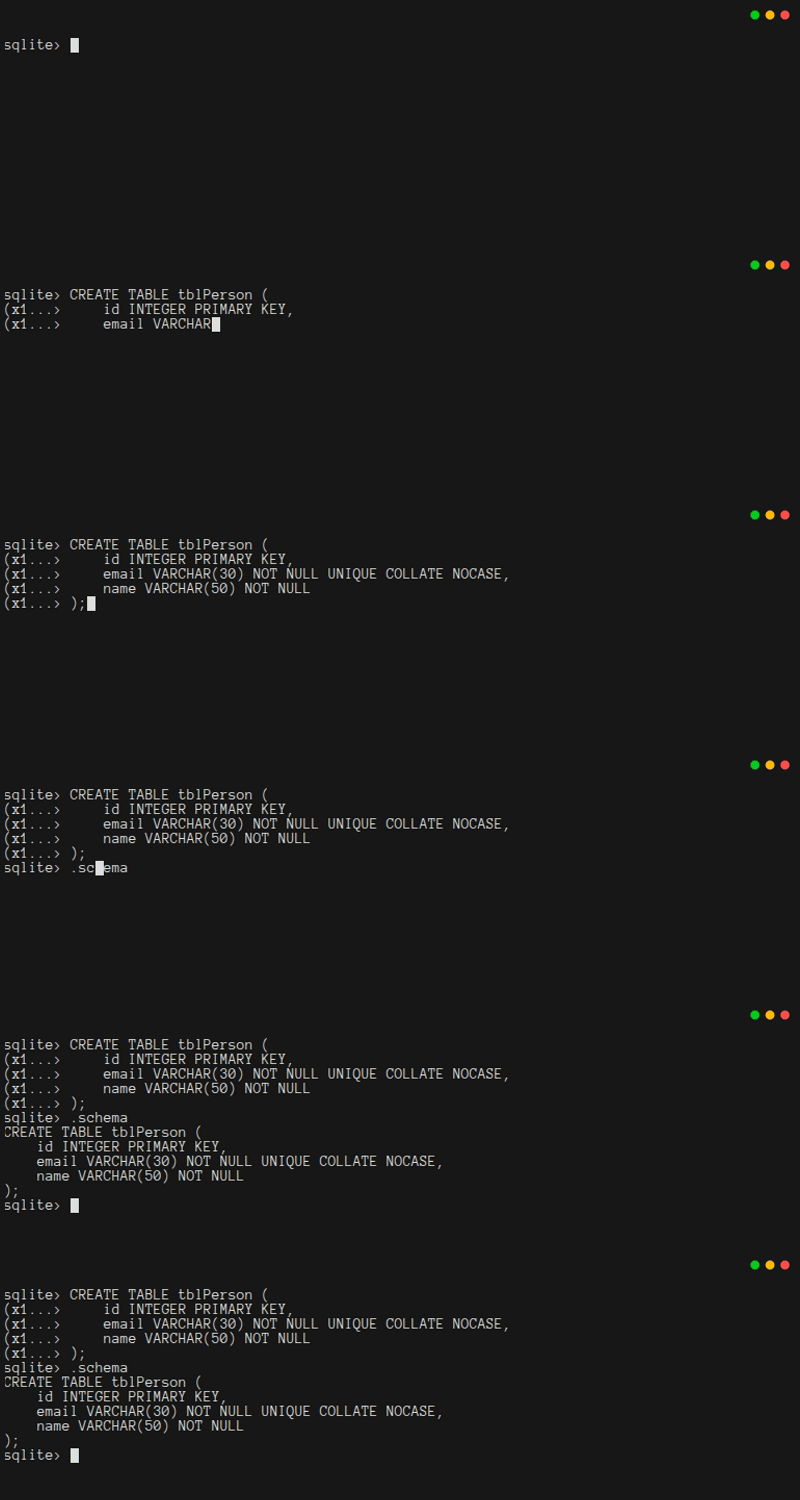
Next, create tblMessage. This is a bit trickier, because of the foreign key:
sql
CREATE TABLE tblMessage (
    id INTEGER PRIMARY KEY,
    subject VARCHAR(50) NOT NULL,
    details VARCHAR(500) NOT NULL,
    as_of DATE NOT NULL,
    creatorId INTEGER,
    FOREIGN KEY (creatorId) REFERENCES tblPerson(id)
);
Again, you can type .schema to make sure it worked:
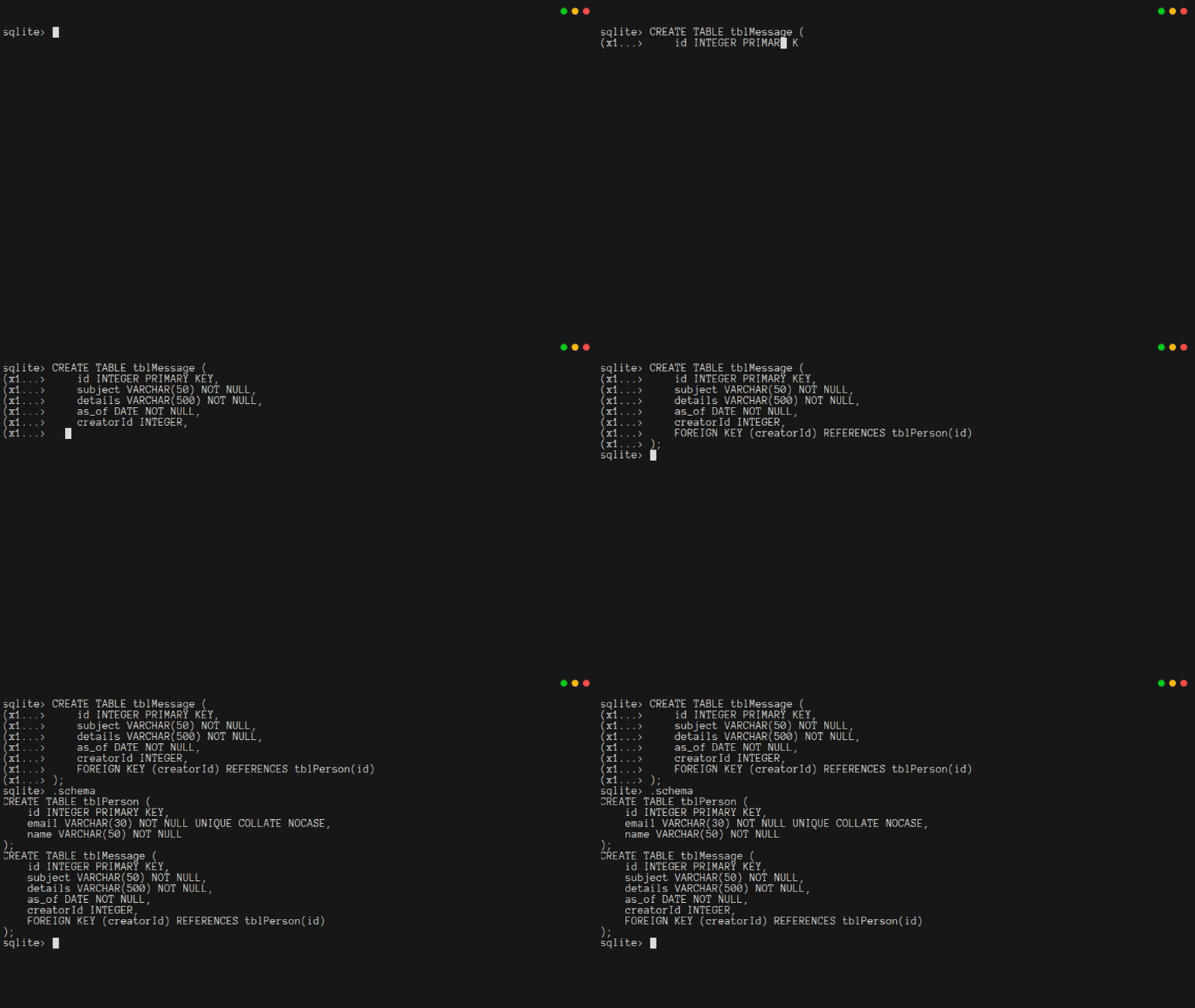
Unlike most popular databases, SQLite does not enforce referential integrity by default. In SQLite, you must turn it on manually. Typing PRAGMA foreign_keys; will indicate if it is turned on. Typing PRAGMA foreign_keys = ON; will ensure it is on.
Warning
When you close the database, the foreign_key pragma is not saved. You will need to turn it on every time you open a database.
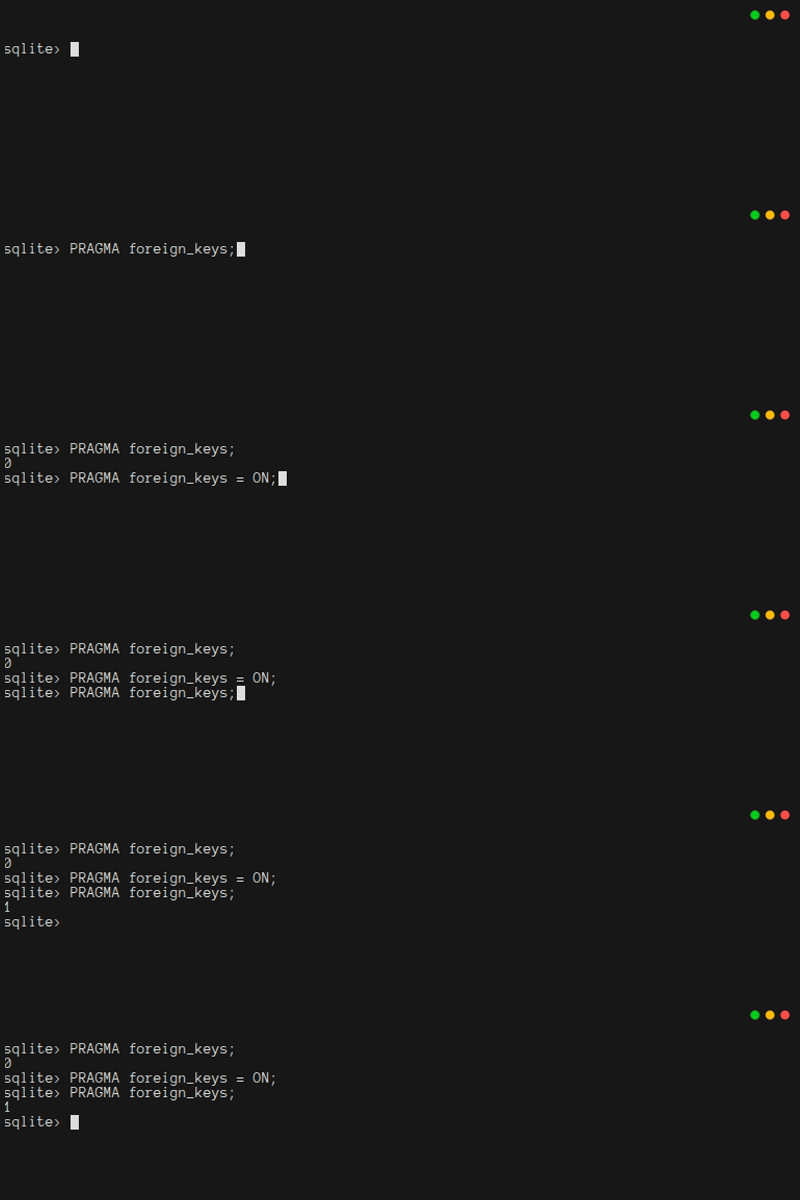
Finally, you should create a view, so that you can request a message and also get its creator's information at the same time:
sql
CREATE VIEW viewMessage AS
SELECT
    tblMessage.id AS id,
    tblMessage.subject AS subject,
    tblMessage.details AS details,
    tblMessage.as_of AS as_of,
    tblMessage.creatorId AS creatorId,
    tblPerson.email AS email,
    tblPerson.name AS name
FROM
    tblMessage INNER JOIN tblPerson
        ON tblMessage.creatorId = tblPerson.id;
One last time, be sure to type .schema to make sure it worked:
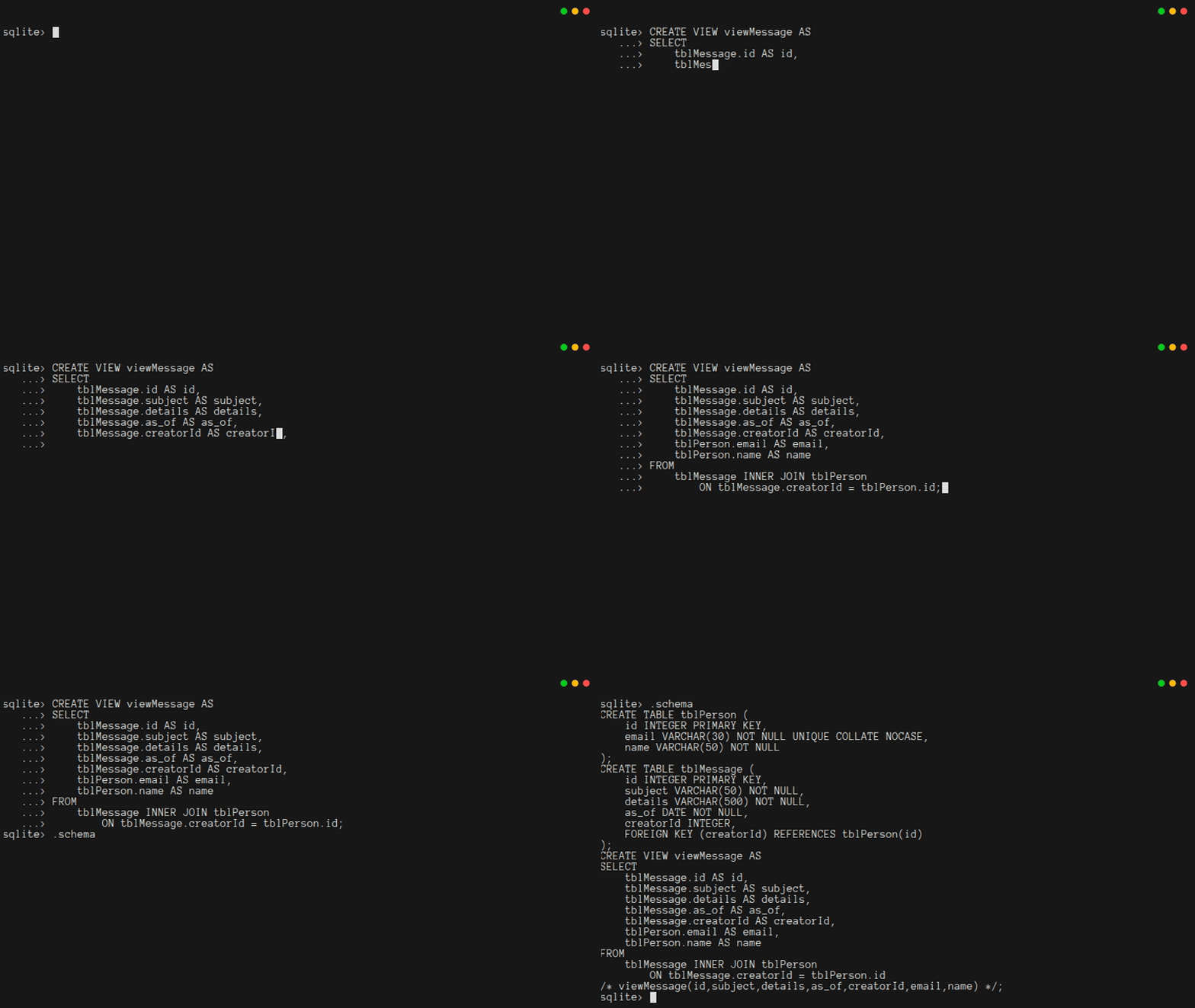
1.5. Working With Your Database
Structured Query Language (SQL) is a special language for interacting with databases. You just used SQL to create tables and views. You can also use SQL to Create, Read, Update, and Delete data in your database. These are the "CRUD" operations, and will be the foundation of how your app uses your database.
Try typing the following commands to Create, Read, Update, and Delete data from tblPerson:
sql
INSERT INTO tblPerson (email, name) VALUES ('person@email.com', 'A. Person');
INSERT INTO tblPerson (email, name) VALUES ('person2@email.com', 'B. Person');
SELECT * FROM tblPerson;
UPDATE tblPerson SET name = 'My Friend' WHERE id = 2;
SELECT * FROM tblPerson;
DELETE FROM tblPerson WHERE id = 2;
SELECT * FROM tblPerson;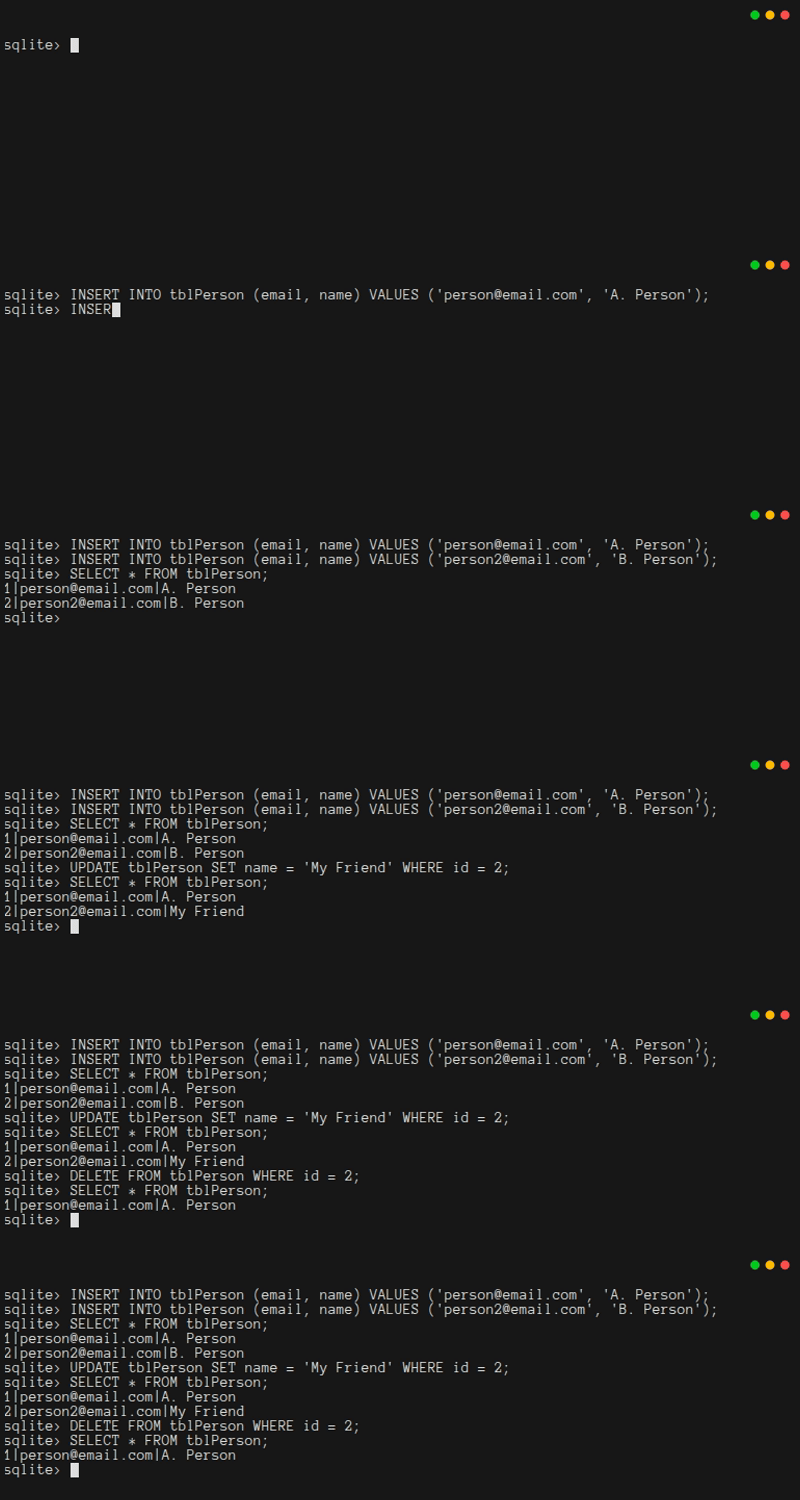
Next, create a message so you can read it and its creator via the view:
sql
INSERT INTO tblMessage (subject, details, as_of, creatorId) VALUES ('test', 'this is a test message', 1757603196045, 1);
SELECT * FROM tblMessage;
SELECT * from viewMessage;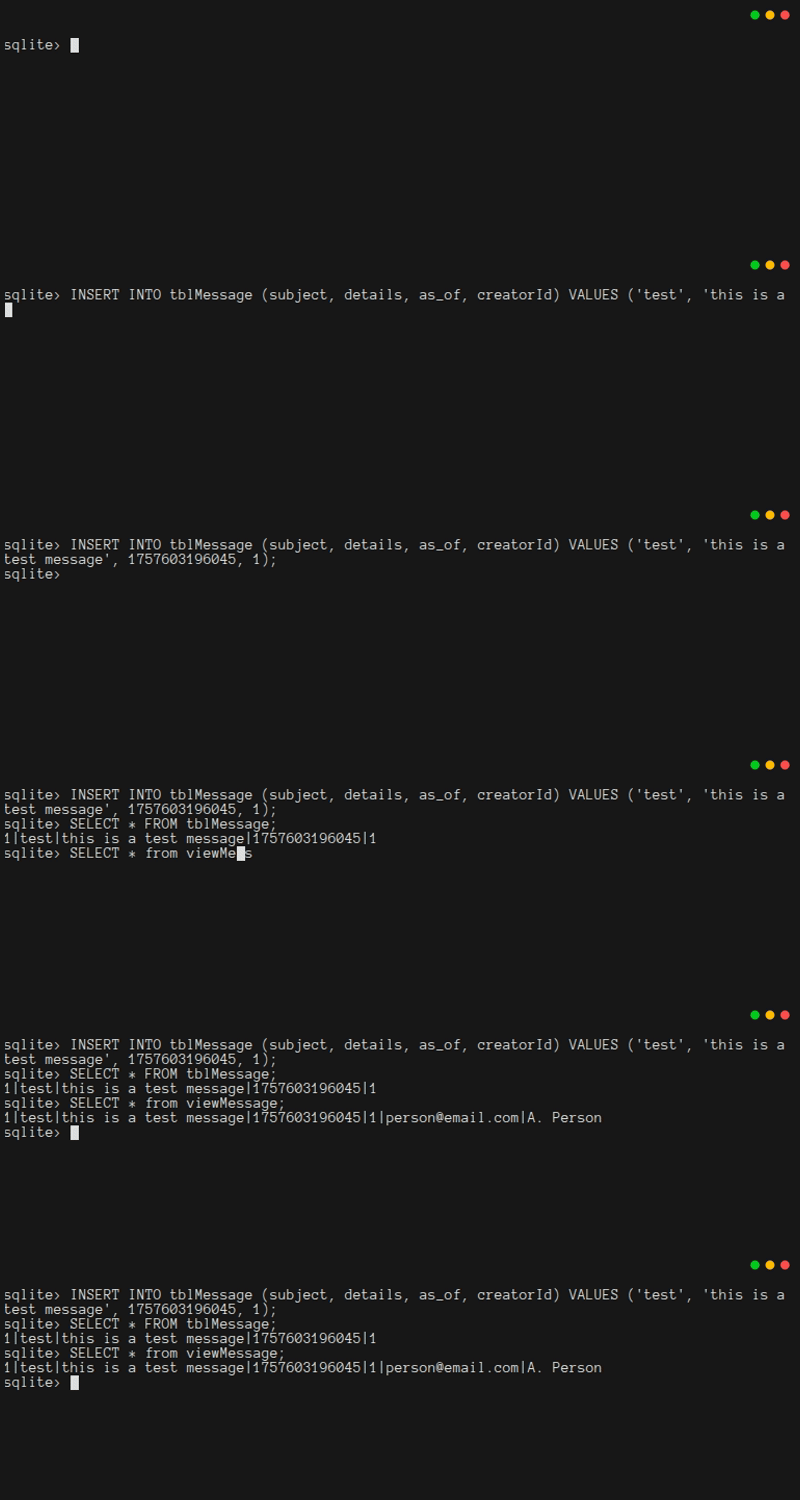
There are a few things to notice here. First, the dates are ugly. Do not worry about that, your Java code will know how to format dates nicely. Second, the view joined the tables, so you could see the person's details without putting those details into the message.
You should do one more thing to really appreciate joins:
sql
INSERT INTO tblMessage (subject, details, as_of, creatorId) VALUES ('test 2', 'this is another test message', 1757603198045, 1);
SELECT * FROM viewMessage;
UPDATE tblPerson SET name='Professor Parse' WHERE id=1;
SELECT * FROM viewMessage;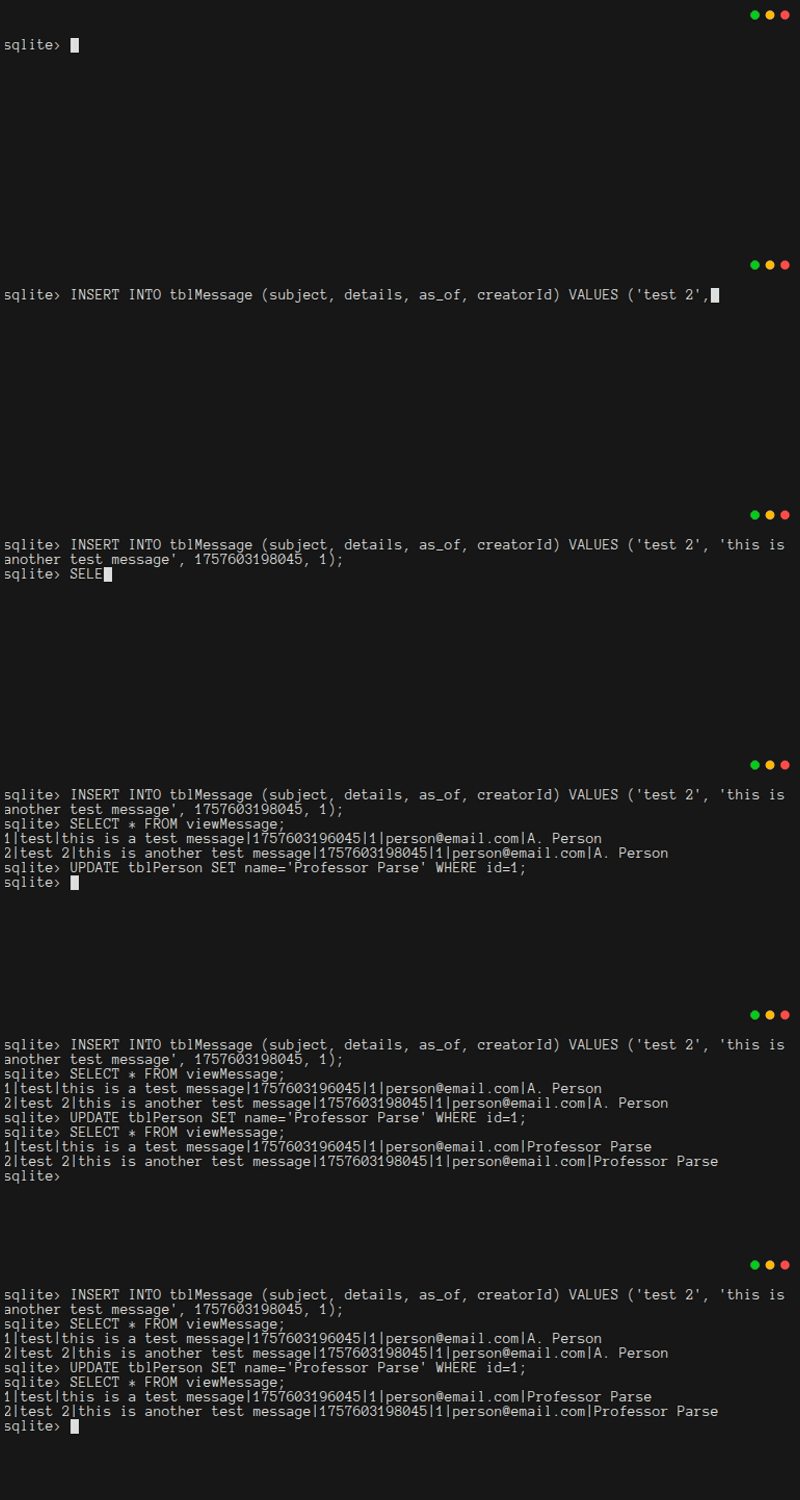
You updated the user's name in one place, and all data linked to that name now reflects that change. Wow!
Now try to delete the user responsible for these posts.
sql
DELETE FROM tblPerson WHERE id=1;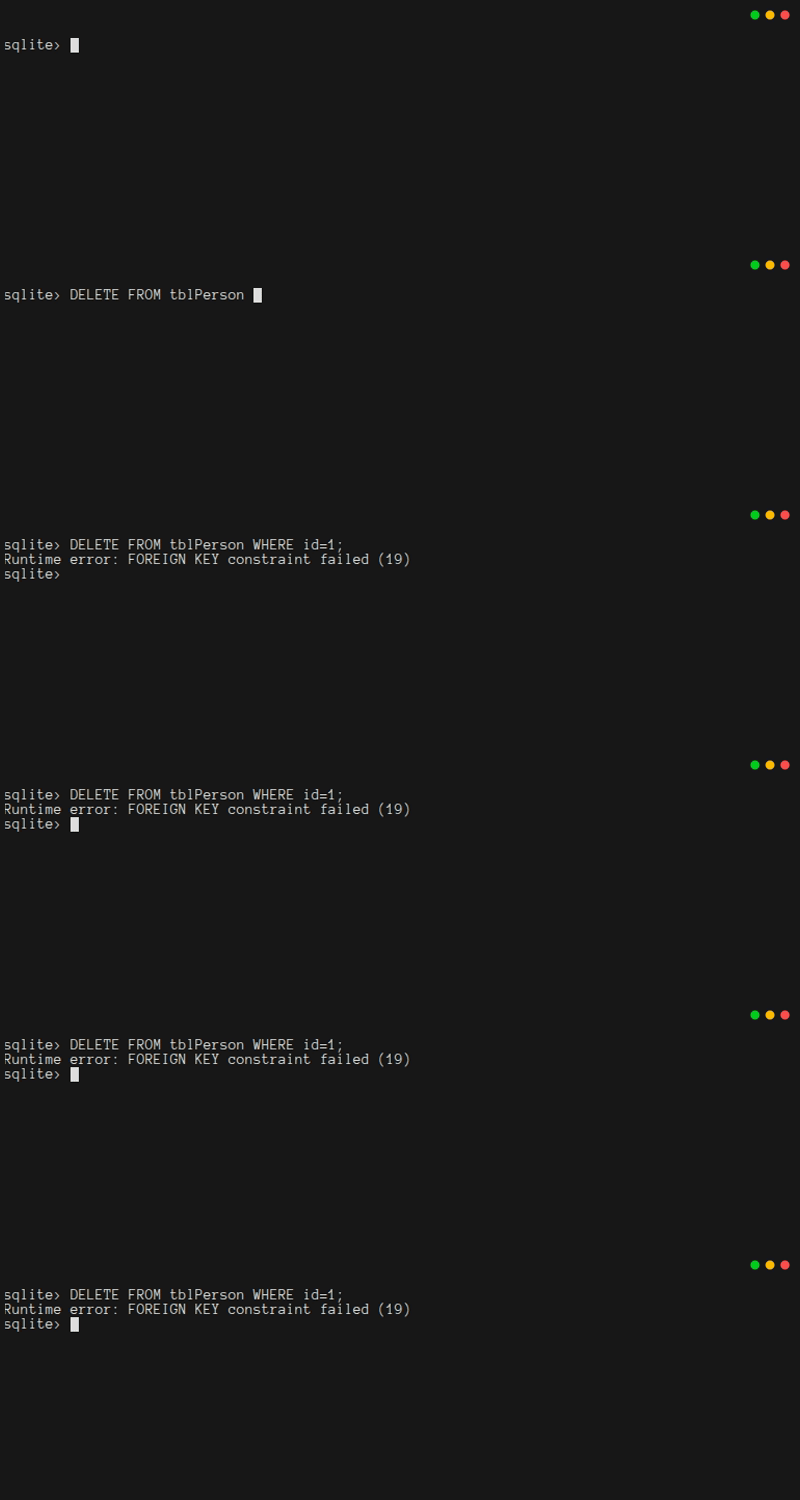
SQLite prevented the person from being deleted because it would break the relationship between a message and its creator. If you hadn't typed PRAGMA foreign_keys = ON;, SQLite would have deleted the person, resulting in something terrible: a message with an invalid creator!
In some databases, deleting a person would cause cascading deletes. Instead of an error, the person and all their associated messages would be deleted. The real lesson is that you should always be careful when deleting relational data.
The real goal of this chapter is to interact with the database through Java code.
You could exit sqlite3 by pressing ctrl-d or ctrl-c or typing .quit, and then delete db.db. But it is good to see that you can also delete views and tables via SQL statements. When you do, remember that due to the relationships among tables and views, the order matters:
sql
DROP VIEW viewMessage;
DROP TABLE tblMessage;
DROP TABLE tblPerson;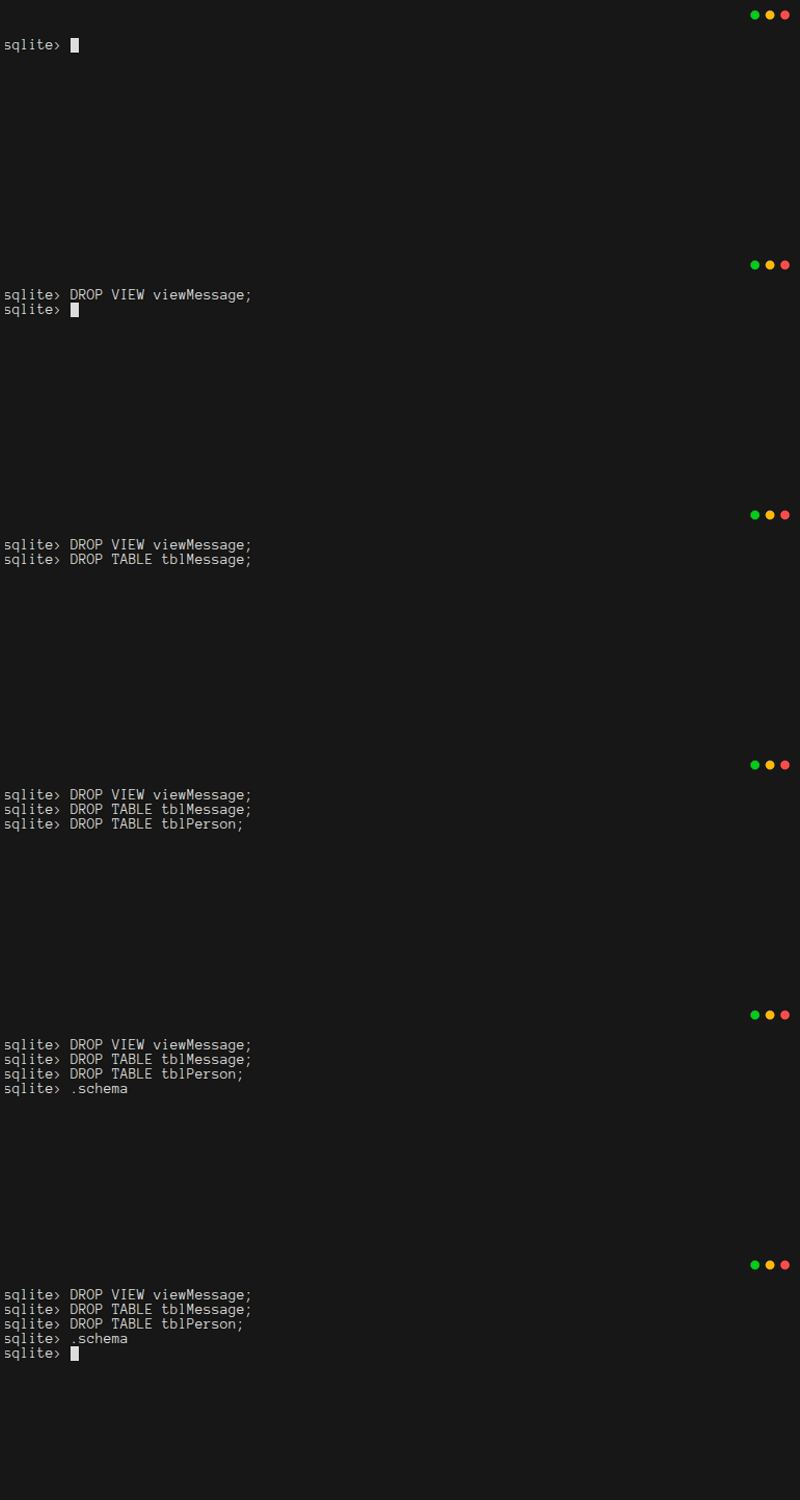
1.6. Security Concerns
Before you write any code, it is good to think about security, because it is much easier to implement a secure system from scratch than it is to add security to a system after it has been built. Since you're planning to make a web-based system that can be accessed by many people, security cannot be an afterthought.
The system you're implementing in this tutorial is designed so that certain things cannot be done through the web interface. This is an intentional security feature. If your system does not even have code to do something, then a malicious user cannot trick your system into running that code. In this tutorial, the web interface won't support:
- Low-level database management, like creating and dropping tables and views
- Creation and deletion of users
Instead, there will be a Java command-line program for performing these tasks. It will only run when an administrator needs to do one of these tasks. In that way, your code will be a bit safer.
There's another security issue you need to be careful about. Above, you saw this code:
sql
INSERT INTO tblMessage (subject, details, as_of, creatorId) VALUES ('test 2', 'this is another test message', 1757603198045, 1);If untrusted users provide data, such as 'test 2', could they create messages with a creatorId that is not their own? Could they forge a date (as_of) from the dawn of time? What if they provide carefully-formatted SQL code and trick your code into running it?
The last case is unfortunately both the worst and most likely situation. An untrusted user could try to inject extra SQL into your SQL statement.

This is known as a SQL Injection Attack. In late 2025, it was the third most common security vulnerability according to OWASP. Fortunately, Java provides PreparedStatement objects to address this problem. All of the code that you'll write for interacting with a database will use prepared statements, as a precaution.
1.7. Creating A Java Project With Maven
At last, it is time to start making the admin program. There are several goals for this program. First, it will be the only way for anyone to ever CREATE or DROP tables and views in your database. Second, it will be the only way for anyone to ever INSERT or DELETE rows in tblPerson. Third, it will provide an opportunity to learn how to do CRUD operations from Java code. (You'll be doing this a lot in Chapter 2.) Finally, it will let you get experience with unit tests.
The admin program is going to be more complex than programs you've written in introductory classes. It is going to need a special library for interacting with SQLite. It is also going to require more lines of code than you should put in a single .java file.
When you start using external libraries and splitting your code into files, it can become difficult to compile the program correctly, and even more difficult to actually get the program to run. To avoid these problems, this tutorial will show you how to use Maven. It is going to take a little bit of work to set up Maven. Once it works, it will be easy for you to add new libraries, and easy to build your program as a runnable jar file.
On whatever machine you are using to do this tutorial, now is a good time to install Maven.[1]
After you've installed Maven, navigate to the folder where you're going to create all of your code. If you are a student enrolled in CSE 216, that folder should be the root of a blank repository provided by your instructor. Otherwise, it should be a blank repository that you've created (by typing git init in an empty folder). This tutorial uses the folder ~/cse216 in the home folder of a user named me. In your folder, initialize a Java project named quickstart.app in the admin subfolder by typing the following: [2] [3]
bash
# recall that the backslash "escapes" the newline character that follows, so the shell interprets the below as one line
mvn archetype:generate \
    -DarchetypeGroupId=org.apache.maven.archetypes \
    -DarchetypeArtifactId=maven-archetype-quickstart \
    -DarchetypeVersion=1.5 \
    -DinteractiveMode=false \
    -DartifactId=admin \
    -DgroupId=quickstart.admin \
    -Dpackage=quickstart.admin
When you type this command, you will see a lot of output.
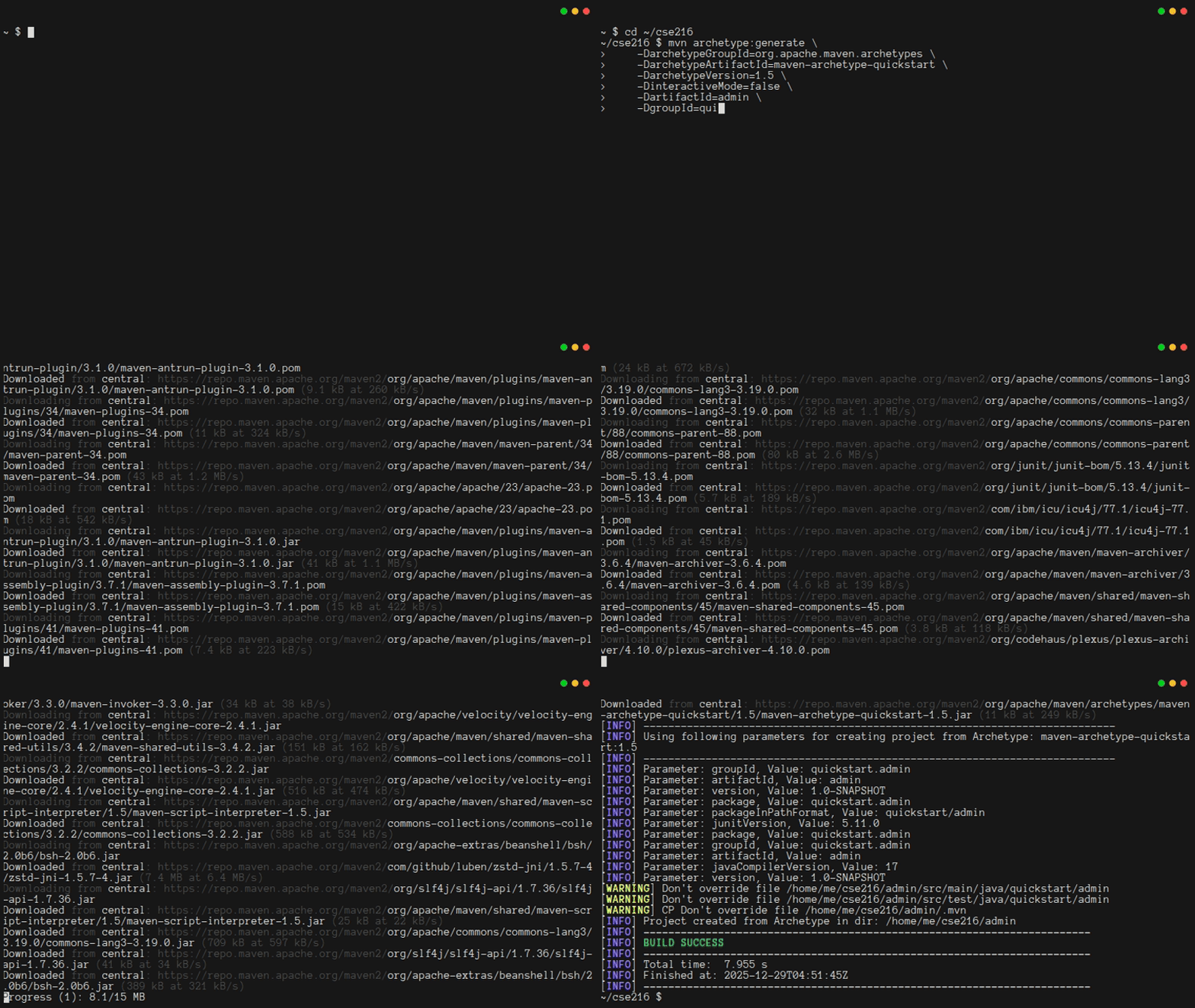
As long as you see the message "BUILD SUCCESS", the rest of the output can be ignored. Also, note that the first time you run this command, it will download a lot of extra packages. They will be saved to the .m2 folder in your home directory for future use. If you find yourself running out of disk space, you can remove this folder, and maven will re-create it as needed.
When the command completes, you will have a folder called admin. In it, there will be a maven-based project where the main class is quickstart.admin.App. You should see a directory layout like this:
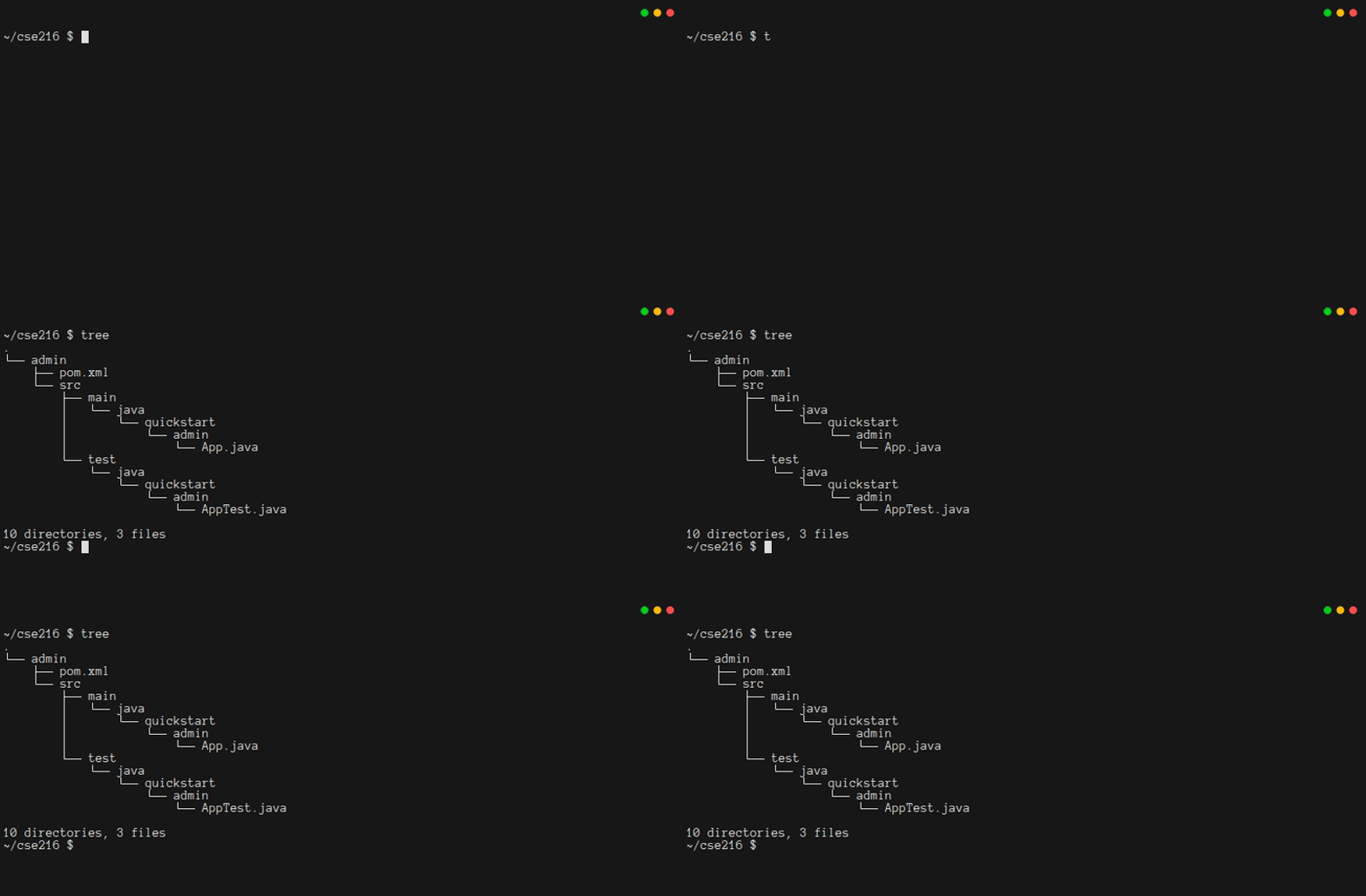
Here's a quick run-down of the files and folders:[4]
pom.xmltells Maven how to build your program and manage the libraries your program needs.mvn/is a hidden folder that you can usually ignoresrc/main/java/quickstart/adminis where code for your program goessrc/test/java/quickstart/adminis where unit tests for your program go
For reference, the pom.xml created by Maven should look like this:
xml
<?xml version="1.0" encoding="UTF-8"?>
<project xmlns="http://maven.apache.org/POM/4.0.0"
  xmlns:xsi="http://www.w3.org/2001/XMLSchema-instance"
  xsi:schemaLocation="http://maven.apache.org/POM/4.0.0 http://maven.apache.org/xsd/maven-4.0.0.xsd">
  <modelVersion>4.0.0</modelVersion>

  <groupId>quickstart.admin</groupId>
  <artifactId>admin</artifactId>
  <version>1.0-SNAPSHOT</version>

  <name>admin</name>
  <!-- FIXME change it to the project's website -->
  <url>http://www.example.com</url>

  <properties>
    <project.build.sourceEncoding>UTF-8</project.build.sourceEncoding>
    <maven.compiler.release>17</maven.compiler.release>
  </properties>

  <dependencyManagement>
    <dependencies>
      <dependency>
        <groupId>org.junit</groupId>
        <artifactId>junit-bom</artifactId>
        <version>5.11.0</version>
        <type>pom</type>
        <scope>import</scope>
      </dependency>
    </dependencies>
  </dependencyManagement>

  <dependencies>
    <dependency>
      <groupId>org.junit.jupiter</groupId>
      <artifactId>junit-jupiter-api</artifactId>
      <scope>test</scope>
    </dependency>
    <!-- Optionally: parameterized tests support -->
    <dependency>
      <groupId>org.junit.jupiter</groupId>
      <artifactId>junit-jupiter-params</artifactId>
      <scope>test</scope>
    </dependency>
  </dependencies>

  <build>
    <pluginManagement><!-- lock down plugins versions to avoid using Maven defaults (may be moved to
      parent pom) -->
      <plugins>
        <!-- clean lifecycle, see
        https://maven.apache.org/ref/current/maven-core/lifecycles.html#clean_Lifecycle -->
        <plugin>
          <artifactId>maven-clean-plugin</artifactId>
          <version>3.4.0</version>
        </plugin>
        <!-- default lifecycle, jar packaging: see
        https://maven.apache.org/ref/current/maven-core/default-bindings.html#Plugin_bindings_for_jar_packaging -->
        <plugin>
          <artifactId>maven-resources-plugin</artifactId>
          <version>3.3.1</version>
        </plugin>
        <plugin>
          <artifactId>maven-compiler-plugin</artifactId>
          <version>3.13.0</version>
        </plugin>
        <plugin>
          <artifactId>maven-surefire-plugin</artifactId>
          <version>3.3.0</version>
        </plugin>
        <plugin>
          <artifactId>maven-jar-plugin</artifactId>
          <version>3.4.2</version>
        </plugin>
        <plugin>
          <artifactId>maven-install-plugin</artifactId>
          <version>3.1.2</version>
        </plugin>
        <plugin>
          <artifactId>maven-deploy-plugin</artifactId>
          <version>3.1.2</version>
        </plugin>
        <!-- site lifecycle, see
        https://maven.apache.org/ref/current/maven-core/lifecycles.html#site_Lifecycle -->
        <plugin>
          <artifactId>maven-site-plugin</artifactId>
          <version>3.12.1</version>
        </plugin>
        <plugin>
          <artifactId>maven-project-info-reports-plugin</artifactId>
          <version>3.6.1</version>
        </plugin>
      </plugins>
    </pluginManagement>
  </build>
</project>
When you type mvn package from within the admin folder, you should see a lot of output. (Subsequent calls to mvn package will have less output, because they won't re-download supporting libraries.) After the code is compiled, then the unit tests will automatically run. Finally, you should see the message "BUILD SUCCESS". There should be a folder called target, and in it there should be a jar file called admin-1.0-SNAPSHOT.jar. Unfortunately, the jar can't be run. If you type java -jar target/admin-1.0-SNAPSHOT.jar, you will get an error:
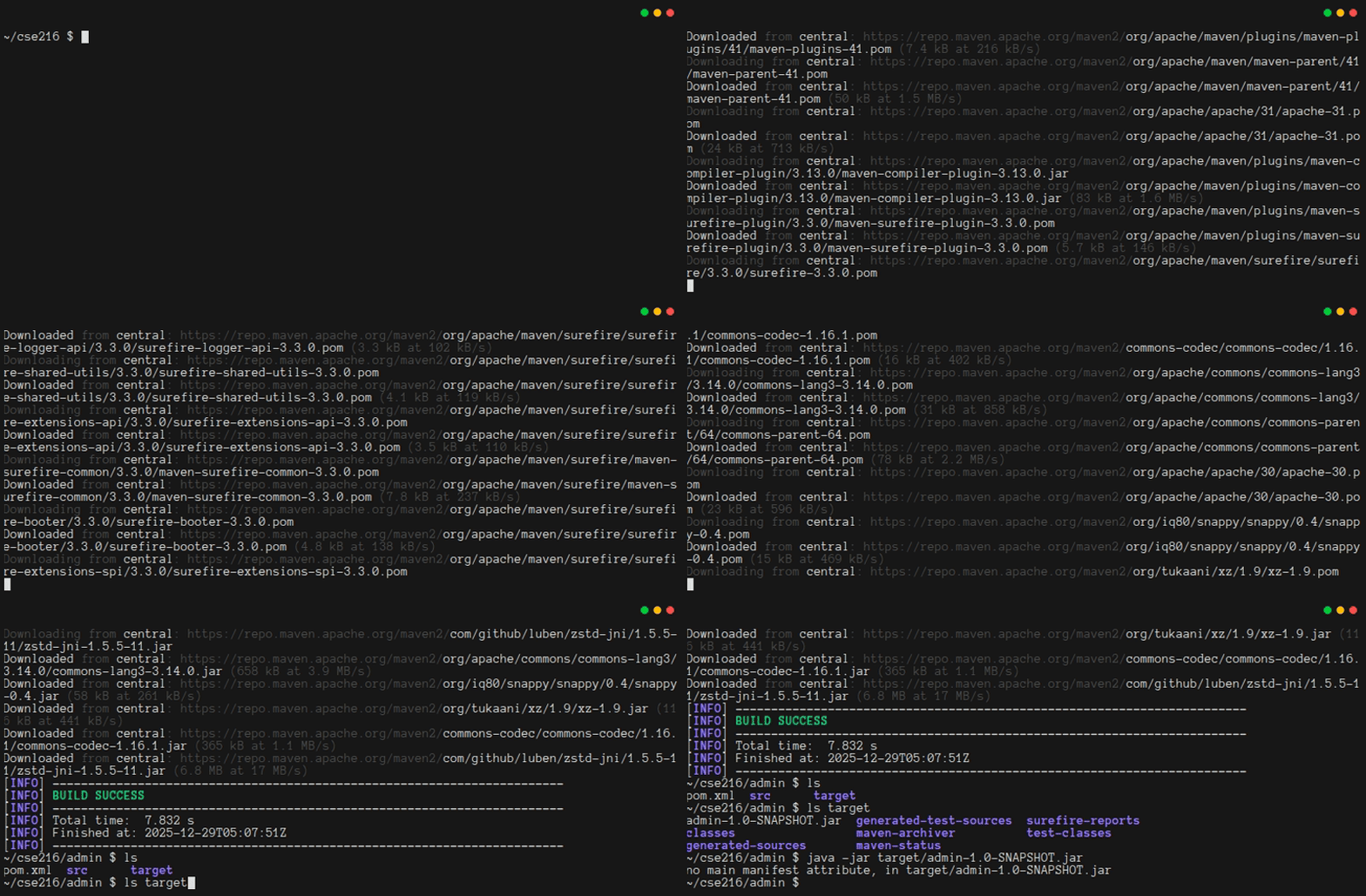
The simplest way to fix this problem is by creating a second jar that has a manifest. Thinking ahead a bit, you also want to be sure that when your project starts using additional libraries, those libraries are included in the jar. These needs are both met by the maven-assembly-plugin. To configure it, add the highlighted lines from the code block below into your pom.xml:
xml
        </plugin>
      </plugins>
    </pluginManagement>

    <plugins>
      <plugin>
        <artifactId>maven-assembly-plugin</artifactId>
        <executions>
          <execution>
            <phase>package</phase>
            <goals>
              <goal>single</goal>
            </goals>
          </execution>
        </executions>
        <configuration>
          <descriptorRefs>
            <descriptorRef>jar-with-dependencies</descriptorRef>
          </descriptorRefs>
          <appendAssemblyId>false</appendAssemblyId>
          <finalName>admin-1.0</finalName>
          <archive>
            <manifest>
              <mainClass>quickstart.admin.App</mainClass>
            </manifest>
          </archive>
        </configuration>
      </plugin>
    </plugins>

  </build>
</project>
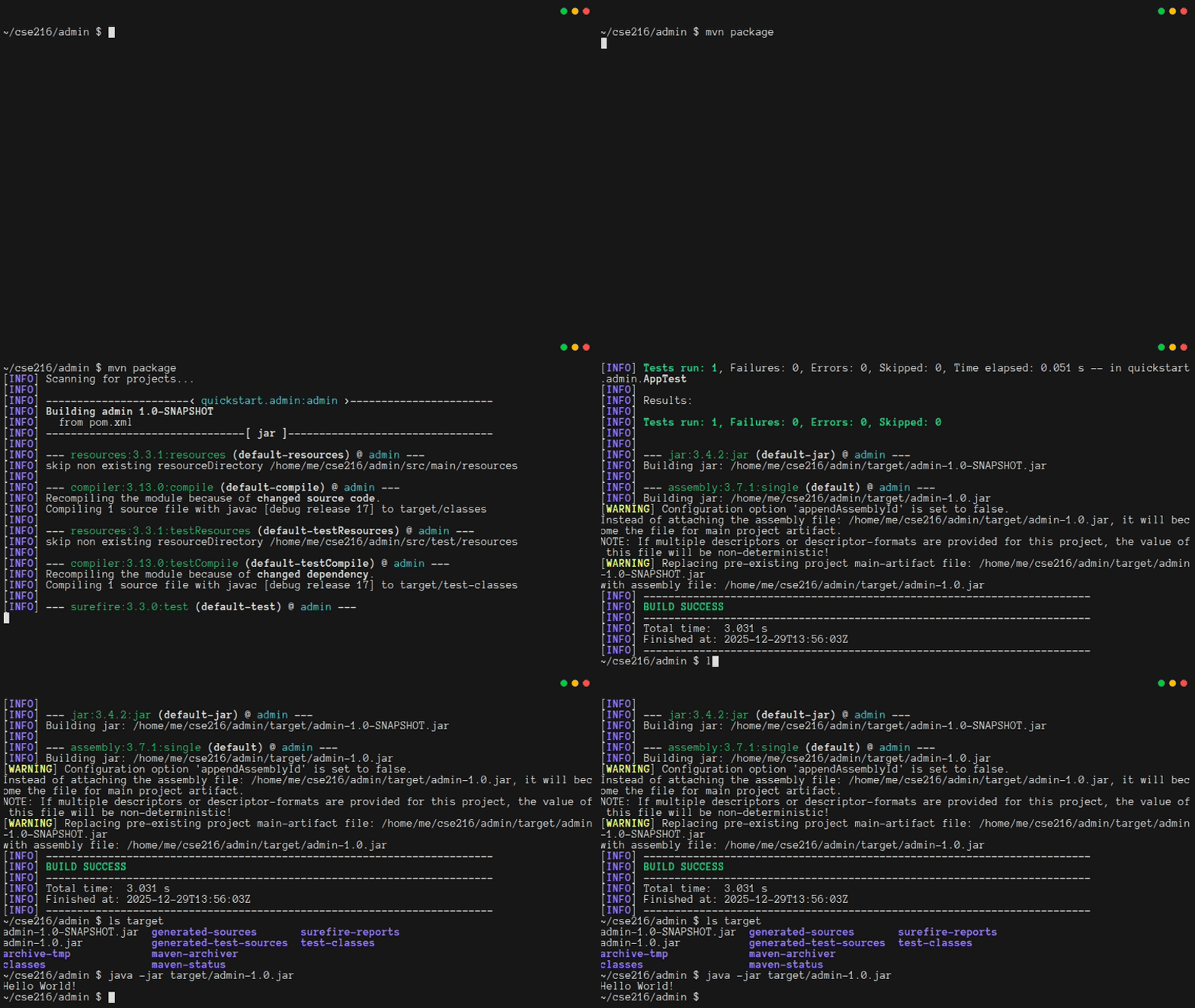
With these changes in place, when you type mvn package you should see that two jar files are built. To run the program, you can simply type java -jar target/admin-1.0.jar:
1.8. Creating And Dropping Tables
Warning
When you are developing code, it is extremely important that you compile and run your code often. Otherwise, you will risk having bugs that are hard to track down. This tutorial is about to ask you to write a lot of code all at once. You won't even see how to run the code until Chapter 1.11. That's not a good habit when writing real code, even though it's OK for this tutorial.
In order to use SQLite from your java program, you will need to update the <dependencies> section of pom.xml.
To find the latest versions of plugins and dependencies, visit the Maven Package Repository. From there, find the driver for SQLite (JDBC provided by org.xerial), select the latest version, and from the "Maven" tab copy the dependency into the <dependencies> section (not the <dependencyManagement> section). The addition to pom.xml is highlighted below:
xml
  </dependency>
  <!-- Source: https://mvnrepository.com/artifact/org.xerial/sqlite-jdbc -->
  <dependency>
    <groupId>org.xerial</groupId>
    <artifactId>sqlite-jdbc</artifactId>
    <version>3.51.1.0</version>
  </dependency>
</dependencies>

<build>
A nice outcome is that Maven won't just install the Java code for interacting with Maven. It will also install a local copy of SQLite for your program to use.
Next, create a file called src/main/java/quickstart/admin/Database.java. It will hold all code for interacting with the database. To start, give it some code for connecting to and disconnecting from the database:
java
package quickstart.admin;

import java.sql.Connection;
import java.sql.DriverManager;
import java.sql.SQLException;

/**
 * Database has all the logic for connecting to and interacting with a database
 *
 * Note: This class is hard-coded for SQLite.
 */
public class Database implements AutoCloseable {
    // Load the sqlite-JDBC driver when the class is initialized
    static {
        try {
            Class.forName("org.sqlite.JDBC");
        } catch (java.lang.ClassNotFoundException e) {
            e.printStackTrace();
            System.exit(1);
        }
    }

    /** A connection to a SQLite db, or null */
    private Connection conn;

    /**
     * Use dbFile to create a connection to a database, and store it in the
     * constructed Database object
     *
     * @param dbFile the connection string for the database
     * @throws SQLException if a connection cannot be created
     */
    public Database(String dbFile) throws SQLException {
        // Connect to the database or fail
        conn = DriverManager.getConnection("jdbc:sqlite:" + dbFile);
        // SQLite is odd: we need to opt-in for referential integrity
        try (var stmt = conn.prepareStatement("PRAGMA foreign_keys = ON;")) {
            stmt.execute();
            getPragmaForeignKeysStatus();
        }
    }

    /**
     * If connection isn't null, verifies that referential integrity is enabled
     *
     * @return true if enabled, false otherwise
     */
    synchronized boolean getPragmaForeignKeysStatus() throws SQLException {
        if (conn != null) {
            try (var stmt = conn.prepareStatement("PRAGMA foreign_keys;");
                    var rs = stmt.executeQuery();) {
                if (rs.next()) {
                    int status = rs.getInt(1);
                    if (status == 1)
                        System.out.println("sqlite referential integrity enabled");
                    else
                        System.out.println("WARNING: sqlite referential integrity is DISABLED");
                    return status == 1;
                } else {
                    System.err.println("ERROR: did not get a result set for PRAGMA foreign_keys when expected 0 or 1.");
                }
            }
        }
        return false;
    }

    /**
     * Close the current connection to the database, if one exists.
     *
     * NB: The connection will always be null after this call, even if an
     * error occurred during the closing operation.
     */
    @Override
    public void close() throws Exception {
        if (conn != null) {
            try {
                conn.close();
            } catch (SQLException e) {
                e.printStackTrace();
            } finally {
                conn = null;
            }
        }
    }
}
The code is not especially tricky, but you should be sure you understand the following points:
- There is a static initialization block that loads the SQLite driver before the
Databaseobject is constructed - The constructor tries to connect to the SQLite database file whose path is provided as an argument
- The constructor also "opts in" to foreign key constraints in SQLite
- The database implements
AutoCloseableso that it will be easy to avoid resource leaks - To avoid resource leaks, interactions with
PreparedStatementobjects usetry-with-resources(and thusAutoCloseable) - The
getPragmaForeignKeysStatusfunction is only called once, but it's still its own function, because you're going to want it to be a standalone function for the unit tests you'll write later on.
Now it is time to add the methods for creating and dropping tables and views. Since the backend (Chapter 2) will need to use prepared statements, you might as well use them here, too, so the code is consistent and safe. Also, even though the admin app won't be multithreaded, this code still marks every method that interacts with the database as synchronized, so it is also consistent with what you'll do in Chapter 2.[5]
The code below can be added to the Database class. Notice that it creates a new PreparedStatement each time it interacts with the database. One other thing worth noting is that order matters when creating and dropping. You shouldn't have dangling foreign keys to tables that do not exist.
java
/**
 * Create the database tables
 *
 * @throws SQLException if any table cannot be created
 */
synchronized void createTables() throws SQLException {
    var createTblPerson = """
            CREATE TABLE tblPerson (
                id INTEGER PRIMARY KEY,
                email VARCHAR(30) NOT NULL UNIQUE COLLATE NOCASE,
                name VARCHAR(50)
            );""";
    try (var ps = conn.prepareStatement(createTblPerson)) {
        ps.execute();
    }
    var createTblMessage = """
            CREATE TABLE tblMessage (
                id INTEGER PRIMARY KEY,
                subject VARCHAR(50) NOT NULL,
                details VARCHAR(500) NOT NULL,
                as_of DATE NOT NULL,
                creatorId INTEGER,
                FOREIGN KEY (creatorId) REFERENCES tblPerson(id)
            );""";
    try (var ps = conn.prepareStatement(createTblMessage)) {
        ps.execute();
    }
    System.out.println("Tables created successfully");
}

/**
 * Create the database views
 *
 * @throws SQLException if any view cannot be created
 */
synchronized void createViews() throws SQLException {
    var createViewMessage = """
            CREATE VIEW viewMessage AS
            SELECT
                tblMessage.id as id,
                tblMessage.subject as subject,
                tblMessage.details as details,
                tblMessage.as_of as as_of,
                tblMessage.creatorId as creatorId,
                tblPerson.email as email,
                tblPerson.name as name
            FROM tblMessage INNER JOIN tblPerson on
                tblMessage.creatorId = tblPerson.id;""";
    try (var ps = conn.prepareStatement(createViewMessage)) {
        ps.execute();
    }
    System.out.println("Views created successfully");
}

/**
 * Remove all tables from the database
 *
 * @throws SQLException if any table cannot be dropped
 */
synchronized void dropTables() throws SQLException {
    var dropTblMessage = "DROP TABLE tblMessage;";
    try (var ps = conn.prepareStatement(dropTblMessage)) {
        ps.execute();
    }
    var dropTblPerson = "DROP TABLE tblPerson;";
    try (var ps = conn.prepareStatement(dropTblPerson)) {
        ps.execute();
    }
    System.out.println("Tables dropped successfully");
}

/**
 * Remove all views from the database
 *
 * @throws SQLException if any view cannot be dropped
 */
synchronized void dropViews() throws SQLException {
    var dropViewMessage = "DROP VIEW viewMessage;";
    try (var ps = conn.prepareStatement(dropViewMessage)) {
        ps.execute();
    }
    System.out.println("Views dropped successfully");
}
1.9. Create/Read/Update/Delete People
The four basic operations in a web application are Creating, Reading, Updating, and Deleting data (the "CRUD" operations). These correspond to the SQL statements INSERT, SELECT, UPDATE, and DELETE. Your app should be able to do all four of these operations in tblPeople.
It is likely that there will be many places where your code will need to make sure that the data it receives from a user meets some requirements. As a starting point, you should provide code for validating the user name and email address. Note that names and email addresses are much less standard than you might think!
That being the case, this tutorial only does extremely simple validation. The functions below ensure that basic expectations about string lengths are being satisfied:
java
/**
 * Perform lightweight validation of the provided email address.
 *
 * @param email The address to validate
 *
 * @throws RuntimeException if the address does not meet length requirements
 */
private static synchronized void validateEmail(String email) throws RuntimeException {
    if (email == null || email.length() < 3 || email.length() > 30) {
        throw new RuntimeException("Invalid email address");
    }
}

/**
 * Perform lightweight validation of the provided display name
 *
 * @param name The name to validate
 * @throws RuntimeException if the address does not meet length requirements
 */
private static synchronized void validateName(String name) throws RuntimeException {
    if (name == null || name.length() < 1 || name.length() > 50) {
        throw new RuntimeException("Invalid name");
    }
}
Now that validators are in place, you can implement the INSERT code. Starting with INSERT is a good idea, because you won't be able to test SELECT, UPDATE, or DELETE until there is some data in the database.
java
/**
 * Create a new Person in the database. Note that uniqueness of email
 * addresses is enforced by the database itself, which lets this code remain
 * clean and simple.
 *
 * @param email The new person's email address
 * @param name  The new person's name
 *
 * @throws SQLException     If the person cannot be created
 * @throws RuntimeException If the provided data is invalid
 * @return the id of the new row upon success, Integer.MIN_VALUE on failure
 */
synchronized int insertPerson(String email, String name) throws SQLException, RuntimeException {
    // Be sure to validate the email and name!
    Database.validateEmail(email);
    Database.validateName(name);

    // NB: The PreparedStatement uses a second parameter to request the row
    // Id of the created row
    try (var stmt = conn.prepareStatement("INSERT INTO tblPerson (email, name) VALUES (?, ?) RETURNING id;");) {
        stmt.setString(1, email);
        stmt.setString(2, name);
        if (stmt.execute()) {
            try (ResultSet rs = stmt.getResultSet()) {
                if (rs.next()) { // retrieves the id of the new row
                    return rs.getInt(1);
                }
            }
        }
    }
    return Integer.MIN_VALUE;
}
The code above uses a prepared statement to prevent SQL injection attacks. Prepared statements use placeholders (?) and then when you provide values for those placeholders, your values get cleaned automatically. Note that prepared statements are not thread safe, so this code makes a new one each time the method is called.
This code validates its inputs before it uses them. This is extremely important. When you write a web app, a key thing to remember is "trust nobody". It is better to check more often than necessary than to have a situation where data might not be checked at all!
Once the insert code makes sense, deleting should be not be too hard to understand:
java
/**
 * Delete a person from the database
 *
 * @param id The Id of the person to delete
 *
 * @throws SQLException If the person cannot be deleted
 */
synchronized void deletePerson(int id) throws SQLException {
    try (var stmt = conn.prepareStatement("DELETE FROM tblPerson WHERE id = ?");) {
        stmt.setInt(1, id);
        stmt.executeUpdate();
    }
}
Updating is a bit trickier. The issue is that you're going to want to provide a good error message if the user tries to change their email address to an address that is already taken. While you could rely on the database to enforce this (and are, through the UNIQUE constraint on email when creating the table), using a transaction to check the uniqueness of the address before updating it enables nicer error messages:
java
/**
 * Update a person's data in the database
 *
 * @apiNote If this function throws a SQLException, the connection
 *          autocommit setting can be in an undefined or invalid state.
 *          Callers will not be able to recover in that case, so they should
 *          treat SQLExceptions as fatal.
 *
 * @param id    The Id of the person to update
 * @param email The email (might be the same as before)
 * @param name  The name (might be the same as before)
 *
 * @throws SQLException     If the person cannot be updated
 * @throws RuntimeException If the provided data is invalid
 */
synchronized void updatePerson(int id, String email, String name) throws SQLException, RuntimeException {
    Database.validateEmail(email);
    Database.validateName(name);

    // We could rely on the database to enforce email uniqueness,
    // (and are, through the `UNIQUE` constraint on `email`), but we instead
    // use a *transaction* to check the uniqueness of the address
    // before updating so we can provide nicer error messages
    conn.setAutoCommit(false);

    try (var stmt = conn.prepareStatement("SELECT * FROM tblPerson WHERE email = ? and id <> ?");) {
        stmt.setString(1, email);
        stmt.setInt(2, id);
        try (var rs = stmt.executeQuery();) {
            if (rs.next()) {
                conn.commit();
                conn.setAutoCommit(true); // return to non-transaction mode
                throw new RuntimeException("Email already in use");
            }
        }
    }
    try (var stmt = conn.prepareStatement("UPDATE tblPerson SET email = ?, name = ? WHERE id = ?;");) {
        stmt.setString(1, email);
        stmt.setString(2, name);
        stmt.setInt(3, id);
        stmt.executeUpdate();
        conn.commit();
        conn.setAutoCommit(true); // return to non-transaction mode
    }
}
Notice that there is a chance that this code could fail for unexpected reasons. If it does, then the fact that there was an in-flight transaction might mean that the database is in an inconsistent state. Recovering from this kind of error can require lots of complicated code. Rather than fix this bug, the code has an @apiNote to warn the caller. In a production system, you would need to do something more careful.
Finally, it's time to write code for reading from the database. This code needs to produce lists of data. That means you need to add a few imports at the top of the file:
java
import java.sql.ResultSet;
import java.util.ArrayList;
import java.util.List;
When you think about the list you need to return, what type of object should go into it? The type will need to have a field for each column of tblPerson. Java record types are well-suited for storing data that is sent to/from the database. Records are read-only once they're made. Since this code trusts the database, it does not need to validate data returned by the database. Later, you'll see that some cases require a validate method for records that hold data from the user. You can add the declaration for a record after the updatePerson method:
java
/** Person is a Java object that matches the contents of tblPerson */
public static record Person(int id, String email, String name) {
}
When you think about the web app you're going to make, you'll realize that it will do two kinds of reads:
- Reads that gets summary data for all the rows
- Reads that gets detailed data for one row
tblPerson is simple enough that the returned data for the summary is no different than the returned data when getting one row, so only one record type is needed. The following code does everything you need to get people:
java
/**
 * Get all data for a single person
 *
 * @param id The Id of the person to get
 *
 * @return a Person object representing the data that was retrieved from the
 *         database, or null if no person was found
 *
 * @throws SQLException on any error
 */
synchronized Person getOnePerson(int id) throws SQLException {
    try (var stmt = conn.prepareStatement("SELECT * FROM tblPerson WHERE id = ?;");) {
        stmt.setInt(1, id);
        try (var rs = stmt.executeQuery();) {
            if (rs.next()) {
                return new Person(rs.getInt("id"), rs.getString("email"), rs.getString("name"));
            }
        }
    }
    return null;
}

/**
 * Get all data for all people in the database
 *
 * @return A List with zero or more Person objects
 *
 * @throws SQLException on any error
 */
synchronized List<Person> getAllPerson() throws SQLException {
    try (var ps = conn.prepareStatement("SELECT * FROM tblPerson;");
            var rs = ps.executeQuery();) {
        var results = new ArrayList<Person>();
        while (rs.next()) {
            results.add(new Person(rs.getInt("id"), rs.getString("email"), rs.getString("name")));
        }
        return results;
    }
}
1.10. Create/Read/Update/Delete Messages
As you can probably guess, once you can do CRUD operations on tblPerson, the code for interacting with tblMessage is pretty easy to write. One issue that will come up is that the code needs to deal with the date column from the database. Be sure to add import java.sql.Date; to the top of the file:
java
import java.sql.Date;After you've imported the Date type, the rest of the code is mostly just copy/paste/edit, to translate from the columns of tblPerson to the columns of tblMessage:
java
/**
 * Perform lightweight validation of the provided message subject
 *
 * @param subject The subject text to validate
 *
 * @throws RuntimeException if the subject does not meet length requirements
 */
private static synchronized void validateSubject(String subject) throws RuntimeException {
    if (subject == null || subject.length() < 1 || subject.length() > 50) {
        throw new RuntimeException("Invalid subject");
    }
}

/**
 * Perform lightweight validation of the provided message details
 *
 * @param details The details text to validate
 *
 * @throws RuntimeException if the details do not meet length requirements
 */
private static synchronized void validateDetails(String details) throws RuntimeException {
    if (details == null || details.length() < 1 || details.length() > 500) {
        throw new RuntimeException("Invalid details");
    }
}

/**
 * Create a new message in the database
 *
 * @param subject   The subject
 * @param details   The details
 * @param creatorId The Id of the user creating the message
 *
 * @throws SQLException     If the person cannot be created
 * @throws RuntimeException If the provided data is invalid
 */
synchronized void insertMessage(String subject, String details, int creatorId)
        throws SQLException, RuntimeException {
    Database.validateSubject(subject);
    Database.validateDetails(details);
    try (var stmt = conn.prepareStatement(
            "INSERT INTO tblMessage (subject, details, as_of, creatorId) VALUES (?, ?, ?, ?);");) {
        stmt.setString(1, subject);
        stmt.setString(2, details);
        stmt.setDate(3, new java.sql.Date(new java.util.Date().getTime()));
        stmt.setInt(4, creatorId);
        stmt.executeUpdate();
    }
}

/**
 * Update a message in the database
 *
 * @param id      The Id of the message to update
 * @param subject The subject (might be the same as before)
 * @param details The details (might be the same as before)
 *
 * @throws SQLException     If the message cannot be updated
 * @throws RuntimeException If the provided data is invalid
 */
synchronized void updateMessage(int id, String subject, String details) throws SQLException, RuntimeException {
    Database.validateSubject(subject);
    Database.validateDetails(details);
    try (var stmt = conn
            .prepareStatement("UPDATE tblMessage SET subject = ?, details = ?, as_of = ? WHERE id = ?;");) {
        stmt.setString(1, subject);
        stmt.setString(2, details);
        stmt.setDate(3, new java.sql.Date(new java.util.Date().getTime()));
        stmt.setInt(4, id);
        stmt.executeUpdate();
    }
}

/**
 * Delete a message from the database
 *
 * @param id The Id of the message to delete
 *
 * @throws SQLException If the message cannot be deleted
 */
synchronized void deleteMessage(int id) throws SQLException {
    try (var stmt = conn.prepareStatement("DELETE FROM tblMessage WHERE id = ?");) {
        stmt.setInt(1, id);
        stmt.executeUpdate();
    }
}

/** Message is a Java object that matches the contents of viewMessage */
public static record Message(int id, String subject, String details, Date as_of, int creatorId, String email,
        String name) {
}

/**
 * Get all data for a single message
 *
 * @param id The Id of the message to get
 *
 * @return a Message object representing the data that was retrieved from
 *         the database, or null if no message was found
 *
 * @throws SQLException on any error
 */
synchronized Message getOneMessage(int id) throws SQLException {
    try (var stmt = conn.prepareStatement("SELECT * FROM viewMessage WHERE id = ?;");) {
        stmt.setInt(1, id);
        try (var rs = stmt.executeQuery();) {
            if (rs.next()) {
                return new Message(rs.getInt("id"), rs.getString("subject"), rs.getString("details"),
                        rs.getDate("as_of"), rs.getInt("creatorId"), rs.getString("email"), rs.getString("name"));
            }
        }
    }
    return null;
}

/**
 * Get all data for all messages in the database
 *
 * @return a List with zero or more message objects
 *
 * @throws SQLException on any error
 */
synchronized List<Message> getAllMessage() throws SQLException {
    try (var stmt = conn.prepareStatement("SELECT * FROM viewMessage;");
            var rs = stmt.executeQuery();) {
        var results = new ArrayList<Message>();
        while (rs.next()) {
            results.add(new Message(rs.getInt("id"), rs.getString("subject"), rs.getString("details"),
                    rs.getDate("as_of"), rs.getInt("creatorId"), rs.getString("email"), rs.getString("name")));
        }
        return results;
    }
}
1.11. A User Interface For The Admin App
To finish your admin app, you'll need to rewrite the main() method in App.java so that it can interact with Database.java. The admin app will implement an interactive text-based interface that gets commands from the user and interacts with the database. That means the main routine will read from the keyboard, get a request, execute it, print a result to the screen, and repeat.
java
package quickstart.admin;

import java.io.BufferedReader;
import java.io.IOException;
import java.io.InputStreamReader;
import java.util.Arrays;
import java.util.HashSet;
import java.util.List;

/**
 * App lets us manage the database schema and the data in it.
 */
public class App {
    public static void main(String[] argv) {
        // get the SQLite configuration from environment variables;
        String dbFile = System.getenv("DB_FILE");
        System.out.println("Using the following environment variables:");
        System.out.println("-".repeat(45));
        System.out.println("  DB_FILE=" + dbFile);
        System.out.println("-".repeat(45));

        if (dbFile == null) {
            // insufficient information to connect
            System.err.println("Insufficient information to connect. Bye.");
            return;
        }

        // Get a fully-configured connection to the database, or exit immediately
        try (Database db = new Database(dbFile)) {
            // Start reading requests and processing them
            BufferedReader in = new BufferedReader(new InputStreamReader(System.in));
            while (true) {
                switch (prompt(in)) {
                    case "?": // help
                        menu();
                        break;
                    case "q": // quit
                        return;
                    case "C": // create tables and views
                        db.createTables();
                        db.createViews();
                        break;
                    case "D": // drop tables and views
                        db.dropViews();
                        db.dropTables();
                        break;
                    case "1p": // query for one person row
                        var person = db.getOnePerson(getInt(in, "Enter the person ID"));
                        if (person != null) {
                            System.out.println(" " + person.id() + " | " + person.email() + " | " + person.name());
                        }
                        break;
                    case "*p": // query for all person rows
                        System.out.println("  tblPerson");
                        System.out.println("  -------------------------");
                        for (var row : db.getAllPerson()) {
                            System.out.println(" " + row.id() + " | " + row.email() + " | " + row.name());
                        }
                        break;
                    case "-p": // delete a person
                        db.deletePerson(getInt(in, "Enter the person ID"));
                        break;
                    case "+p": // insert a person
                        int newPid = db.insertPerson(
                                getString(in, "Enter the email"),
                                getString(in, "Enter the name"));
                        System.out.println("id of newly inserted person: " + newPid);
                        break;
                    case "~p": // update a person
                        db.updatePerson(
                                getInt(in, "Enter the person ID"),
                                getString(in, "Enter the new email"),
                                getString(in, "Enter the new name"));
                        break;
                    case "1m": // query for one message row
                        var msg = db.getOneMessage(getInt(in, "Enter the message ID"));
                        if (msg != null) {
                            System.out.println(" " + msg.id() + " | " + msg.subject() + " | " + msg.details() + " | "
                                    + new java.util.Date(msg.as_of().getTime()) + " | " + msg.creatorId() + " | "
                                    + msg.email() + " | " + msg.name());
                        }
                        break;
                    case "*m": // query for all message rows
                        System.out.println("  tblMessage");
                        System.out.println("  -------------------------");
                        for (var row : db.getAllMessage()) {
                            System.out.println(" " + row.id() + " | " + row.subject() + " | " + row.details() + " | "
                                    + new java.util.Date(row.as_of().getTime()) + " | " + row.creatorId() + " | "
                                    + row.email() + " | " + row.name());
                        }
                        break;
                    case "-m": // delete a message
                        db.deleteMessage(getInt(in, "Enter the message ID"));
                        break;
                    case "+m": // insert a message
                        db.insertMessage(getString(in, "Enter the subject"),
                                getString(in, "Enter the message"),
                                getInt(in, "Enter the person ID"));
                        break;
                    case "~m": // update a message
                        db.updateMessage(getInt(in, "Enter the message ID"),
                                getString(in, "Enter the subject"),
                                getString(in, "Enter the message"));
                        break;
                }
            }
        } catch (Exception e) {
            e.printStackTrace();
        }
    }

    /** All of the valid menu options of the program */
    static List<String> menuOptions = Arrays.asList("C", "D", "1p", "*p", "-p", "+p", "~p", "1m", "*m", "-m", "+m",
            "~m", "q", "?");

    /** Print the menu for the program */
    static void menu() {
        System.out.println("Main Menu");
        System.out.println("  [C] Create tables and views");
        System.out.println("  [D] Drop tables and views");
        System.out.println("  [1p] Query for a person");
        System.out.println("  [*p] Query for all person rows");
        System.out.println("  [-p] Delete a person");
        System.out.println("  [+p] Insert a new person");
        System.out.println("  [~p] Update a person");
        System.out.println("  [1m] Query for a specific message");
        System.out.println("  [*m] Query for all message rows");
        System.out.println("  [-m] Delete a message");
        System.out.println("  [+m] Insert a new message");
        System.out.println("  [~m] Update a message");
        System.out.println("  [q] Quit Program");
        System.out.println("  [?] Help (this message)");
    }

    /**
     * Ask the user to enter a menu option; repeat until we get a valid option
     *
     * @param in A BufferedReader, for reading from the keyboard
     *
     * @return The chosen menu option
     */
    static String prompt(BufferedReader in) {
        // Create a set with the valid actions, so it's easy to get the user's
        // request
        var options = new HashSet<String>(menuOptions);

        // Repeat until a valid option is selected
        while (true) {
            System.out.print("[" + String.join(", ", options) + "] :> ");
            try {
                String action = in.readLine();
                if (options.contains(action)) {
                    return action;
                } else if (action == null) {
                    return "q";
                }
            } catch (IOException e) {
                e.printStackTrace();
                continue;
            }
            System.out.println("Invalid Command");
        }
    }

    /**
     * Ask the user to enter a String message
     *
     * @param in      A BufferedReader, for reading from the keyboard
     * @param message A message to display when asking for input
     *
     * @return The string that the user provided. May be "".
     */
    static String getString(BufferedReader in, String message) {
        try {
            System.out.print(message + " :> ");
            return in.readLine();
        } catch (IOException e) {
            e.printStackTrace();
            return "";
        }
    }

    /**
     * Ask the user to enter an integer
     *
     * @param in      A BufferedReader, for reading from the keyboard
     * @param message A message to display when asking for input
     *
     * @return The integer that the user provided. On error, it will be -1
     */
    static int getInt(BufferedReader in, String message) {
        try {
            System.out.print(message + " :> ");
            return Integer.parseInt(in.readLine());
        } catch (Exception e) {
            e.printStackTrace();
            return -1;
        }
    }
}
This might seem like a lot of code, but it is sort of unavoidable. There are five operations on each of the two tables, plus creating and dropping tables and views. That's a lot of options to have to handle.
Fortunately, there's not much complexity to the code. There are only two things worth discussing. First, the code uses the try-with-resources pattern with the AutoCloseable Database object, so that you do not have to remember to close the database. Second, the name of the database file is provided through an environment variable. That means you will need to run the program with a shell command like DB_FILE=db.db java -jar target/admin-1.0.jar. Passing configuration through environment variables is a best practice for the web backend, so this code might as well do the same.
Hopefully, you have been building and testing your code while working through these last few sections. Below is an example of how things should work:
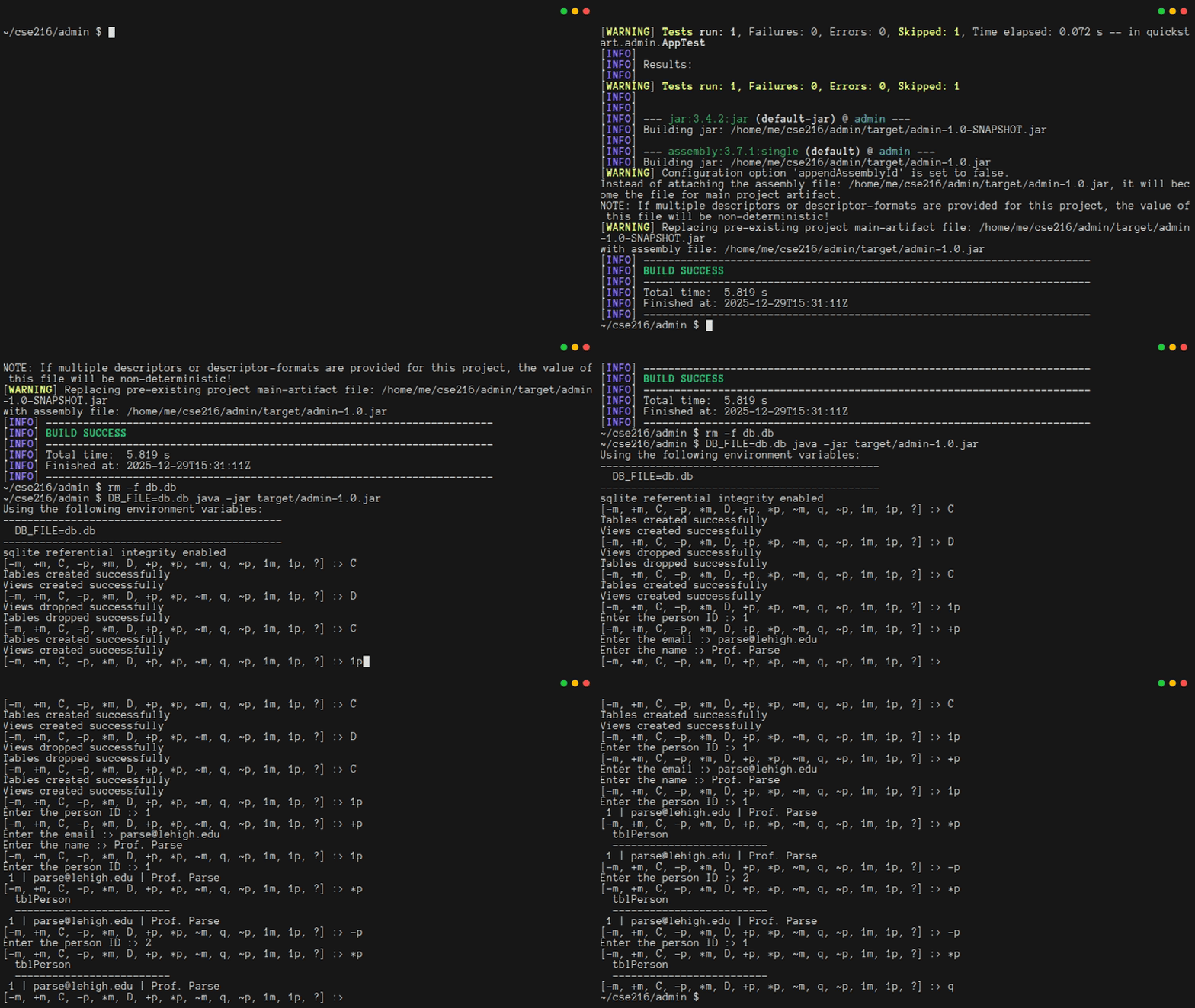
If you now open the database using sqlite3, you should be able to see the changes that you made. This is important: the database itself is separate from your Java program. Different applications can connect to the same database. In fact, they can even connect to it at the same time. That's why it was so important to put critical requirements, like the uniqueness of email addresses, in the database rules themselves. Otherwise, they would need to be managed in each individual app that connects to the database.
1.12. Getting Started With Unit Tests
This tutorial is intended to get you up and running quickly. As a result, the focus has been on getting code to work, while building up enough understanding that you should be able to extend that code. In truth, when you make changes, you're probably going to end up making mistakes. Some of those mistakes will be bugs in the code you are adding, but others will break code that used to work (a so-called "regression"). Unit tests help to identify both of those kinds of bugs.
There is an art to writing good tests, and during the semester, you will have many opportunities to hone your skills. For now, it will suffice to write a few simple tests, just to get a sense for how they work. You will first focus on testing the most important assumptions (e.g. foreign keys are on), and attempt to automate things you checked manually using sqlite and your admin application (e.g. not being able to use the same email for multiple users).
Maven set up a test folder structure that is parallel to the main folder structure. It also set up a dependency on the JUnit unit testing framework. For now, there's just one file in the folder: src/test/java/quickstart/admin/AppTest.java. Most of the code in that file is scaffolding, and you don't need to worry about what it means. All that really matters is that there is a fake test called testApp(). You can replace the file contents with this:
java
package quickstart.admin;

import static org.junit.jupiter.api.Assertions.assertDoesNotThrow;
import static org.junit.jupiter.api.Assertions.assertEquals;
import static org.junit.jupiter.api.Assertions.assertFalse;
import static org.junit.jupiter.api.Assertions.assertNotEquals;
import static org.junit.jupiter.api.Assertions.assertNotNull;
import static org.junit.jupiter.api.Assertions.assertNull;
import static org.junit.jupiter.api.Assertions.assertThrows;
import static org.junit.jupiter.api.Assertions.assertTrue;

import java.io.File;
import java.sql.SQLException;

import org.junit.jupiter.api.AfterAll;
import org.junit.jupiter.api.AfterEach;
import org.junit.jupiter.api.BeforeAll;
import org.junit.jupiter.api.BeforeEach;
import org.junit.jupiter.api.Disabled;
import org.junit.jupiter.api.DisplayName;
import org.junit.jupiter.api.Test;

import quickstart.admin.Database.Person;

/**
 * Unit test for simple App.
 * Creates a shared test db for all tests in initAll, and deletes it at the end
 * in tearDownAll.
 * To better isolate each test, the tables and views are dropped after each
 * test, and recreated (empty) before each test begins.
 * See https://docs.junit.org/current/user-guide/#writing-tests
 */
public class AppTest {

    /**
     * rather than mocking, we share among tests a newly constructed database object
     */
    static Database db = null;
    /**
     * the test db has its own filename based on system time; we track it so we can
     * delete it when finished
     */
    static String dbFileName = null;

    /**
     * Ensure that DB_FILE env var is provided, has 1 or more characters, then
     * create a db just for testing
     */
    @BeforeAll
    static void initAll() {
        String dbFile = System.getenv("DB_FILE");
        assertNotNull(dbFile, "Missing environment variable: DB_FILE.");
        assertFalse(dbFile.length() == 0, "DB_FILE should be 1 or more characters.");
        dbFileName = String.format("%s_junit_%d.db", dbFile, System.currentTimeMillis());
        try {
            assertDoesNotThrow(() -> db = new Database(dbFileName), "Exception thrown while creating test db.");
        } catch (Exception e) {
            System.err.println("ERROR: AppTest.initAll failed to establish test database connection.");
        }
    }

    /** Shuts down the database and deletes the file */
    @AfterAll
    static void tearDownAll() throws Exception {
        System.out.println("Cleaning up: Shutting down the test database.");
        if (db != null) {
            try {
                db.close();
            } catch (Exception e) {
                System.err.println("WARNING: problem closing test database.");
            }
        }
        if (dbFileName != null) {
            java.io.File dbFileToDelete = new File(dbFileName);
            if (dbFileToDelete.exists()) {
                System.out.println("Cleaning up: deleting " + dbFileName);
                if (dbFileToDelete.delete()) {
                    System.out.println("  Delete test database successful.");
                } else {
                    System.err.println("WARNING: could not delete test db " + dbFileName);
                }
            }
        }
    }

    /** Ensures before each test that db exists, and has fresh tables and views */
    @BeforeEach
    void initEach() {
        System.out.println("running initEach");
        assertNotNull(db);
        if (db != null) {
            assertDoesNotThrow(() -> db.createTables());
            assertDoesNotThrow(() -> db.createViews());
        }
    }

    /** Ensures after each test that all tables and views are dropped from db */
    @AfterEach
    void tearDownEach() {
        System.out.println("running tearDownEach");
        if (db != null) {
            assertDoesNotThrow(() -> db.dropViews());
            assertDoesNotThrow(() -> db.dropTables());
        }
    }

    /**
     * Foreign keys are essential for our apps correctness; this ensures they are on
     */
    @Test
    @DisplayName("Verify FOREIGN_KEYS are on.")
    public void givenDatabase_whenCreated_thenPragmaIsOn() throws SQLException {
        assertNotNull(db);
        assertTrue(db.getPragmaForeignKeysStatus(), "This application requires that FOREIGN_KEYS be on.");
    }

    /**
     * Rigorous Test :-)
     */
    @Test
    @Disabled("For demonstration purposes")
    public void shouldAnswerWithTrue() {
        assertTrue(true);
    }

    /** The app expects env var DB_FILE to exist; this ensures it does. */
    @Test
    @DisplayName("Verify environment variable DB_FILE")
    public void checkEnv_DB_FILE() {
        String dbFile = System.getenv("DB_FILE");
        assertNotNull(dbFile, "Missing environment variable: DB_FILE.");
        assertTrue(dbFile.length() >= 1, "DB_FILE should be 1 or more characters.");
    }

    /**
     * Database::insertPerson should not be able to insert person with null email
     */
    @Test
    @DisplayName("insertPerson should throw if the email is null")
    public void givenPerson_whenEmailNull_thenRejectInsert() {
        assertNotNull(db);
        var ex = assertThrows(RuntimeException.class, () -> db.insertPerson(null, null));
        assertEquals("Invalid email address", ex.getMessage());
    }

    /**
     * Database::insertPerson should not be able to insert person with overly long
     * email
     */
    @Test
    @DisplayName("insertPerson should throw if the email is too long")
    public void givenPerson_whenEmailTooLong_thenRejectInsert() {
        assertNotNull(db);
        var ex = assertThrows(RuntimeException.class, () -> db.insertPerson(".".repeat(31), null));
        assertEquals("Invalid email address", ex.getMessage());
    }

    /** Should not be able to insert a new person with same email as another */
    @Test
    @DisplayName("insertPerson should throw if the email is already in use")
    public void givenPerson_whenAlreadyExists_thenRejectInsert() {
        assertNotNull(db);
        final String sEmail = "test@email.com", sName = "test person";
        assertDoesNotThrow(() -> db.insertPerson(sEmail, sName));
        var ex = assertThrows(SQLException.class, () -> db.insertPerson(sEmail, sName));
        assertEquals(
                "[SQLITE_CONSTRAINT_UNIQUE] A UNIQUE constraint failed (UNIQUE constraint failed: tblPerson.email)",
                ex.getMessage());
    }

    /**
     * Should not be able to update a person's email to one in use by another user
     */
    @Test
    @DisplayName("updatePerson should throw if the email is already in use")
    public void givenPerson_whenChangingEmailToOneInUse_thenRejectUpdate() {
        assertNotNull(db);
        final String sEmail1 = "test1@email.com", sName1 = "test person1";
        final String sEmail2 = "test2@email.com", sName2 = "test person2";
        final int idUser1 = assertDoesNotThrow(() -> {
            return db.insertPerson(sEmail1, sName1);
        });
        final int idUser2 = assertDoesNotThrow(() -> {
            return db.insertPerson(sEmail2, sName2);
        });
        assertNotEquals(idUser1, idUser2, "Two distinct users should not get the same id upon creation.");
        var ex = assertThrows(RuntimeException.class, () -> db.updatePerson(idUser2, sEmail1, sName2));
        assertEquals("Email already in use", ex.getMessage());
    }

    /**
     * Confirm a new user can be created, and getOnePerson retreives it correctly
     */
    @Test
    @DisplayName("getOnePerson should retreive the information for a newly created user")
    public void givenPerson_whenCreating_then_getOnePerson_should_match() {
        assertNotNull(db);
        final String sEmail1 = "test1@email.com", sName1 = "test person1";
        final int idUser1 = assertDoesNotThrow(() -> {
            return db.insertPerson(sEmail1, sName1);
        });
        Database.Person p = assertDoesNotThrow(() -> {
            return db.getOnePerson(idUser1);
        });
        assertNotNull(p, "Could not reteive new user by their id.");
        assertEquals(idUser1, p.id(), "getOneUser returned a user with an id different than expected");
        assertEquals(sEmail1, p.email());
        assertEquals(sName1, p.name());
    }

    /**
     * Confirm a new user can be created, and getAllPerson retreives it correctly
     */
    @Test
    @DisplayName("getAllPerson should retreive the information for a newly created user")
    public void givenPerson_whenCreating_then_getAllPerson_should_haveThem() {
        assertNotNull(db);
        final String sEmail1 = "test1@email.com", sName1 = "test person1";
        final int idUser1 = assertDoesNotThrow(() -> {
            return db.insertPerson(sEmail1, sName1);
        });
        java.util.List<Database.Person> allPeople = assertDoesNotThrow(() -> {
            return db.getAllPerson();
        });
        assertNotNull(allPeople);
        boolean foundUser = false;
        for (Person pEntry : allPeople) {
            if (pEntry.id() == idUser1 || sEmail1.equals(pEntry.email())) {
                foundUser = true;
                assertEquals(idUser1, pEntry.id());
                assertEquals(sEmail1, pEntry.email());
                assertEquals(sName1, pEntry.name());
            }
        }
        assertTrue(foundUser, "Did not find user in list returned by getAllPerson()");
    }

    /** Confirm a user can be deleted if they have no messages */
    @Test
    @DisplayName("deletePerson should remove an existing user if they have no messages")
    public void givenPerson_whenDeleting_thenSucceedWhenNoMessagesExist() {
        assertNotNull(db);
        final String sEmail1 = "test1@email.com", sName1 = "test person1";
        final int idUser1 = assertDoesNotThrow(() -> {
            return db.insertPerson(sEmail1, sName1);
        });
        Database.Person p = assertDoesNotThrow(() -> {
            return db.getOnePerson(idUser1);
        });
        assertNotNull(p);
        assertEquals(idUser1, p.id());
        assertDoesNotThrow(() -> db.deletePerson(idUser1));
        p = assertDoesNotThrow(() -> {
            return db.getOnePerson(idUser1);
        });
        assertNull(p);
        java.util.List<Database.Person> allPeople = assertDoesNotThrow(() -> {
            return db.getAllPerson();
        });
        for (Person pEntry : allPeople)
            assertNotEquals(pEntry.id(), idUser1);
    }

    /**
     * Confirm a user canNOT be deleted if they have messages associated with their
     * account
     */
    @Test
    @DisplayName("deletePerson should NOT remove an existing user if they have messages")
    public void givenPerson_whenDeleting_thenFailWhenMessagesExist() {
        assertNotNull(db);
        final String sEmail1 = "test1@email.com", sName1 = "test person1";
        final String sSubject = "test subject", sDetails = "test details";
        final int idUser1 = assertDoesNotThrow(() -> {
            return db.insertPerson(sEmail1, sName1);
        });
        Database.Person p = assertDoesNotThrow(() -> {
            return db.getOnePerson(idUser1);
        });
        assertNotNull(p);
        assertEquals(idUser1, p.id());
        assertDoesNotThrow(() -> db.insertMessage(sSubject, sDetails, idUser1));

        assertThrows(SQLException.class, () -> db.deletePerson(idUser1));
        p = assertDoesNotThrow(() -> {
            return db.getOnePerson(idUser1);
        });
        assertNotNull(p);
    }

    /** Should not be able to insert message with a creatorId not in user table */
    @Test
    @DisplayName("insertMessage should fail when associated creatorId is not in users table")
    public void givenMessage_whenCreatorIdDoesNotExistInUsers_thenRejectInsert() {
        assertNotNull(db);
        final String sSubject = "test subject", sDetails = "test details";
        java.util.List<Database.Person> allPeople = assertDoesNotThrow(() -> {
            return db.getAllPerson();
        });
        assertNotNull(allPeople);
        assertEquals(allPeople.size(), 0);
        var ex = assertThrows(SQLException.class, () -> db.insertMessage(sSubject, sDetails, 42));
        assertEquals(ex.getMessage(),
                "[SQLITE_CONSTRAINT_FOREIGNKEY] A foreign key constraint failed (FOREIGN KEY constraint failed)");
    }
}
None of the unit tests in this code are incredibly complicated. However, they ensure that some of the most important application assumptions are verified (e.g. restrictions on email addresses). They do this by making use of the various assertions defined in org.junit.jupiter.api.Assertions.*, for example by asserting failure if an exception is not caught when it is expected to be.
Any time you type mvn package, these tests will run. Because one or more of your tests require the DB_FILE environment variable, you will need to ensure it is set for the tests to pass: DB_FILE=test.db mvn package. Run it, and you will see something like this in the output:
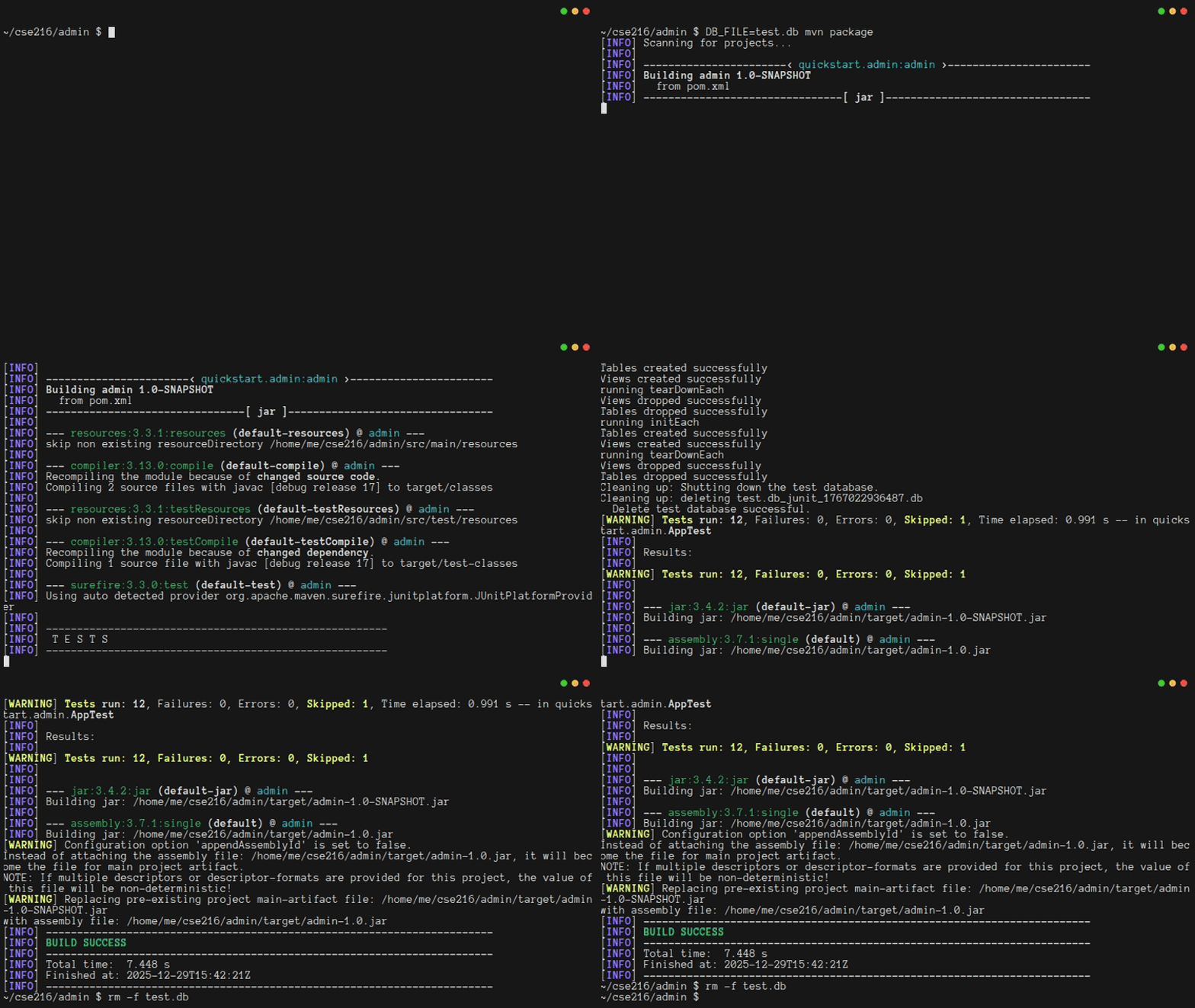
Notice that the example uses a different DB_FILE than the one used for the "production" run of the program in Chapter 1.11. Since the tests run automatically, you will need to be very careful not to let your tests accidentally overwrite the database you use for the production version of your program, especially once your app is live at the end of Chapter 2. The unit test code provided does so by changing the given filename so it includes the System.currentTimeMillis(), minimizing the likelihood of name collisions.
As a final step, you should try adding invalid tests to AppTest.java to see what happens when a test fails. And, because the testing code prints more output during testing than desirable you may remove the "chatty" System.out.println statements when comfortable with how things are working; the verbose output is only included to help you understand the behavior of the provided unit tests.
1.13. Finishing Up
Once you're happy with your work, you should commit it to your repository. When you do, be sure to put target/ in admin/.gitignore, so that you do not accidentally commit the built artifacts, just the code.
At this point, you are ready to move on to Chapter 2. There are two important things you should do.
First, make sure your code matches the code below:
xml
<?xml version="1.0" encoding="UTF-8"?>
<project xmlns="http://maven.apache.org/POM/4.0.0"
  xmlns:xsi="http://www.w3.org/2001/XMLSchema-instance"
  xsi:schemaLocation="http://maven.apache.org/POM/4.0.0 http://maven.apache.org/xsd/maven-4.0.0.xsd">
  <modelVersion>4.0.0</modelVersion>

  <groupId>quickstart.admin</groupId>
  <artifactId>admin</artifactId>
  <version>1.0-SNAPSHOT</version>

  <name>admin</name>
  <!-- FIXME change it to the project's website -->
  <url>http://www.example.com</url>

  <properties>
    <project.build.sourceEncoding>UTF-8</project.build.sourceEncoding>
    <maven.compiler.release>17</maven.compiler.release>
  </properties>

  <dependencyManagement>
    <dependencies>
      <dependency>
        <groupId>org.junit</groupId>
        <artifactId>junit-bom</artifactId>
        <version>5.11.0</version>
        <type>pom</type>
        <scope>import</scope>
      </dependency>
    </dependencies>
  </dependencyManagement>

  <dependencies>
    <dependency>
      <groupId>org.junit.jupiter</groupId>
      <artifactId>junit-jupiter-api</artifactId>
      <scope>test</scope>
    </dependency>
    <!-- Optionally: parameterized tests support -->
    <dependency>
      <groupId>org.junit.jupiter</groupId>
      <artifactId>junit-jupiter-params</artifactId>
      <scope>test</scope>
    </dependency>
    <dependency>
      <groupId>org.xerial</groupId>
      <artifactId>sqlite-jdbc</artifactId>
      <version>3.51.1.0</version>
    </dependency>
  </dependencies>

  <build>
    <pluginManagement><!-- lock down plugins versions to avoid using Maven defaults (may be moved to
      parent pom) -->
      <plugins>
        <!-- clean lifecycle, see
        https://maven.apache.org/ref/current/maven-core/lifecycles.html#clean_Lifecycle -->
        <plugin>
          <artifactId>maven-clean-plugin</artifactId>
          <version>3.4.0</version>
        </plugin>
        <!-- default lifecycle, jar packaging: see
        https://maven.apache.org/ref/current/maven-core/default-bindings.html#Plugin_bindings_for_jar_packaging -->
        <plugin>
          <artifactId>maven-resources-plugin</artifactId>
          <version>3.3.1</version>
        </plugin>
        <plugin>
          <artifactId>maven-compiler-plugin</artifactId>
          <version>3.13.0</version>
        </plugin>
        <plugin>
          <artifactId>maven-surefire-plugin</artifactId>
          <version>3.3.0</version>
        </plugin>
        <plugin>
          <artifactId>maven-jar-plugin</artifactId>
          <version>3.4.2</version>
        </plugin>
        <plugin>
          <artifactId>maven-install-plugin</artifactId>
          <version>3.1.2</version>
        </plugin>
        <plugin>
          <artifactId>maven-deploy-plugin</artifactId>
          <version>3.1.2</version>
        </plugin>
        <!-- site lifecycle, see
        https://maven.apache.org/ref/current/maven-core/lifecycles.html#site_Lifecycle -->
        <plugin>
          <artifactId>maven-site-plugin</artifactId>
          <version>3.12.1</version>
        </plugin>
        <plugin>
          <artifactId>maven-project-info-reports-plugin</artifactId>
          <version>3.6.1</version>
        </plugin>
      </plugins>
    </pluginManagement>
    <plugins>
      <plugin>
        <artifactId>maven-assembly-plugin</artifactId>
        <executions>
          <execution>
            <phase>package</phase>
            <goals>
              <goal>single</goal>
            </goals>
          </execution>
        </executions>
        <configuration>
          <descriptorRefs>
            <descriptorRef>jar-with-dependencies</descriptorRef>
          </descriptorRefs>
          <appendAssemblyId>false</appendAssemblyId>
          <finalName>admin-1.0</finalName>
          <archive>
            <manifest>
              <mainClass>quickstart.admin.App</mainClass>
            </manifest>
          </archive>
        </configuration>
      </plugin>
    </plugins>
  </build>
</project>
java
package quickstart.admin;

import java.sql.Connection;
import java.sql.DriverManager;
import java.sql.ResultSet;
import java.sql.SQLException;
import java.util.ArrayList;
import java.util.List;
import java.sql.Date;

/**
 * Database has all the logic for connecting to and interacting with a database
 *
 * Note: This class is hard-coded for SQLite.
 */
public class Database implements AutoCloseable {
    // Load the sqlite-JDBC driver when the class is initialized
    static {
        try {
            Class.forName("org.sqlite.JDBC");
        } catch (java.lang.ClassNotFoundException e) {
            e.printStackTrace();
            System.exit(1);
        }
    }

    /** A connection to a SQLite db, or null */
    private Connection conn;

    /**
     * Use dbFile to create a connection to a database, and store it in the
     * constructed Database object
     *
     * @param dbFile the connection string for the database
     * @throws SQLException if a connection cannot be created
     */
    public Database(String dbFile) throws SQLException {
        // Connect to the database or fail
        conn = DriverManager.getConnection("jdbc:sqlite:" + dbFile);
        // SQLite is odd: we need to opt-in for referential integrity
        try (var stmt = conn.prepareStatement("PRAGMA foreign_keys = ON;")) {
            stmt.execute();
            getPragmaForeignKeysStatus();
        }
    }

    /**
     * If connection isn't null, verifies that referential integrity is enabled
     *
     * @return true if enabled, false otherwise
     */
    synchronized boolean getPragmaForeignKeysStatus() throws SQLException {
        if (conn != null) {
            try (var stmt = conn.prepareStatement("PRAGMA foreign_keys;");
                    var rs = stmt.executeQuery();) {
                if (rs.next()) {
                    int status = rs.getInt(1);
                    if (status == 1)
                        System.out.println("sqlite referential integrity enabled");
                    else
                        System.out.println("WARNING: sqlite referential integrity is DISABLED");
                    return status == 1;
                } else {
                    System.err.println("ERROR: did not get a result set for PRAGMA foreign_keys when expected 0 or 1.");
                }
            }
        }
        return false;
    }

    /**
     * Close the current connection to the database, if one exists.
     *
     * NB: The connection will always be null after this call, even if an
     * error occurred during the closing operation.
     */
    @Override
    public void close() throws Exception {
        if (conn != null) {
            try {
                conn.close();
            } catch (SQLException e) {
                e.printStackTrace();
            } finally {
                conn = null;
            }
        }
    }

    /**
     * Create the database tables
     *
     * @throws SQLException if any table cannot be created
     */
    synchronized void createTables() throws SQLException {
        var createTblPerson = """
                CREATE TABLE tblPerson (
                    id INTEGER PRIMARY KEY,
                    email VARCHAR(30) NOT NULL UNIQUE COLLATE NOCASE,
                    name VARCHAR(50)
                );""";
        try (var ps = conn.prepareStatement(createTblPerson)) {
            ps.execute();
        }
        var createTblMessage = """
                CREATE TABLE tblMessage (
                    id INTEGER PRIMARY KEY,
                    subject VARCHAR(50) NOT NULL,
                    details VARCHAR(500) NOT NULL,
                    as_of DATE NOT NULL,
                    creatorId INTEGER,
                    FOREIGN KEY (creatorId) REFERENCES tblPerson(id)
                );""";
        try (var ps = conn.prepareStatement(createTblMessage)) {
            ps.execute();
        }
        System.out.println("Tables created successfully");
    }

    /**
     * Create the database views
     *
     * @throws SQLException if any view cannot be created
     */
    synchronized void createViews() throws SQLException {
        var createViewMessage = """
                CREATE VIEW viewMessage AS
                SELECT
                    tblMessage.id as id,
                    tblMessage.subject as subject,
                    tblMessage.details as details,
                    tblMessage.as_of as as_of,
                    tblMessage.creatorId as creatorId,
                    tblPerson.email as email,
                    tblPerson.name as name
                FROM tblMessage INNER JOIN tblPerson on
                    tblMessage.creatorId = tblPerson.id;""";
        try (var ps = conn.prepareStatement(createViewMessage)) {
            ps.execute();
        }
        System.out.println("Views created successfully");
    }

    /**
     * Remove all tables from the database
     *
     * @throws SQLException if any table cannot be dropped
     */
    synchronized void dropTables() throws SQLException {
        var dropTblMessage = "DROP TABLE tblMessage;";
        try (var ps = conn.prepareStatement(dropTblMessage)) {
            ps.execute();
        }
        var dropTblPerson = "DROP TABLE tblPerson;";
        try (var ps = conn.prepareStatement(dropTblPerson)) {
            ps.execute();
        }
        System.out.println("Tables dropped successfully");
    }

    /**
     * Remove all views from the database
     *
     * @throws SQLException if any view cannot be dropped
     */
    synchronized void dropViews() throws SQLException {
        var dropViewMessage = "DROP VIEW viewMessage;";
        try (var ps = conn.prepareStatement(dropViewMessage)) {
            ps.execute();
        }
        System.out.println("Views dropped successfully");
    }

    /**
     * Perform lightweight validation of the provided email address.
     *
     * @param email The address to validate
     *
     * @throws RuntimeException if the address does not meet length requirements
     */
    private static synchronized void validateEmail(String email) throws RuntimeException {
        if (email == null || email.length() < 3 || email.length() > 30) {
            throw new RuntimeException("Invalid email address");
        }
    }

    /**
     * Perform lightweight validation of the provided display name
     *
     * @param name The name to validate
     * @throws RuntimeException if the address does not meet length requirements
     */
    private static synchronized void validateName(String name) throws RuntimeException {
        if (name == null || name.length() < 1 || name.length() > 50) {
            throw new RuntimeException("Invalid name");
        }
    }

    /**
     * Create a new Person in the database. Note that uniqueness of email
     * addresses is enforced by the database itself, which lets this code remain
     * clean and simple.
     *
     * @param email The new person's email address
     * @param name  The new person's name
     *
     * @throws SQLException     If the person cannot be created
     * @throws RuntimeException If the provided data is invalid
     * @return the id of the new row upon success, Integer.MIN_VALUE on failure
     */
    synchronized int insertPerson(String email, String name) throws SQLException, RuntimeException {
        // Be sure to validate the email and name!
        Database.validateEmail(email);
        Database.validateName(name);

        // NB: The PreparedStatement uses a second parameter to request the row
        // Id of the created row
        try (var stmt = conn.prepareStatement("INSERT INTO tblPerson (email, name) VALUES (?, ?) RETURNING id;");) {
            stmt.setString(1, email);
            stmt.setString(2, name);
            if( stmt.execute() ){
                try (ResultSet rs = stmt.getResultSet()) {
                    if( rs.next() ){ // retrieves the id of the new row
                        return rs.getInt(1);
                    }
                }
            }
        }
        return Integer.MIN_VALUE;
    }

    /**
     * Delete a person from the database
     *
     * @param id The Id of the person to delete
     *
     * @throws SQLException If the person cannot be deleted
     */
    synchronized void deletePerson(int id) throws SQLException {
        try (var stmt = conn.prepareStatement("DELETE FROM tblPerson WHERE id = ?");) {
            stmt.setInt(1, id);
            stmt.executeUpdate();
        }
    }

    /**
     * Update a person's data in the database
     *
     * @apiNote If this function throws a SQLException, the connection
     *          autocommit setting can be in an undefined or invalid state.
     *          Callers will not be able to recover in that case, so they should
     *          treat SQLExceptions as fatal.
     *
     * @param id    The Id of the person to update
     * @param email The email (might be the same as before)
     * @param name  The name (might be the same as before)
     *
     * @throws SQLException     If the person cannot be updated
     * @throws RuntimeException If the provided data is invalid
     */
    synchronized void updatePerson(int id, String email, String name) throws SQLException, RuntimeException {
        Database.validateEmail(email);
        Database.validateName(name);

        // We could rely on the database to enforce email uniqueness,
        // (and are, through the `UNIQUE` constraint on `email`), but we instead
        // use a *transaction* to check the uniqueness of the address
        // before updating so we can provide nicer error messages
        conn.setAutoCommit(false);

        try (var stmt = conn.prepareStatement("SELECT * FROM tblPerson WHERE email = ? and id <> ?");) {
            stmt.setString(1, email);
            stmt.setInt(2, id);
            try (var rs = stmt.executeQuery();) {
                if (rs.next()) {
                    conn.commit();
                    conn.setAutoCommit(true); // return to non-transaction mode
                    throw new RuntimeException("Email already in use");
                }
            }
        }
        try (var stmt = conn.prepareStatement("UPDATE tblPerson SET email = ?, name = ? WHERE id = ?;");) {
            stmt.setString(1, email);
            stmt.setString(2, name);
            stmt.setInt(3, id);
            stmt.executeUpdate();
            conn.commit();
            conn.setAutoCommit(true); // return to non-transaction mode
        }
    }

    /** Person is a Java object that matches the contents of tblPerson */
    public static record Person(int id, String email, String name) {
    }

    /**
     * Get all data for a single person
     *
     * @param id The Id of the person to get
     *
     * @return a Person object representing the data that was retrieved from the
     *         database, or null if no person was found
     *
     * @throws SQLException on any error
     */
    synchronized Person getOnePerson(int id) throws SQLException {
        try (var stmt = conn.prepareStatement("SELECT * FROM tblPerson WHERE id = ?;");) {
            stmt.setInt(1, id);
            try (var rs = stmt.executeQuery();) {
                if (rs.next()) {
                    return new Person(rs.getInt("id"), rs.getString("email"), rs.getString("name"));
                }
            }
        }
        return null;
    }

    /**
     * Get all data for all people in the database
     *
     * @return A List with zero or more Person objects
     *
     * @throws SQLException on any error
     */
    synchronized List<Person> getAllPerson() throws SQLException {
        try (var ps = conn.prepareStatement("SELECT * FROM tblPerson;");
                var rs = ps.executeQuery();) {
            var results = new ArrayList<Person>();
            while (rs.next()) {
                results.add(new Person(rs.getInt("id"), rs.getString("email"), rs.getString("name")));
            }
            return results;
        }
    }

    /**
     * Perform lightweight validation of the provided message subject
     *
     * @param subject The subject text to validate
     *
     * @throws RuntimeException if the subject does not meet length requirements
     */
    private static synchronized void validateSubject(String subject) throws RuntimeException {
        if (subject == null || subject.length() < 1 || subject.length() > 50) {
            throw new RuntimeException("Invalid subject");
        }
    }

    /**
     * Perform lightweight validation of the provided message details
     *
     * @param details The details text to validate
     *
     * @throws RuntimeException if the details do not meet length requirements
     */
    private static synchronized void validateDetails(String details) throws RuntimeException {
        if (details == null || details.length() < 1 || details.length() > 500) {
            throw new RuntimeException("Invalid details");
        }
    }

    /**
     * Create a new message in the database
     *
     * @param subject   The subject
     * @param details   The details
     * @param creatorId The Id of the user creating the message
     *
     * @throws SQLException     If the person cannot be created
     * @throws RuntimeException If the provided data is invalid
     */
    synchronized void insertMessage(String subject, String details, int creatorId)
            throws SQLException, RuntimeException {
        Database.validateSubject(subject);
        Database.validateDetails(details);
        try (var stmt = conn.prepareStatement(
                "INSERT INTO tblMessage (subject, details, as_of, creatorId) VALUES (?, ?, ?, ?);");) {
            stmt.setString(1, subject);
            stmt.setString(2, details);
            stmt.setDate(3, new java.sql.Date(new java.util.Date().getTime()));
            stmt.setInt(4, creatorId);
            stmt.executeUpdate();
        }
    }

    /**
     * Update a message in the database
     *
     * @param id      The Id of the message to update
     * @param subject The subject (might be the same as before)
     * @param details The details (might be the same as before)
     *
     * @throws SQLException     If the message cannot be updated
     * @throws RuntimeException If the provided data is invalid
     */
    synchronized void updateMessage(int id, String subject, String details) throws SQLException, RuntimeException {
        Database.validateSubject(subject);
        Database.validateDetails(details);
        try (var stmt = conn
                .prepareStatement("UPDATE tblMessage SET subject = ?, details = ?, as_of = ? WHERE id = ?;");) {
            stmt.setString(1, subject);
            stmt.setString(2, details);
            stmt.setDate(3, new java.sql.Date(new java.util.Date().getTime()));
            stmt.setInt(4, id);
            stmt.executeUpdate();
        }
    }

    /**
     * Delete a message from the database
     *
     * @param id The Id of the message to delete
     *
     * @throws SQLException If the message cannot be deleted
     */
    synchronized void deleteMessage(int id) throws SQLException {
        try (var stmt = conn.prepareStatement("DELETE FROM tblMessage WHERE id = ?");) {
            stmt.setInt(1, id);
            stmt.executeUpdate();
        }
    }

    /** Message is a Java object that matches the contents of viewMessage */
    public static record Message(int id, String subject, String details, Date as_of, int creatorId, String email,
            String name) {
    }

    /**
     * Get all data for a single message
     *
     * @param id The Id of the message to get
     *
     * @return a Message object representing the data that was retrieved from
     *         the database, or null if no message was found
     *
     * @throws SQLException on any error
     */
    synchronized Message getOneMessage(int id) throws SQLException {
        try (var stmt = conn.prepareStatement("SELECT * FROM viewMessage WHERE id = ?;");) {
            stmt.setInt(1, id);
            try (var rs = stmt.executeQuery();) {
                if (rs.next()) {
                    return new Message(rs.getInt("id"), rs.getString("subject"), rs.getString("details"),
                            rs.getDate("as_of"), rs.getInt("creatorId"), rs.getString("email"), rs.getString("name"));
                }
            }
        }
        return null;
    }

    /**
     * Get all data for all messages in the database
     *
     * @return a List with zero or more message objects
     *
     * @throws SQLException on any error
     */
    synchronized List<Message> getAllMessage() throws SQLException {
        try (var stmt = conn.prepareStatement("SELECT * FROM viewMessage;");
                var rs = stmt.executeQuery();) {
            var results = new ArrayList<Message>();
            while (rs.next()) {
                results.add(new Message(rs.getInt("id"), rs.getString("subject"), rs.getString("details"),
                        rs.getDate("as_of"), rs.getInt("creatorId"), rs.getString("email"), rs.getString("name")));
            }
            return results;
        }
    }
}
java
package quickstart.admin;

import java.io.BufferedReader;
import java.io.IOException;
import java.io.InputStreamReader;
import java.util.Arrays;
import java.util.HashSet;
import java.util.List;

/**
 * App lets us manage the database schema and the data in it.
 */
public class App {
    public static void main(String[] argv) {
        // get the SQLite configuration from environment variables;
        String dbFile = System.getenv("DB_FILE");
        System.out.println("Using the following environment variables:");
        System.out.println("-".repeat(45));
        System.out.println("  DB_FILE=" + dbFile);
        System.out.println("-".repeat(45));

        if (dbFile == null) {
            // insufficient information to connect
            System.err.println("Insufficient information to connect. Bye.");
            return;
        }

        // Get a fully-configured connection to the database, or exit immediately
        try (Database db = new Database(dbFile)) {
            // Start reading requests and processing them
            BufferedReader in = new BufferedReader(new InputStreamReader(System.in));
            while (true) {
                switch (prompt(in)) {
                    case "?": // help
                        menu();
                        break;
                    case "q": // quit
                        return;
                    case "C": // create tables and views
                        db.createTables();
                        db.createViews();
                        break;
                    case "D": // drop tables and views
                        db.dropViews();
                        db.dropTables();
                        break;
                    case "1p": // query for one person row
                        var person = db.getOnePerson(getInt(in, "Enter the person ID"));
                        if (person != null) {
                            System.out.println(" " + person.id() + " | " + person.email() + " | " + person.name());
                        }
                        break;
                    case "*p": // query for all person rows
                        System.out.println("  tblPerson");
                        System.out.println("  -------------------------");
                        for (var row : db.getAllPerson()) {
                            System.out.println(" " + row.id() + " | " + row.email() + " | " + row.name());
                        }
                        break;
                    case "-p": // delete a person
                        db.deletePerson(getInt(in, "Enter the person ID"));
                        break;
                    case "+p": // insert a person
                        int newPid = db.insertPerson(
                                getString(in, "Enter the email"),
                                getString(in, "Enter the name"));
                        System.out.println("id of newly inserted person: " + newPid);
                        break;
                    case "~p": // update a person
                        db.updatePerson(
                                getInt(in, "Enter the person ID"),
                                getString(in, "Enter the new email"),
                                getString(in, "Enter the new name"));
                        break;
                    case "1m": // query for one message row
                        var msg = db.getOneMessage(getInt(in, "Enter the message ID"));
                        if (msg != null) {
                            System.out.println(" " + msg.id() + " | " + msg.subject() + " | " + msg.details() + " | "
                                    + new java.util.Date(msg.as_of().getTime()) + " | " + msg.creatorId() + " | "
                                    + msg.email() + " | " + msg.name());
                        }
                        break;
                    case "*m": // query for all message rows
                        System.out.println("  tblMessage");
                        System.out.println("  -------------------------");
                        for (var row : db.getAllMessage()) {
                            System.out.println(" " + row.id() + " | " + row.subject() + " | " + row.details() + " | "
                                    + new java.util.Date(row.as_of().getTime()) + " | " + row.creatorId() + " | "
                                    + row.email() + " | " + row.name());
                        }
                        break;
                    case "-m": // delete a message
                        db.deleteMessage(getInt(in, "Enter the message ID"));
                        break;
                    case "+m": // insert a message
                        db.insertMessage(getString(in, "Enter the subject"),
                                getString(in, "Enter the message"),
                                getInt(in, "Enter the person ID"));
                        break;
                    case "~m": // update a message
                        db.updateMessage(getInt(in, "Enter the message ID"),
                                getString(in, "Enter the subject"),
                                getString(in, "Enter the message"));
                        break;
                }
            }
        } catch (Exception e) {
            e.printStackTrace();
        }
    }

    /** All of the valid menu options of the program */
    static List<String> menuOptions = Arrays.asList("C", "D", "1p", "*p", "-p", "+p", "~p", "1m", "*m", "-m", "+m",
            "~m", "q", "?");

    /** Print the menu for the program */
    static void menu() {
        System.out.println("Main Menu");
        System.out.println("  [C] Create tables and views");
        System.out.println("  [D] Drop tables and views");
        System.out.println("  [1p] Query for a person");
        System.out.println("  [*p] Query for all person rows");
        System.out.println("  [-p] Delete a person");
        System.out.println("  [+p] Insert a new person");
        System.out.println("  [~p] Update a person");
        System.out.println("  [1m] Query for a specific message");
        System.out.println("  [*m] Query for all message rows");
        System.out.println("  [-m] Delete a message");
        System.out.println("  [+m] Insert a new message");
        System.out.println("  [~m] Update a message");
        System.out.println("  [q] Quit Program");
        System.out.println("  [?] Help (this message)");
    }

    /**
     * Ask the user to enter a menu option; repeat until we get a valid option
     *
     * @param in A BufferedReader, for reading from the keyboard
     *
     * @return The chosen menu option
     */
    static String prompt(BufferedReader in) {
        // Create a set with the valid actions, so it's easy to get the user's
        // request
        var options = new HashSet<String>(menuOptions);

        // Repeat until a valid option is selected
        while (true) {
            System.out.print("[" + String.join(", ", options) + "] :> ");
            try {
                String action = in.readLine();
                if (options.contains(action)) {
                    return action;
                } else if (action == null) {
                    return "q";
                }
            } catch (IOException e) {
                e.printStackTrace();
                continue;
            }
            System.out.println("Invalid Command");
        }
    }

    /**
     * Ask the user to enter a String message
     *
     * @param in      A BufferedReader, for reading from the keyboard
     * @param message A message to display when asking for input
     *
     * @return The string that the user provided. May be "".
     */
    static String getString(BufferedReader in, String message) {
        try {
            System.out.print(message + " :> ");
            return in.readLine();
        } catch (IOException e) {
            e.printStackTrace();
            return "";
        }
    }

    /**
     * Ask the user to enter an integer
     *
     * @param in      A BufferedReader, for reading from the keyboard
     * @param message A message to display when asking for input
     *
     * @return The integer that the user provided. On error, it will be -1
     */
    static int getInt(BufferedReader in, String message) {
        try {
            System.out.print(message + " :> ");
            return Integer.parseInt(in.readLine());
        } catch (Exception e) {
            e.printStackTrace();
            return -1;
        }
    }
}
java
package quickstart.admin;

import static org.junit.jupiter.api.Assertions.assertDoesNotThrow;
import static org.junit.jupiter.api.Assertions.assertEquals;
import static org.junit.jupiter.api.Assertions.assertFalse;
import static org.junit.jupiter.api.Assertions.assertNotEquals;
import static org.junit.jupiter.api.Assertions.assertNotNull;
import static org.junit.jupiter.api.Assertions.assertNull;
import static org.junit.jupiter.api.Assertions.assertThrows;
import static org.junit.jupiter.api.Assertions.assertTrue;

import java.io.File;
import java.sql.SQLException;

import org.junit.jupiter.api.AfterAll;
import org.junit.jupiter.api.AfterEach;
import org.junit.jupiter.api.BeforeAll;
import org.junit.jupiter.api.BeforeEach;
import org.junit.jupiter.api.Disabled;
import org.junit.jupiter.api.DisplayName;
import org.junit.jupiter.api.Test;

import quickstart.admin.Database.Person;

/**
 * Unit test for simple App.
 * Creates a shared test db for all tests in initAll, and deletes it at the end
 * in tearDownAll.
 * To better isolate each test, the tables and views are dropped after each
 * test, and recreated (empty) before each test begins.
 * See https://docs.junit.org/current/user-guide/#writing-tests
 */
public class AppTest {

    /**
     * rather than mocking, we share among tests a newly constructed database object
     */
    static Database db = null;
    /**
     * the test db has its own filename based on system time; we track it so we can
     * delete it when finished
     */
    static String dbFileName = null;

    /**
     * Ensure that DB_FILE env var is provided, has 1 or more characters, then
     * create a db just for testing
     */
    @BeforeAll
    static void initAll() {
        String dbFile = System.getenv("DB_FILE");
        assertNotNull(dbFile, "Missing environment variable: DB_FILE.");
        assertFalse(dbFile.length() == 0, "DB_FILE should be 1 or more characters.");
        dbFileName = String.format("%s_junit_%d.db", dbFile, System.currentTimeMillis());
        try {
            assertDoesNotThrow(() -> db = new Database(dbFileName), "Exception thrown while creating test db.");
        } catch (Exception e) {
            System.err.println("ERROR: AppTest.initAll failed to establish test database connection.");
        }
    }

    /** Shuts down the database and deletes the file */
    @AfterAll
    static void tearDownAll() throws Exception {
        System.out.println("Cleaning up: Shutting down the test database.");
        if (db != null) {
            try {
                db.close();
            } catch (Exception e) {
                System.err.println("WARNING: problem closing test database.");
            }
        }
        if (dbFileName != null) {
            java.io.File dbFileToDelete = new File(dbFileName);
            if (dbFileToDelete.exists()) {
                System.out.println("Cleaning up: deleting " + dbFileName);
                if (dbFileToDelete.delete()) {
                    System.out.println("  Delete test database successful.");
                } else {
                    System.err.println("WARNING: could not delete test db " + dbFileName);
                }
            }
        }
    }

    /** Ensures before each test that db exists, and has fresh tables and views */
    @BeforeEach
    void initEach() {
        System.out.println("running initEach");
        assertNotNull(db);
        if (db != null) {
            assertDoesNotThrow(() -> db.createTables());
            assertDoesNotThrow(() -> db.createViews());
        }
    }

    /** Ensures after each test that all tables and views are dropped from db */
    @AfterEach
    void tearDownEach() {
        System.out.println("running tearDownEach");
        if (db != null) {
            assertDoesNotThrow(() -> db.dropViews());
            assertDoesNotThrow(() -> db.dropTables());
        }
    }

    /**
     * Foreign keys are essential for our apps correctness; this ensures they are on
     */
    @Test
    @DisplayName("Verify FOREIGN_KEYS are on.")
    public void givenDatabase_whenCreated_thenPragmaIsOn() throws SQLException {
        assertNotNull(db);
        assertTrue(db.getPragmaForeignKeysStatus(), "This application requires that FOREIGN_KEYS be on.");
    }

    /**
     * Rigorous Test :-)
     */
    @Test
    @Disabled("For demonstration purposes")
    public void shouldAnswerWithTrue() {
        assertTrue(true);
    }

    /** The app expects env var DB_FILE to exist; this ensures it does. */
    @Test
    @DisplayName("Verify environment variable DB_FILE")
    public void checkEnv_DB_FILE() {
        String dbFile = System.getenv("DB_FILE");
        assertNotNull(dbFile, "Missing environment variable: DB_FILE.");
        assertTrue(dbFile.length() >= 1, "DB_FILE should be 1 or more characters.");
    }

    /**
     * Database::insertPerson should not be able to insert person with null email
     */
    @Test
    @DisplayName("insertPerson should throw if the email is null")
    public void givenPerson_whenEmailNull_thenRejectInsert() {
        assertNotNull(db);
        var ex = assertThrows(RuntimeException.class, () -> db.insertPerson(null, null));
        assertEquals("Invalid email address", ex.getMessage());
    }

    /**
     * Database::insertPerson should not be able to insert person with overly long
     * email
     */
    @Test
    @DisplayName("insertPerson should throw if the email is too long")
    public void givenPerson_whenEmailTooLong_thenRejectInsert() {
        assertNotNull(db);
        var ex = assertThrows(RuntimeException.class, () -> db.insertPerson(".".repeat(31), null));
        assertEquals("Invalid email address", ex.getMessage());
    }

    /** Should not be able to insert a new person with same email as another */
    @Test
    @DisplayName("insertPerson should throw if the email is already in use")
    public void givenPerson_whenAlreadyExists_thenRejectInsert() {
        assertNotNull(db);
        final String sEmail = "test@email.com", sName = "test person";
        assertDoesNotThrow(() -> db.insertPerson(sEmail, sName));
        var ex = assertThrows(SQLException.class, () -> db.insertPerson(sEmail, sName));
        assertEquals(
                "[SQLITE_CONSTRAINT_UNIQUE] A UNIQUE constraint failed (UNIQUE constraint failed: tblPerson.email)",
                ex.getMessage());
    }

    /**
     * Should not be able to update a person's email to one in use by another user
     */
    @Test
    @DisplayName("updatePerson should throw if the email is already in use")
    public void givenPerson_whenChangingEmailToOneInUse_thenRejectUpdate() {
        assertNotNull(db);
        final String sEmail1 = "test1@email.com", sName1 = "test person1";
        final String sEmail2 = "test2@email.com", sName2 = "test person2";
        final int idUser1 = assertDoesNotThrow(() -> {
            return db.insertPerson(sEmail1, sName1);
        });
        final int idUser2 = assertDoesNotThrow(() -> {
            return db.insertPerson(sEmail2, sName2);
        });
        assertNotEquals(idUser1, idUser2, "Two distinct users should not get the same id upon creation.");
        var ex = assertThrows(RuntimeException.class, () -> db.updatePerson(idUser2, sEmail1, sName2));
        assertEquals("Email already in use", ex.getMessage());
    }

    /**
     * Confirm a new user can be created, and getOnePerson retreives it correctly
     */
    @Test
    @DisplayName("getOnePerson should retreive the information for a newly created user")
    public void givenPerson_whenCreating_then_getOnePerson_should_match() {
        assertNotNull(db);
        final String sEmail1 = "test1@email.com", sName1 = "test person1";
        final int idUser1 = assertDoesNotThrow(() -> {
            return db.insertPerson(sEmail1, sName1);
        });
        Database.Person p = assertDoesNotThrow(() -> {
            return db.getOnePerson(idUser1);
        });
        assertNotNull(p, "Could not reteive new user by their id.");
        assertEquals(idUser1, p.id(), "getOneUser returned a user with an id different than expected");
        assertEquals(sEmail1, p.email());
        assertEquals(sName1, p.name());
    }

    /**
     * Confirm a new user can be created, and getAllPerson retreives it correctly
     */
    @Test
    @DisplayName("getAllPerson should retreive the information for a newly created user")
    public void givenPerson_whenCreating_then_getAllPerson_should_haveThem() {
        assertNotNull(db);
        final String sEmail1 = "test1@email.com", sName1 = "test person1";
        final int idUser1 = assertDoesNotThrow(() -> {
            return db.insertPerson(sEmail1, sName1);
        });
        java.util.List<Database.Person> allPeople = assertDoesNotThrow(() -> {
            return db.getAllPerson();
        });
        assertNotNull(allPeople);
        boolean foundUser = false;
        for (Person pEntry : allPeople) {
            if (pEntry.id() == idUser1 || sEmail1.equals(pEntry.email())) {
                foundUser = true;
                assertEquals(idUser1, pEntry.id());
                assertEquals(sEmail1, pEntry.email());
                assertEquals(sName1, pEntry.name());
            }
        }
        assertTrue(foundUser, "Did not find user in list returned by getAllPerson()");
    }

    /** Confirm a user can be deleted if they have no messages */
    @Test
    @DisplayName("deletePerson should remove an existing user if they have no messages")
    public void givenPerson_whenDeleting_thenSucceedWhenNoMessagesExist() {
        assertNotNull(db);
        final String sEmail1 = "test1@email.com", sName1 = "test person1";
        final int idUser1 = assertDoesNotThrow(() -> {
            return db.insertPerson(sEmail1, sName1);
        });
        Database.Person p = assertDoesNotThrow(() -> {
            return db.getOnePerson(idUser1);
        });
        assertNotNull(p);
        assertEquals(idUser1, p.id());
        assertDoesNotThrow(() -> db.deletePerson(idUser1));
        p = assertDoesNotThrow(() -> {
            return db.getOnePerson(idUser1);
        });
        assertNull(p);
        java.util.List<Database.Person> allPeople = assertDoesNotThrow(() -> {
            return db.getAllPerson();
        });
        for (Person pEntry : allPeople)
            assertNotEquals(pEntry.id(), idUser1);
    }

    /**
     * Confirm a user canNOT be deleted if they have messages associated with their
     * account
     */
    @Test
    @DisplayName("deletePerson should NOT remove an existing user if they have messages")
    public void givenPerson_whenDeleting_thenFailWhenMessagesExist() {
        assertNotNull(db);
        final String sEmail1 = "test1@email.com", sName1 = "test person1";
        final String sSubject = "test subject", sDetails = "test details";
        final int idUser1 = assertDoesNotThrow(() -> {
            return db.insertPerson(sEmail1, sName1);
        });
        Database.Person p = assertDoesNotThrow(() -> {
            return db.getOnePerson(idUser1);
        });
        assertNotNull(p);
        assertEquals(idUser1, p.id());
        assertDoesNotThrow(() -> db.insertMessage(sSubject, sDetails, idUser1));

        assertThrows(SQLException.class, () -> db.deletePerson(idUser1));
        p = assertDoesNotThrow(() -> {
            return db.getOnePerson(idUser1);
        });
        assertNotNull(p);
    }

    /** Should not be able to insert message with a creatorId not in user table */
    @Test
    @DisplayName("insertMessage should fail when associated creatorId is not in users table")
    public void givenMessage_whenCreatorIdDoesNotExistInUsers_thenRejectInsert() {
        assertNotNull(db);
        final String sSubject = "test subject", sDetails = "test details";
        java.util.List<Database.Person> allPeople = assertDoesNotThrow(() -> {
            return db.getAllPerson();
        });
        assertNotNull(allPeople);
        assertEquals(allPeople.size(), 0);
        var ex = assertThrows(SQLException.class, () -> db.insertMessage(sSubject, sDetails, 42));
        assertEquals(ex.getMessage(),
                "[SQLITE_CONSTRAINT_FOREIGNKEY] A foreign key constraint failed (FOREIGN KEY constraint failed)");
    }
}
Second, run your program to create a file called ../db.db. Create tables and views in the file, and then use +p to add yourself to tblPerson. Be sure to use your gmail-managed @lehigh.edu email account, or you won't be able to test logging in:
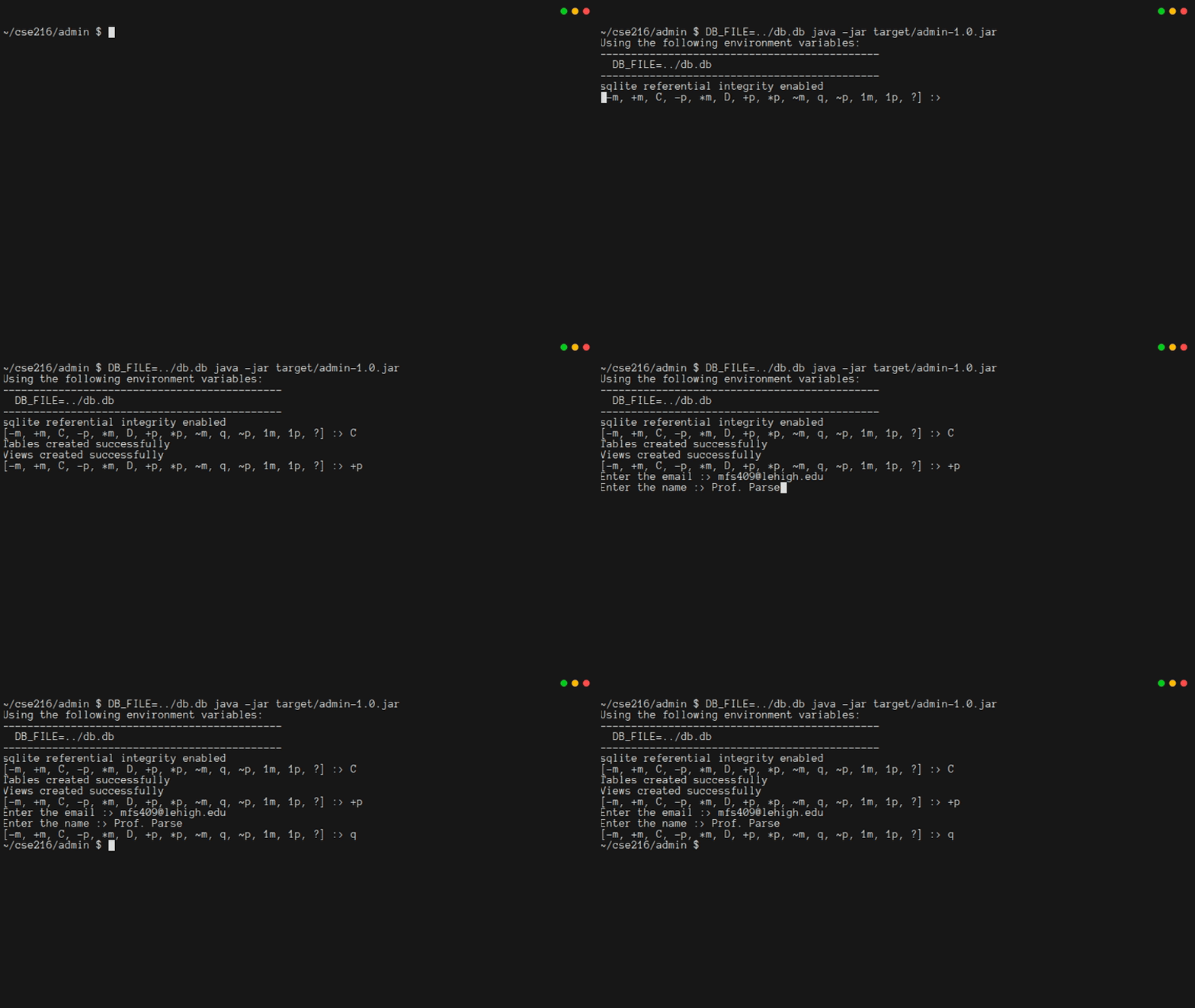
Now you're ready to start Chapter 2!
Footnotes
If you are a student in CSE 216, and you do not know how to install Maven, please consult the class Piazza forum. ↩︎
This code is using a pre-defined template, which Maven calls an "archetype". Maven has many pre-built archetypes that you might want to explore. ↩︎
According to the maven documentation on the quickstart archetype, on Windows you may need to put quotes around the arguments:
mvn archetype:generate "-DarchetypeGroupId=org.apache.maven.archetypes" "-DarchetypeArtifactId=maven-archetype-quickstart" "-DarchetypeVersion=1.5" "-DinteractiveMode=false" "-DartifactId=admin" "-DgroupId=quickstart.admin" "-Dpackage=quickstart.admin"↩︎There is a standard structure when organizing your code as java packages. Since the command to
mvngave the package namequickstart.admin, the main class for the program should bequickstart/admin/App.java. The unit tests should have a matching hierarchy, so the main unit test file should bequickstart/admin/AppTest.java. Maven tucks both of these inside of thesrc/folder. In Chapter 3, you will put other stuff insrc/main/resourcesso that it can be added to yourjarfile. ↩︎Using
synchronizedmethods is not great for performance, but it is an easy way to help ensure that your code does not have data races. Since every method that might use the connection issynchronized, then no two methods can run simultaneously, and they cannot simultaneously use the connection in incompatible ways. In a high-performance service, you would want to do something fancier thansynchronizedmethods. ↩︎